Windows Widgets Removes MSN News Feed—What It Means

Why this change matters
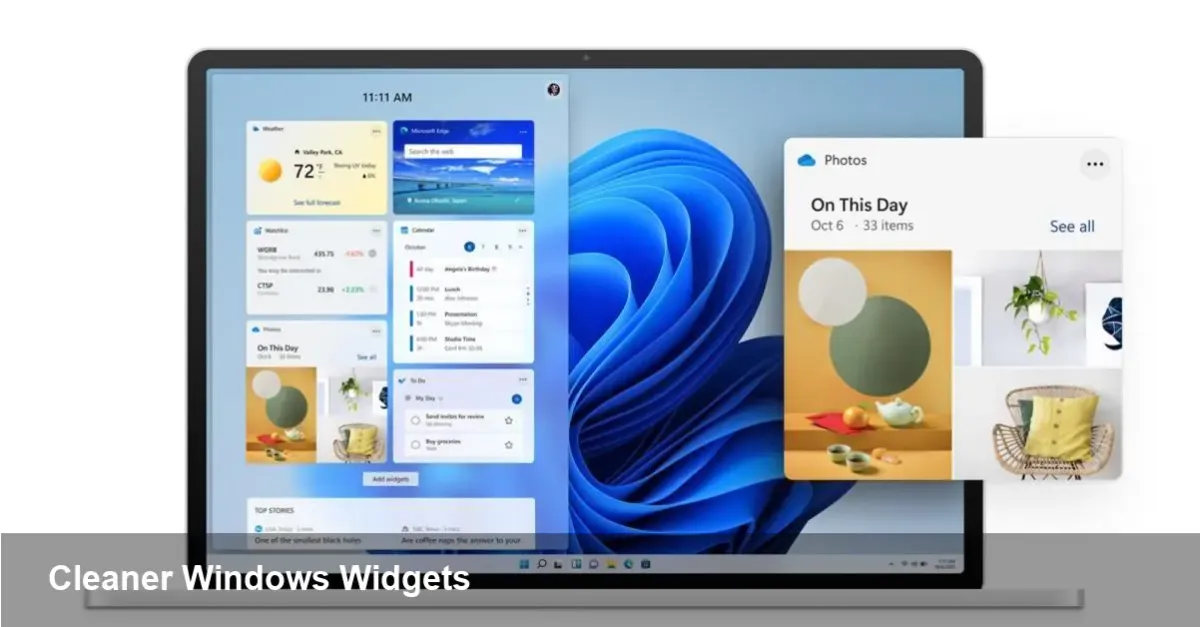
Microsoft recently moved to hide the MSN news feed from the Windows widgets panel. For many users the feed felt noisy, repetitive and out of place inside a space that’s supposed to surface concise, useful information. The shift is small in code but meaningful for habits: fewer distractions, a cleaner widgets surface, and a clearer path for future widget evolution in Windows 11.
Quick background: widgets in Windows 11
Widgets arrived as a core part of Windows 11’s desktop experience, offering at-a-glance cards for weather, calendar, sports, traffic and news. Under the hood the system has leaned on Microsoft’s content services (notably MSN/Microsoft News) and WebView components to render rich, personalized content. That arrangement delivered content quickly, but it also made the widgets panel feel like a news feed more than a productivity space.
What changed technically and for users
Instead of removing news entirely, Microsoft has hidden the default MSN news feed from the main widgets panel by default and exposed controls to hide or surface content. The net effect:
- Users get a less cluttered widgets surface focused on useful cards like calendar, to-do, and system info.
- News remains accessible if you opt in, but it’s no longer the dominant default experience.
- Organizations and power users can configure widget visibility to reduce distractions across endpoints.
For everyday users this is a quality-of-life change: quicker load times in the widget flyout, fewer auto-playing or image-heavy cards, and fewer algorithmically surfaced stories pushing clickbait or repetitive headlines.
Real-world scenarios where this matters
- Productivity-focused desktops: Knowledge workers who use widgets for calendar, tasks, and weather now see those cards first. Fewer headline interruptions help focus between meetings and during coding or design sprints.
- Shared or public PCs: In classrooms, kiosks, or reception areas, hiding MSN news avoids surfacing irrelevant or sensitive headlines in public view.
- Low-bandwidth or metered connections: News cards can be image-heavy and consume data. Disabling the default feed reduces background data use and improves performance on constrained networks.
Example: a design agency configures employee machines so widgets show only calendar, Microsoft To Do, and a status card tied to their internal build server. The team avoids headline noise and uses the panel as a quick project dashboard.
What this means for developers and partners
If you build apps or widgets for Windows, this pivot has a couple of implications:
- Opportunity to surface utility: With news de-emphasized, utility-focused widgets (calendar, timers, build monitors, collaboration status) have a clearer path to visibility and user engagement.
- Rethink “attention” strategies: Apps that relied on the sheer volume of impressions from the widgets feed will need to design for value-driven interactions—quick glanceability, actionable cards, and low friction entry points into the full app.
- Integration and platform considerations: Windows widgets still use web technologies under the hood. Developers can leverage the platform to build PWAs or web-powered cards, but they should optimize for minimal data usage and privacy-friendly behavior.
For independent developers, this is a moment to focus on cards that solve a specific user need rather than chasing traffic through broad, feed-style content.
Enterprise and security implications
IT administrators gain more control over end-user desktops. Hiding default news reduces potential attack surface that comes from external, dynamic content rendering inside widgets. It’s also a compliance win: corporate machines that must not show unauthorized or externally-sourced content can be configured to present only sanctioned cards.
From a privacy perspective, the change gives users and admins a clearer choice about whether Microsoft’s content pipeline runs on their device. Organizations with strict data policies can opt out without crippling the rest of the widgets functionality.
Business trade-offs for Microsoft
The MSN feed has been a channel for content partners and for advertising revenue. De-emphasizing it inside widgets means Microsoft is prioritizing user trust and desktop utility over immediate engagement metrics. That may reduce ad impressions inside the widgets surface but could increase long-term satisfaction with Windows.
This also frees Microsoft to experiment with different monetization or partnerships: focusing widgets on productivity could create opportunities for premium integrations with Office 365, Teams, or third-party services that pay for deeper placement.
Limitations and rollout notes
- Regional differences: Microsoft News and MSN content have different footprints globally. The behavior may vary by market and by whether users are signed into a Microsoft account.
- Not a total removal: Hiding the feed is not the same as deleting the underlying content pipeline; MSN content still exists and can be re-enabled by users.
- Third-party widget ecosystem: The long-term value of widgets depends on whether Microsoft opens more capabilities and APIs to third-party developers to build richer cards that don’t rely on feed-style engagement.
What’s next — three practical implications
- Widgets will gravitate to utility: Expect more cards that report status and trigger actions rather than flowing headlines. Teams and developers should prioritize glanceable, actionable design.
- Privacy-first defaults spread: Microsoft’s move is part of a broader trend toward giving users and enterprises clearer on/off switches for external content. That’s likely to influence other desktop and browser features.
- Opportunity for partner integrations: With news less prominent, there’s room for vertical partners (productivity tools, security dashboards, devops monitors) to claim real estate in the widgets panel.
This change is small, but it signals a shift in how Microsoft thinks about the desktop surface: less of a news distribution channel, more of a practical control center. For users and admins who asked for a calmer, faster widgets experience, the update lands exactly where they hoped. For developers and product teams, it’s an invitation to build fewer noise-generating experiences and more utility-driven cards that respect attention and bandwidth.