
Warp: Share files between Android and your desktop

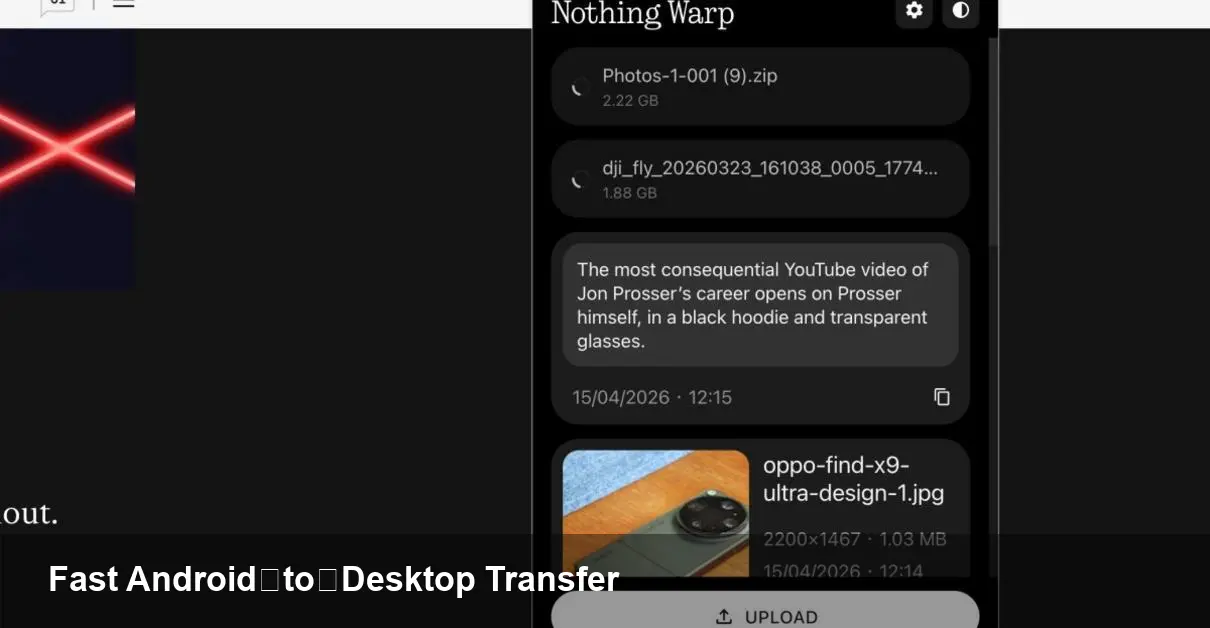
What Warp is and why it matters
Nothing — the consumer tech company co-founded by Carl Pei — has expanded beyond phones and earbuds into software that solves a very practical problem: moving files between Android devices and desktop machines. Warp is a cross-platform file-transfer app that aims to replace the friction of email attachments, slow cloud uploads, or fiddly USB connections with a fast, no-nonsense workflow.
For anyone who frequently moves photos, APKs, build artifacts, or large documents between a phone and a computer, the usefulness is immediate. Designers, QA engineers, journalists, and small teams working on prototypes all benefit when a quick photo or a multi-gigabyte video can be transferred in seconds rather than minutes.
How Warp changes the day-to-day flow
Most people default to one of the following when they need to move a file from phone to desktop:
- Email or messaging apps (size limits, compression)
- Cloud storage (upload/download delays, sync friction)
- USB cable and ADB (technical, slow for casual users)
Warp targets the space between those options: simpler than developer tools, faster than uploads, and more private than sharing links. The app provides a straightforward pairing and drag-and-drop experience for sending and receiving files on macOS, Windows, Linux, and Android.
Concrete examples
- A photographer lining up a client preview: snap photos on an Android device and push the uncompressed images straight to Lightroom on macOS without waiting for cloud sync.
- A mobile developer testing installables: send a freshly built APK from desktop to phone without manually copying it via ADB or uploading to a distribution service.
- A product manager collecting screenshots: teammates drop annotated screenshots from different platforms into one folder on a shared laptop for quick review.
Installation and basic workflow (what to expect)
Install the Nothing Warp app on your Android phone and the companion desktop client for macOS, Windows, or Linux. The desktop client runs in the background and exposes an easy accept/drag target — you can drag files to the app or use the Android share menu to push files to your desktop.
The design prioritizes a low-friction pairing flow so you can be productive within minutes of installing the apps. For most tasks you won’t need to configure network settings or set up cloud accounts.
Where Warp fits in a developer’s toolkit
Warp is not a replacement for automated deployment pipelines or device farms, but it fills several practical gaps:
- Rapid manual QA: A tester can receive nightly builds on a device in seconds.
- Ad-hoc demos: During meetings, presenters can instantly transfer sample media between phone and laptop.
- Small-scale internal distribution: Teams can move artifacts without opening a shared cloud folder or managing permissions.
Limitations to be aware of: if you depend on scripting, ADB automation, or continuous distribution tooling, Warp won’t replace those; instead, treat it as a more convenient handoff tool alongside your existing DevOps processes.
Security, privacy and corporate considerations
A cross-device transfer tool raises immediate questions about encryption, access control, and auditability — especially for teams handling sensitive files. Warp’s appeal is its simplicity, but organizations should evaluate it with the same scrutiny as any file-sharing tool:
- Confirm whether transfers occur only locally or are relayed through servers (this affects security and speed).
- Check whether the client supports authentication models suitable for your environment (single sign-on, MDM policies).
- For regulated data, determine if Warp meets compliance requirements or if a managed alternative is preferable.
For individuals and many small teams, the convenience trade-off will be acceptable. Enterprises should perform a short security review before approving wide deployment.
Pros and cons at a glance
Pros:
- Fast, intuitive transfers without email or cables
- Cross-platform desktop clients for macOS, Windows, Linux
- Useful for creatives, testers, and ad-hoc workflows
Cons:
- Requires both endpoints to run the app
- Not a replacement for automated, scriptable workflows
- Enterprise controls and compliance features may be limited out of the box
How businesses can leverage Warp
Start with a small pilot: equip a product or QA squad and measure time saved on routine file exchanges. Warp can reduce manual friction in iterative processes like design review and feature demos. For teams that frequently shuttle large media files, the cumulative time savings — and the removal of cloud storage overhead — can be meaningful.
If adoption grows, consider policy controls (who can install the app, which devices are allowed) and integrations with existing asset management practices. Nothing’s broader hardware and software ecosystem also provides an opportunity: if a company standardizes on Nothing phones or accessories, Warp becomes a natural complement for cross-device workflows.
Two practical setup tips
- Use a hotspot or the same local network for the best transfer speeds: local transfers typically outperform cloud relays and avoid external bandwidth limits.
- Keep a dedicated download folder visible on your desktop during review sessions so transferred files land where collaborators expect them — that little bit of organization saves repeated searching.
Looking ahead — three implications for workflows
- Desktop-mobile parity: As apps like Warp reduce friction, we’ll see more workflows move fluidly across devices instead of being bottled on one platform.
- Reduced cloud dependency for internal sharing: Teams may prefer direct transfers for speed and privacy, reserving cloud storage for archival and collaboration rather than point-to-point handoffs.
- Opportunity for integrations: The next wave will be scriptable transfer hooks, CLI access, and MDM-friendly enterprise features that let administrators manage and audit transfers at scale.
Warp isn’t a wholesale replacement for every file transfer method, but it addresses a constant pain point with a pragmatic, user-friendly solution. For anyone whose day includes frequent phone-to-desktop handoffs, it’s worth installing and keeping in the toolbox.



