
Extra: Rethinking Email Around Your Life

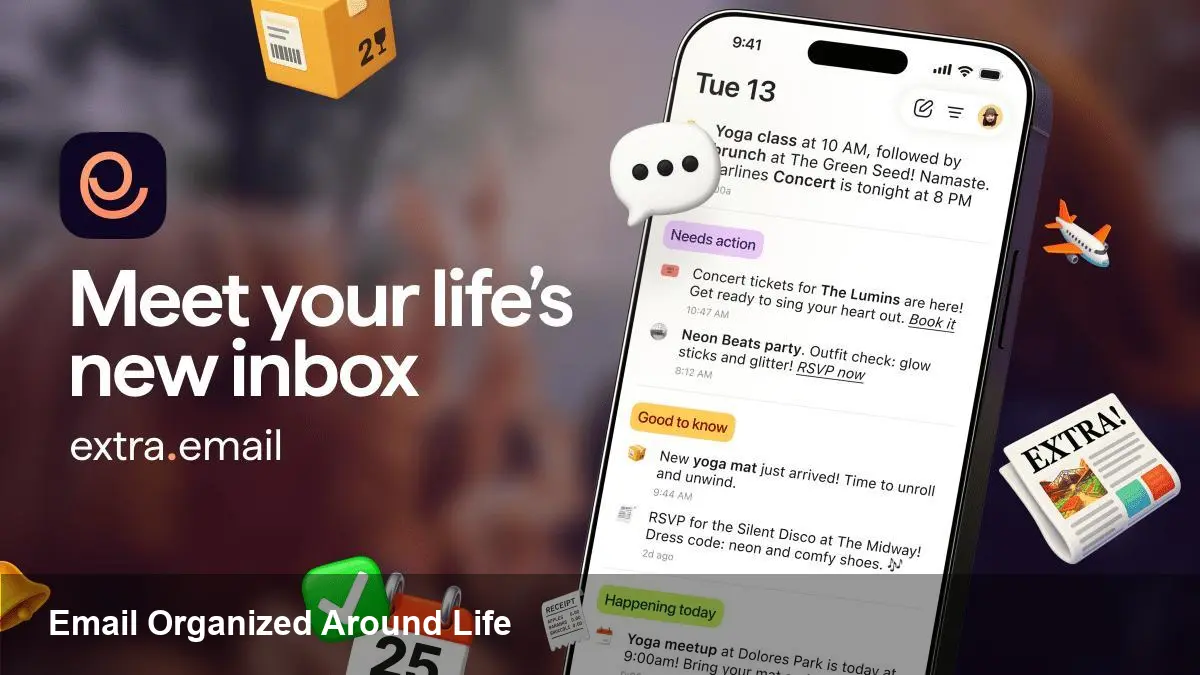
A fresh take on email from former Pinterest builders
A small group of designers and engineers who previously worked at Pinterest have launched Extra, an email app that deliberately moves away from the classic inbox-as-list model. Rather than presenting email as a single reverse-chronological feed, Extra organizes messages around people, events, and actions so your email reflects the way you actually use it—planning, paying, coordinating, and following up.
This isn’t just a visual redesign. The team’s pedigree in product design shows up in an emphasis on workflows and context: timelines, bundles, and actionable cards replace an overflowing list of unread messages. For developers, founders, and productivity-savvy users, Extra surfaces a different set of trade-offs and opportunities than typical mail clients.
What a life-centric email feels like
Imagine opening your email to see today’s meetings, bills due, and recent conversational threads grouped by project instead of by sender. That’s the mental model Extra aims to provide.
Core shifts in that model include:
- Action-first presentation: Messages are surfaced as tasks or events you can complete (RSVP, pay, confirm) rather than as items you must manually file.
- Contextual grouping: Threads are bundled by activity—shipping notifications, travel plans, or team syncs—so related items are visible together.
- Time-aware prioritization: Items relevant to the user’s current day or upcoming week are promoted, reducing the background noise of older, low-priority messages.
Those changes alter everyday behavior. You spend less time scanning and more time closing loops.
Concrete examples and user scenarios
- Busy founder coordinating investors and contractors: Instead of sifting through dozens of threads, the founder sees a “fundraising” group with recent replies, outstanding action items, and calendar conflicts. Quick actions like “request update” or “delegate” convert an email into a task.
- Freelance designer juggling invoices and client reviews: Billing reminders and attachments are presented as billable events with shortcuts to mark paid or generate a receipt. Client feedbacks on designs are grouped per project with the latest assets front and center.
- Support lead triaging customer emails: Conversations are bundled by product area with the ability to tag, escalate, or create tickets directly from the message card. That reduces context switching between email and the ticketing system.
These scenarios highlight why a life-centric interface is attractive: it reduces friction between reading and acting.
Developer and integration considerations
Extra’s approach has implications for developers building on or integrating with email systems:
- Data model needs to be richer. Instead of treating email as messages and folders, integrations must map messages to higher-level entities—events, invoices, orders, or tasks. That requires more robust metadata extraction and potentially ML to classify messages reliably.
- APIs and webhooks become critical. For workflows that convert messages into tasks or tickets, near-real-time hooks keep downstream systems in sync. Developers integrating CRMs, accounting tools, or calendars will want bi-directional synchronization.
- Privacy and permissions grow more complex. Automatically extracting and surfacing structured items (like bill amounts or travel dates) raises questions about user consent and selective sharing. Apps that integrate with Extra should adopt fine-grained scopes and clear UX for data use.
If Extra provides a public SDK or an open API, expect developers to build adapters that translate traditional mail streams into the app’s task-and-event model.
Business value and enterprise fit
For startups and product teams, a life-first email client can be a productivity multiplier:
- Faster closing of operational loops (invoicing, approvals, scheduling) reduces cycle time.
- Fewer missed action items translate into lower support overhead and faster sales follow-ups.
- Bundled views make onboarding and team handoffs simpler—new team members see activity grouped by project rather than chasing down lost threads.
Adoption in larger organizations will hinge on security, compliance, and identity integration. Enterprises need SSO, audit trails, and data retention controls before replacing default mail clients. If Extra focuses on these controls, it could position itself as an alternative front-end for corporate email without changing backend mail servers.
Limitations and where this model may struggle
No interface saves you from poor email hygiene. A life-centric model reduces noise but still depends on accurate classification. Key limitations to watch for:
- Misclassification risk: Bundling via heuristics or ML can surface irrelevant items as high-priority, causing new kinds of distraction.
- Integration gaps: If critical tools (CRM, billing, or proprietary systems) aren’t well-integrated, users may still need to context switch.
- Habit resistance: Many users are accustomed to filing and searching in traditional inboxes; shifting to an action-oriented workflow requires behavior change and trustworthy automation.
Those trade-offs will determine whether Extra becomes a niche productivity tool or a mainstream alternative.
What this means for the future of email
1) Email as a platform for tasks. If Extra’s model catches on, the role of email could evolve from passive archive to active workflow hub—an entry point for executing moves, not just reading them.
2) Composable mail UIs. Expect more experimentation: clients that mix snippets of calendar, payments, and tickets into message cards. The next wave of mail apps will likely be modular, letting users assemble the view that fits their life.
3) Greater pressure on privacy standards. As clients surface more structured data from messages, regulators and users will demand clearer controls. Privacy-first design and transparent data handling will be competitive advantages.
Practical advice for product teams and power users
- Start by mapping common email workflows in your organization (invoicing, approvals, scheduling). If a life-centric client can automate or shortcut those, pilot it with a small team.
- For developers, build adapters that extract the entities you care about (orders, invoices, dates) and expose them via a clean API so the mail client can render meaningful cards.
- Monitor classification errors. Keep human override paths obvious to avoid automation fatigue.
A reimagined email client like Extra isn’t a silver bullet, but it demonstrates a viable design direction: email that anticipates work instead of merely listing it. For teams that rely on email to get things done, that shift could save hours each week and reduce the mental load that comes with context switching.



