
Keychron Ultra 8K: Long-Life Mechanical Keyboards with ZMK

Why the Ultra 8K line matters
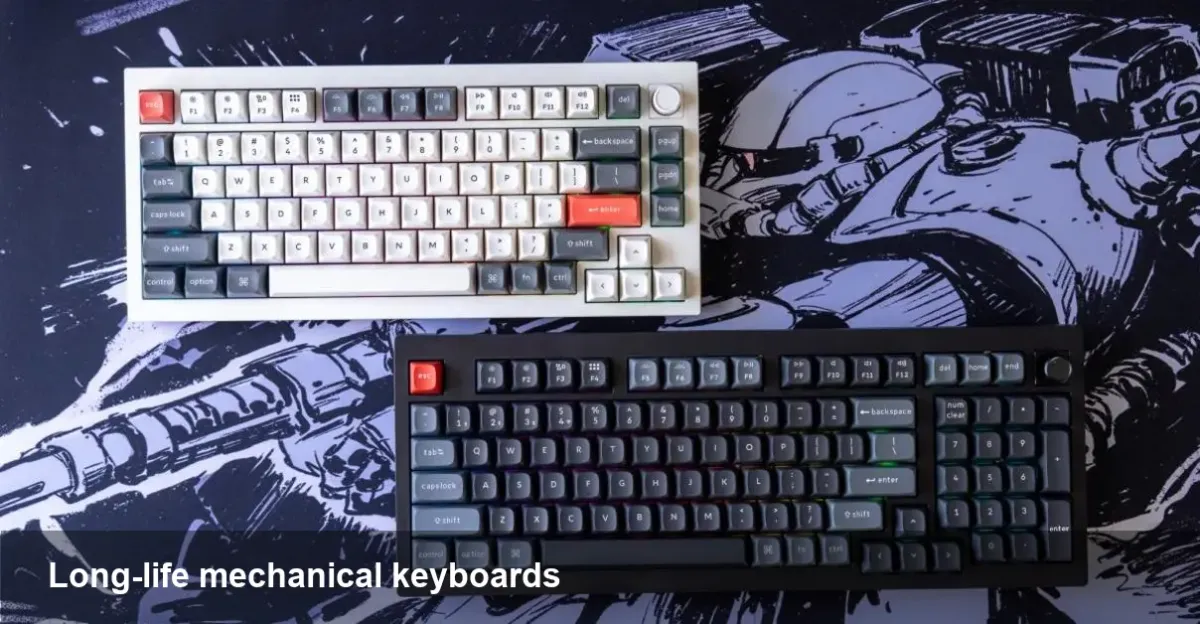
Keychron has steadily moved from affordable USB-C boards to premium, enthusiast-focused mechanical keyboards. The Q1 Ultra 8K and V5 Ultra 8K are the company’s latest step: desktop-grade build quality combined with significantly extended wireless runtime and a modern firmware stack. For anyone who spends hours typing, switches between devices, or tethers a keyboard to a laptop during travel, longer battery life and robust wireless behavior are immediately useful.
What changed — battery life and practical gains
The headline feature for these Ultra 8K models is their much longer wireless endurance. Where many Bluetooth mechanical keyboards need daily or weekly charging depending on usage, the Ultra 8K boards stretch that interval substantially for typical mixed use. The practical benefit is simple: less friction. You don’t have to keep a charging cable on your desk, you can bring the keyboard on short trips without a charger, and shared devices in a hybrid office require fewer top-ups.
This improvement isn’t just marketing — it changes behavior. Teams that hot-desk can keep personal layouts and layers on a single keyboard without worrying about frequent recharges. Creatives who move between a desktop and a tablet can stay connected over Bluetooth for longer presentation sessions. For road warriors, a keyboard that remains usable for days or weeks means one less accessory to manage.
Typing and hardware refinements that matter daily
Battery is one pillar; the other is the typing experience. Keychron’s Ultra models continue the enthusiast trend: tighter tolerances, improved stabilizers, and more attention to how switches and plates interact. You’ll find a smoother sound profile, less rattle, and a more consistent key feel across the board. These aren’t just cosmetic tweaks — they reduce fatigue and make long typing sessions more comfortable.
Hot-swap sockets, premium keycap options, gasket or foam dampening (depending on the specific Ultra variant), and a weighty chassis all contribute to a satisfying desktop presence. If you previously used cheap membrane keyboards or older mechanicals with wobble and noise issues, the difference becomes very tangible after a few days of use.
ZMK firmware: why Keychron adopted it and what it offers
One of the more interesting technical decisions here is shipping with ZMK, an open-source firmware that’s gained traction for Bluetooth LE mechanical keyboards. ZMK is built on Zephyr RTOS with a focus on low power and modern wireless stacks. Practically that means two things:
- Better power management: ZMK gives vendors and tinkerers granular control over sleep states, scan rates, and Bluetooth behavior — a direct contributor to the improved battery life.
- Cleaner wireless feature set: ZMK supports multi-host pairing and modern BLE HID profiles in a way that’s well suited to devices that need to hop between laptops and phones.
For developers and hobbyists, ZMK’s architecture is more modular than many older keyboard firmwares. If you want custom power profiles, alternate pairing flows, or advanced per-layer macros with minimal Bluetooth overhead, ZMK is designed to make those extensions easier and safer.
Example workflows where Ultra 8K shines
- A developer switches between a work laptop and a personal tablet during the day. Using multi-host pairing, they can keep both connected via Bluetooth and avoid constant unplugging. The long battery life means they don’t have to worry about recharging mid-day.
- A writer travels for a week with a laptop and a phone. The keyboard remains usable on flights and in cafes for multi-day stretches without the need for a charger in the bag.
- A product team holds frequent in-person demos. One Ultra 8K can be passed around for presentations, keeping the same keymap and macros across machines, while only needing infrequent charging.
Pros, limitations, and what to watch for
Pros:
- Noticeably extended wireless runtime compared with many competitors.
- Open, modern firmware stack (ZMK) that enables low-power features and easier Bluetooth behavior customization.
- Improved typing feel and reduced noise through hardware refinements.
Limitations:
- ZMK is still maturing relative to older ecosystems; some niche macros or legacy tools in the QMK ecosystem may not map one-to-one. Enthusiasts who rely on very advanced macro tooling should validate workflows.
- The firmware approach puts more emphasis on software updates and tooling. Users comfortable with firmware builds will benefit most; casual buyers may prefer well-documented official tooling.
- High-end mechanical boards are heavier and less pocketable than ultra-portable Bluetooth foldables — the trade-off is build quality versus absolute portability.
What the Ultra 8K signals for keyboards and developers
- Open firmware and low-power BLE are becoming mainstream in commercial keyboards. When vendors ship ZMK-powered devices, it signals a shift away from proprietary stacks toward open, community-driven platforms that are easier to iterate on.
- Battery life matters more than ever for peripheral devices. Users treat keyboards like first-class wireless devices; long runtime reduces friction and encourages wireless-first workflows.
- The line between enthusiast and mainstream hardware keeps blurring. Expect other manufacturers to prioritize long battery life and modern BLE stacks, and to borrow design cues that improve typing comfort and acoustic tuning.
Who should buy an Ultra 8K board?
Choose one if you want a solid, wireless-first mechanical keyboard with far better battery endurance than typical Bluetooth boards, and if you’re interested in the flexibility of an open firmware environment. It’s a good fit for hybrid workers, frequent travelers, and developers who like to tweak firmware or test custom power profiles.
If you prefer plug-and-play simplicity with a familiar macro ecosystem and zero firmware fiddling, evaluate whether the current tooling meets your needs, or look for vendor support resources before buying.
The Ultra 8K models push practical features that real users notice: less charging, cleaner Bluetooth behavior, and a better typing platform. For power users and developers, that combination is genuinely useful; for casual buyers the question is whether those benefits justify moving into a slightly more advanced firmware and setup space.



