
Xbox Mode Brings Console UX to Windows 11 PCs

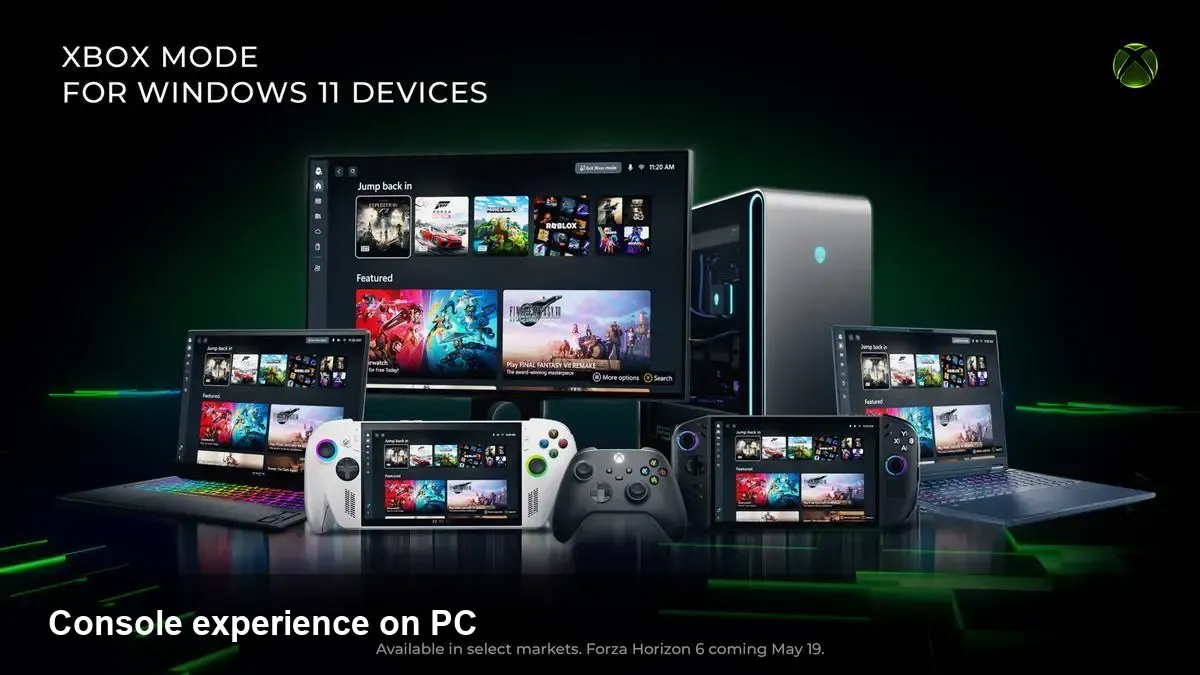
What Xbox Mode is and why it matters
Microsoft has started rolling out "Xbox Mode" to Windows 11 PCs — a package of UI, integrations and cloud-first features that aims to make the PC feel more like an Xbox console. For players this isn’t just a new skin: it ties the Xbox ecosystem (Game Pass, cloud streaming, social features, the Xbox app) closer to Windows so games, friends and services feel more consistent across devices.
If you’re a PC gamer, Xbox Mode is about reducing friction. Instead of juggling separate apps and services for subscriptions, friends lists and remote play, you get a more unified entry point. For developers and businesses it creates another surface to reach players and to standardize certain platform services.
What to expect in day-to-day use
- Unified entry: Xbox Mode surfaces your Game Pass library, recently played titles and store on the desktop experience. That makes launching a subscription game or buying a new title quicker, especially for casual players who don’t maintain a separate game launcher.
- Cloud-first play: If you have Game Pass Ultimate, cloud (xCloud) streaming is easier to access. That enables playing console-class titles on thin clients or low-end laptops without waiting for long downloads.
- Social and multiplayer: Friends lists, party chat and cross-platform invites are more directly accessible, so jumping into co-op or competitive sessions from a PC resembles the console flow.
- Controller-first support: Xbox Mode assumes controller use in more places — pairing and input mapping are surfaced prominently so plug-and-play gaming works better for non-technical users.
Imagine a scenario: a student with a lightweight Windows 11 laptop wants to play an Xbox-first title. Instead of downloading tens of gigabytes and waiting, they hit the Xbox Mode entry, stream the game instantly via Game Pass, and use a wireless controller — all without leaving the desktop.
How this changes developer workflows
Xbox Mode is primarily a consumer UX change, but it nudges technical and product decisions for developers:
- Discovery and monetization: Games in Game Pass or those with strong Xbox Store presence get a visibility boost on Windows 11. Indie teams should evaluate Game Pass deals and store optimization as part of launch planning.
- Platform services standardization: Xbox Live services (achievements, cloud saves, leaderboards) are easier to adopt when the desktop client treats them as first-class. That reduces integration friction for cross-platform features.
- Testing matrix considerations: Developers must ensure titles behave correctly under streamed sessions, controller-first input, and different quality-of-service conditions. QA matrices will need to include cloud streaming scenarios in addition to local hardware profiles.
For middleware and engine teams, tighter Xbox-Windows integration simplifies implementing Xbox-specific features like matchmaking or presence — but it also raises expectations for seamless behavior across device types.
Business and OEM implications
Hardware makers and channel partners will pay attention for a few reasons:
- OEM differentiation: Laptops marketed for gaming can highlight optimized Xbox Mode experiences and Game Pass trials as a selling point. That can help lower-cost devices compete on game access rather than raw GPU power.
- Subscription economics: Game Pass becomes more central to acquisition strategies. Publishers will need to weigh how subscription exposure affects full-price sales, DLC adoption and live-service retention.
- Cloud economics: Greater reliance on streaming shifts some costs toward Microsoft’s cloud infrastructure and network partners — but also opens opportunities for telcos and cloud partners to bundle gaming subscriptions.
Service providers and PC cafes can leverage Xbox Mode to offer console-like experiences without investing in local high-end hardware, instead relying on cloud connections for demanding titles.
Limitations and realistic expectations
Xbox Mode is a significant convenience layer, but it’s not a silver bullet. Expect these constraints initially:
- Latency and bandwidth: Cloud streaming quality still depends on local network conditions. Competitive multiplayer or fast-twitch titles will perform better on local hardware.
- Game compatibility: Not every PC game lives in the Xbox ecosystem. Titles exclusive to other launchers may remain outside the streamlined experience.
- Feature parity: Console and cloud builds occasionally differ from PC-native versions. Players who care about mods, ultra settings, or niche PC features might still prefer traditional installers and launchers.
Sensible testing and communication from developers will be important: indicate whether your game supports cloud streaming, what features are limited in streamed sessions, and how saves or cross-progression are handled.
Practical steps for players and small studios
Players
- Try Xbox Mode if you want fast access to Game Pass titles or a more console-like browsing experience on Windows 11.
- Keep a wired or low-latency wireless controller and a stable internet connection for cloud play.
- Use local installs for competitive or graphics-focused sessions to avoid latency or quality compromises.
Indie / small studios
- Evaluate Xbox Live and Game Pass as discovery channels; the Windows 11 surface can amplify exposure.
- Test under cloud streaming conditions and document limitations in storefront descriptions.
- Consider controller-first UI/UX for broader compatibility across Xbox Mode and console players.
Where this pushes the market next
1) Greater convergence: Expect more features that blur the lines between console and PC. Microsoft is incentivized to make Windows the most frictionless place to access Xbox services. 2) Subscription-first momentum: As Game Pass becomes central to how players discover and play, traditional pricing and launch strategies will evolve to accommodate subscription exposure. 3) Competitive pressure: Valve, Epic, and other platform owners will likely respond with deeper integrations, promotions, or partnerships to retain desktop players.
This rollout signals a practical change: players get faster access to Xbox content on Windows, developers get another channel to reach users, and businesses can rethink hardware and service bundles around subscription-based access rather than raw specs.
If you’re a gamer on Windows 11, give Xbox Mode a try for subscription access and cloud play — but keep your expectations realistic for latency-sensitive titles. For teams shipping games, now’s a smart time to test and document cloud behavior and consider Xbox ecosystem services when planning launches.



