
Why Valve's Steam Controller 2 Matters

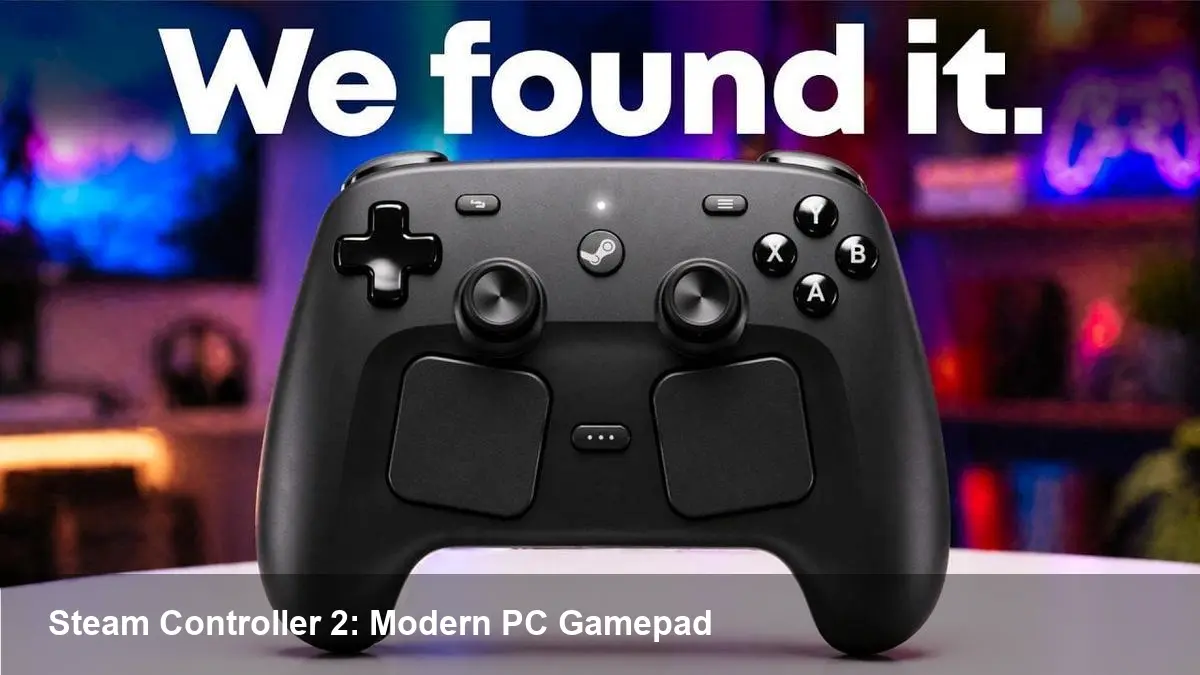
A second act for Valve's gamepad
Valve is gearing up to re-enter the controller market with Steam Controller 2, priced around $70, and a pared-down 512GB Steam Machine aimed at the living room. For players, developers and hardware partners this isn't just a new peripheral — it's a signal that Valve wants to broaden the ways PC games are played beyond keyboards and mice.
If you remember Valve's first Steam Controller, it was ambitious but polarizing. The original sought to map mouse-and-keyboard behavior to dual trackpads and a unique button layout. The new model takes lessons from that experiment: it looks more conventional and ergonomic, but still designed to give PC gamers finer, remappable control than a typical console pad.
What this means for players
- Living-room comfort with PC fidelity: The move pairs a more comfortable controller with a compact 512GB Steam Machine. For people who want to run PC games from the couch — native titles, Steam library streaming, or cloud services — this combination removes friction. You don't need to lug a laptop or set up a keyboard on the coffee table.
- Better default mapping and customization: Valve’s hardware typically leverages Steam Input, so expect deep remapping, custom action sets and community-shared profiles. That translates to fewer fights over awkward control schemes in ports and faster setups for older titles.
- Price vs. alternatives: At roughly $70, the Steam Controller 2 sits between budget gamepads and premium controllers like Sony's DualSense. If the ergonomics and feature set match expectations, it will attract gamers who want more configurability than an Xbox pad but don’t need full haptics or adaptive triggers.
Concrete scenario: A player with an extensive Steam library wanting to play a strategy game on a TV can use community controller profiles to get responsive cursor-like control using the new pad’s input system — no mouse required.
How developers should think about it
- Profile-first testing: Because Valve's controller ecosystem centers on configurable profiles, developers should add controller-first testing into QA. That includes checking multiple community profiles, verifying UI navigation with remapped layouts, and ensuring dead-zone and sensitivity options behave as expected.
- Ship with Steam Input bindings: Include and validate default bindings for the Steam Controller 2 alongside Xbox and PlayStation layouts. Even if your game already supports controllers, small UI tweaks (tooltips, menu prompts) improve the first-run experience for players using non-standard mappings.
- Use controller-aware tutorials and accessibility features: The ease of remapping removes some friction, but not all players will configure controls. Offer clear, discoverable in-game prompts and a controller calibration screen. For accessibility-conscious studios, the extra remap headroom is an opportunity to provide tailored presets for players with motor or sensory needs.
Developer example: An indie studio porting a top-down action game should run the game on the new controller early, check for button clustering, and publish a recommended Steam Input configuration to the store page so players can start with a tuned layout.
Business and ecosystem implications
- Reinvigorating the Steam Machine concept: Valve’s 512GB console suggests a fresh spin on Steam Machines — compact, affordable boxes intended for TV play. This helps Valve address the segment caught between streaming devices and dedicated consoles.
- Hardware as a software driver: New controller models often push platform features forward. If Steam Controller 2 gains traction, more developers will prioritize controller-first UIs on PC. That can increase game sales in the living-room segment and expand Steam’s reach into non-desktop devices.
- Competition and compatibility pressure: Valve faces entrenched incumbents — Xbox and PlayStation controllers are already widely supported across games and middleware. The differentiator will be the depth of customization and how Steam’s ecosystem surfaces those capabilities to average users.
Pros and trade-offs
Pros:
- Customization: Steam Input and community profiles provide unmatched remap flexibility.
- Living-room friendliness: Ergonomics and a compact Steam Machine make PC gaming on the TV easier.
- Price point: At roughly $70, the controller is accessible to most players who want something beyond entry-level pads.
Trade-offs:
- Ecosystem inertia: Many players and developers are already standardized around Xbox/PlayStation controllers.
- Feature expectations: If buyers expect console-grade haptics or adaptive triggers at this price, Valve may disappoint.
- Fragmentation risk: Multiple controller types can increase QA burden for developers.
Three practical steps to prepare
- Update your store pages: If you ship games on Steam, add Steam Input bindings and mention controller support explicitly, so players know your title works well with remapped layouts.
- Test on couch setups: QA on a TV with the Steam Machine hardware (or a controller + Steam Link/Big Picture mode) to validate menu scaling, font sizes, and input timing.
- Publish recommended profiles: Even a short PDF or Steam Workshop profile showing button mapping cuts setup time and improves first impressions.
Looking ahead — three implications for the next few years
- Controller-first PC UX will grow: As more players adopt living-room PC setups, developers will prioritize controller navigation, larger UI elements and more forgiving camera controls.
- Community-driven control standards: Valve's Steam Input encourages shared configurations; expect community-curated profiles to become a key discovery tool, particularly for ‘difficult’ PC genres like RTS or simulation titles.
- A renewed hardware ecosystem could spur partnerships: If Valve’s streamlined Steam Machine finds an audience, hardware partners and boutique PC makers may create more console-style PCs tailored for the living room.
Whether Steam Controller 2 becomes the default pad for PC gamers depends on execution: ergonomics, quality of default bindings, and how well Valve surfaces the customization power to non-technical users. For developers and studios, the safe bet is to treat this as more than a niche peripheral — test early, support the platform in release builds, and use community profiles to smooth the experience for players on the couch.



