
Why Amazon’s Fire TV Gigabit Ethernet Adapter matters

A small accessory with a big impact
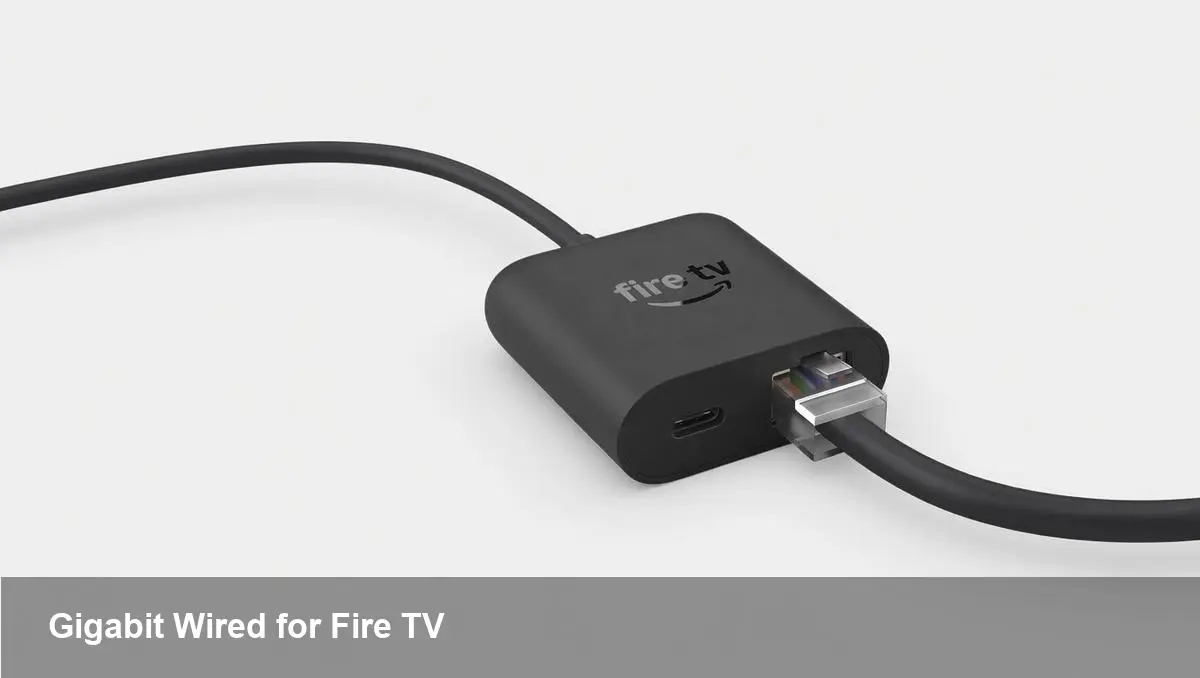
Amazon recently introduced a USB-C Ethernet adapter for its Fire TV lineup that brings true gigabit-class wired networking to the streaming stick/tablet family. On the surface it’s a straightforward accessory, but for power users, integrators and developers it solves a range of real-world problems that Wi‑Fi alone struggles with.
Why wired still matters for streaming
Wi‑Fi has improved a lot, but it’s inherently variable. Interference from neighbors, microwaves, dense apartment buildings and congested access points causes bitrate drops, rebuffering and higher latency — all of which are especially noticeable on 4K HDR streams and cloud gaming. A wired connection removes the last‑mile variability inside the home or venue, delivering consistent bandwidth and lower jitter.
This new adapter plugs into a Fire TV device’s USB‑C port and gives you a dedicated Ethernet uplink capable of gigabit speeds. That matters when you want stable 4K streams, synchronized multi‑room playback, or low-latency input for cloud gaming services.
Who benefits most
- Home streamers: If you run multiple devices or have frequent buffering on 4K content, moving the Fire TV to wired networking can dramatically reduce stutters and improve picture quality.
- Competitive/cloud gamers: Lower latency and fewer packet drops help cloud gaming sessions feel more responsive.
- AV and hospitality integrators: Wired Fire TV devices are easier to manage in hotels, bars, digital signage and meeting rooms where consistent performance is crucial.
- App developers and QA teams: Deterministic networking simplifies stress testing, adaptive bitrate troubleshooting and reproducing network-related bugs.
Practical scenarios
- A small bar uses several Fire TVs to show sports and promotional video. With Wi‑Fi congestion during peak hours, some screens exhibited buffering and frame drops. Swapping to wired connections cut interruptions and reduced onsite support calls.
- A developer diagnosing an intermittent adaptive bitrate (ABR) switching bug can remove Wi‑Fi variance and determine whether the issue is server-side or client-side.
- A home user with a single broadband connection running heavy upstream tasks (backups, IoT) keeps the Fire TV on Ethernet to reserve the router’s Wi‑Fi capacity for phones and tablets.
Easy setup, but check compatibility
The adapter is plug-and-play: connect Ethernet to the adapter, plug the adapter into the Fire TV’s USB‑C port, and the device should route traffic over wired network automatically. However, two practical caveats:
- Not every Fire TV model exposes a usable USB‑C port. Confirm your model supports data over USB‑C rather than just power.
- If your router or switch is older and limited to 100 Mbps, you won’t see the full gigabit benefit until the local network is upgraded.
If you’re deploying at scale (hotels, signage), plan the physical routing of Ethernet and potential switch ports — the accessory removes a wireless headache but replaces it with cable management decisions.
Developer and integrator implications
For developers building streaming or interactive apps, the adapter reduces a major variable in test environments. When diagnosing bitrate ladders, startup latency, or packet-loss recovery logic, wired tests reveal client behavior without Wi‑Fi noise. QA labs and CI systems can use wired Fire TV devices to build repeatable performance tests.
Integrators get a cost-effective route to more dependable installations. Rather than investing in enterprise-grade mesh Wi‑Fi for every screen, a handful of cable drops and switches often provide a simpler, more robust architecture.
Pros and cons at a glance
Pros:
- Consistent throughput and lower latency vs Wi‑Fi
- Better performance for 4K streaming and cloud gaming
- Simple, low-cost way to stabilize network performance for devices
- Useful for debugging and reproducible testing
Cons:
- Requires a compatible USB‑C Fire TV model
- Adds cable clutter and physical installation work
- No Power over Ethernet support, so a nearby power source remains necessary
- Limited benefit if your ISP or local switch is the throughput bottleneck
Business value: where this matters financially
For businesses that pay for uptime — hotels, restaurants, corporate meeting rooms — reducing rebuffering and ensuring predictable playback reduces support costs and improves guest experience. A reliable wired stream also makes it easier to automate content updates and remote monitoring, which pulls operational overhead out of local staff.
For streaming app publishers, delivering consistent playback improves perceived quality of service and reduces churn. A minor hardware accessory can indirectly protect user retention by preventing poor playback experiences tied to flaky wireless environments.
Future signals: what this accessory hints at
- Consumer expectation for reliable streaming will rise: Vendors shipping simpler wired options signals that ‘best-effort’ Wi‑Fi is no longer acceptable for high-end streaming experiences.
- TV‑platforms becoming more professional: Amazon’s move aligns with a trend of treating streaming sticks as deployable AV endpoints for businesses, not just casual living-room gadgets.
- Accessories matter again: As USB‑C becomes ubiquitous, expect more network, input and storage adapters that expand what streaming players can do — from wired networks to local media caching.
Who should buy one?
If your Fire TV is used in a high-traffic Wi‑Fi environment, you rely on consistent 4K playback, or you operate Fire TVs as part of a commercial deployment, this adapter is an inexpensive upgrade that pays back quickly in reliability. For casual users in a quiet home network, the improvement may be marginal.
Wired networking won’t fix every streaming problem, but for scenarios where stability and latency matter, this tiny adapter changes the equation. If you’ve been battling rebuffering, considering cloud gaming on Fire TV, or rolling out multiple devices in a venue, the adapter is worth trying as a first step toward a more deterministic streaming setup.



