
The ROG Zephyrus Duo Is Back: Dual-Screen Laptop Preorders Open

A bold return at CES and a high price tag
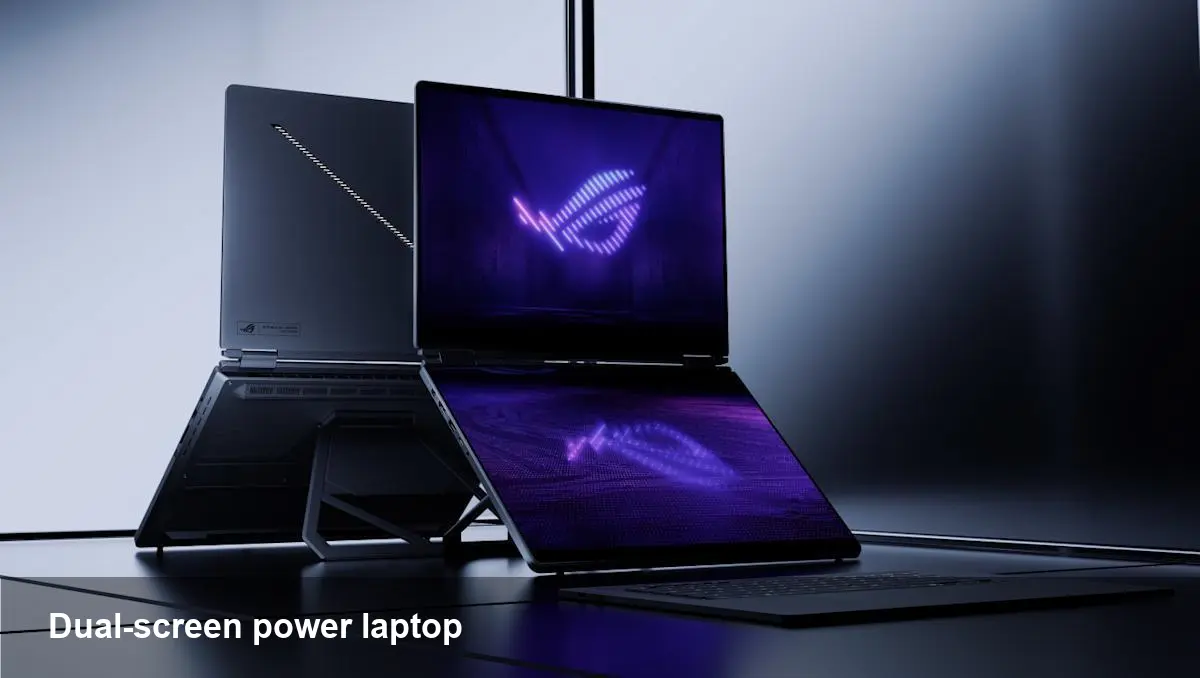
ASUS has revived one of its more unconventional laptop experiments: the ROG Zephyrus Duo. Announced at CES and now available to pre-order starting at $4,500, this is a flagship-class dual-screen laptop aimed squarely at builders, creators and pro-level gamers who want an all-in-one mobile workstation.
If you remember the original Duo models, the formula is familiar: a primary high-performance display up front and a secondary display that sits above the keyboard (and tilts or raises when the lid opens). That extra screen changes how you use the machine: it’s not merely a second monitor, it’s a built-in workspace that shifts the laptop from single-display ergonomics to a two-tiered desktop replacement.
Why this form factor matters in 2026
Dual screens on laptops have moved from novelty to niche productivity tool. For certain workflows—multitrack video editing, live streaming, 3D asset management, or software debugging with heavy console output—having an always-available second display is a tangible time-saver. It replaces the clutter and the need for a portable monitor when you’re on the road.
For teams that do rapid iteration (game studios, creative agencies, VFX houses), the Duo’s integrated approach reduces context switching. Instead of alt-tabbing or dragging windows between external displays, you assign persistent tools to the secondary screen—timelines, chat, mixer panels, logs—while the main display stays focused on the primary task.
Practical scenarios: how professionals can use a dual-screen laptop
- Video editor: Put the timeline and preview on the main panel, and use the secondary display for bins, effects panels, or an annotator app. You gain quick access to assets without a dedicated external monitor.
- Streamer: Run your game or main content on the top screen while chat, overlays, and stream controls sit below. Quick-control layouts on the secondary display let you adjust scenes without breaking immersion.
- Developer: Keep your IDE on the main screen and use the second display for terminal sessions, logs, documentation, or live-reload previews. For full-stack devs diagnosing backend issues while testing UI, that split reduces friction.
- Designer or 3D artist: Reference images, palettes, or toolboxes can live on the secondary screen while the canvas gets the main stage.
These examples show why ASUS is pitching the ROG Zephyrus Duo as more than a gaming novelty—the ergonomics and workflow potential are its selling points.
Downsides and real-world trade-offs
No design is perfect. The Duo’s strengths come with compromises you should evaluate before pre-ordering:
- Price and positioning: Starting at $4,500 places this laptop in an elite bracket. For many buyers, a high-end single-screen workstation plus an external monitor will be a cheaper and more flexible solution.
- Weight and portability: Dual-screen machines are heavier and bulkier than clamshell laptops. If you fly frequently and prioritize light carry, this class of device is less attractive than thin-and-light alternatives.
- Battery life concerns: Running two displays and a high-performance GPU inside a compact chassis will tax the battery. Expect outlet-dependent usage patterns for demanding tasks.
- Software optimization: The secondary screen’s usefulness hinges on software support. Apps that adapt to the two-tier layout and provide meaningful UI placements will deliver the best experiences; older or niche tools may not make good use of the extra panel without manual window management.
- Heat and noise: Packing powerful components into a dual-screen chassis challenges cooling. In sustained loads you may see thermal throttling or louder fan profiles compared with larger desktop replacements.
How developers and power users should set it up
- Reserve the secondary screen for constantly visible tools: terminals, build dashboards, CI alerts, chat apps, or monitoring UIs. That preserves the main screen for focused work.
- Use a window manager or hotkeys to snap windows quickly. If your OS doesn’t offer robust window-tiling by default, pick a lightweight utility to define layout presets you can toggle.
- Dock when possible: connect to an external monitor and peripherals at your desk. Even with two built-in screens, a desk setup with a vertical monitor plus a keyboard/mouse will improve ergonomics for full-day sessions.
- Leverage cloud/offloading: for extremely heavy GPU builds or renders, pair the Duo with cloud workstations or render farms. Use the local screens for control and preview while heavy lifting happens remotely.
Business value and who should consider pre-ordering
The ROG Zephyrus Duo is targeted at a specific group: people who value mobile consolidation over a modular setup. For solo creators, freelance editors, on-site VFX supervisors, and traveling streamers, the convenience of two integrated displays can be a huge productivity win. For companies, buying a fleet of these makes sense when reducing workstation setup time or enabling frequent travel is a priority.
However, for organizations that already standardize around docking stations and desk setups, investing in high-quality external monitors and thin client laptops may deliver a better cost-to-productivity ratio.
What this says about the future of laptop design
- Built-in multi-screen laptops won't remain a gimmick. Expect other OEMs to experiment more with integrated second displays and improved software ecosystems.
- Software adaptability will determine success. Vendors who partner with key creative and developer tool makers to optimize layouts will get more traction.
- Hybrid workstation models will grow: powerful local hardware paired with cloud rendering and virtual desktops will make these machines more flexible for enterprises.
The ASUS ROG Zephyrus Duo’s return signals that at least one OEM believes there’s a premium market that prefers an all-in-one, ultra-capable mobile workstation. If you need concentrated, multi-window workflows on the road and can justify the price, it’s a compelling (if expensive) option. If you’re price-sensitive or prioritize ultra-light travel, wait for the next generation of designs or consider a separate external monitor + laptop combination.
Are you thinking about pre-ordering one, or will you wait to see how software support evolves? Either way, dual screens are moving from niche curiosity toward a serious productivity tool for specialized users.



