
Kindle Colorsoft: Dark Mode and Smarter Drawing Tools

Why this update matters
Amazon has quietly improved the reading and note-taking experience across its color e‑ink Kindles. The Kindle Colorsoft and the Scribe Colorsoft — Amazon’s color-capable e‑ink devices focused on reading and writing — have received a software update that introduces a system-level dark mode and richer drawing tools. That may sound incremental, but for frequent annotators, students, and professionals who depend on e‑ink for long sessions, these changes change the device from a simple reader into a more capable digital notebook.
What changed (at a glance)
- Dark mode: a system-wide toggle that inverts backgrounds and reconfigures UI elements to a darker palette, making low-light reading and late-night note-taking easier on the eyes.
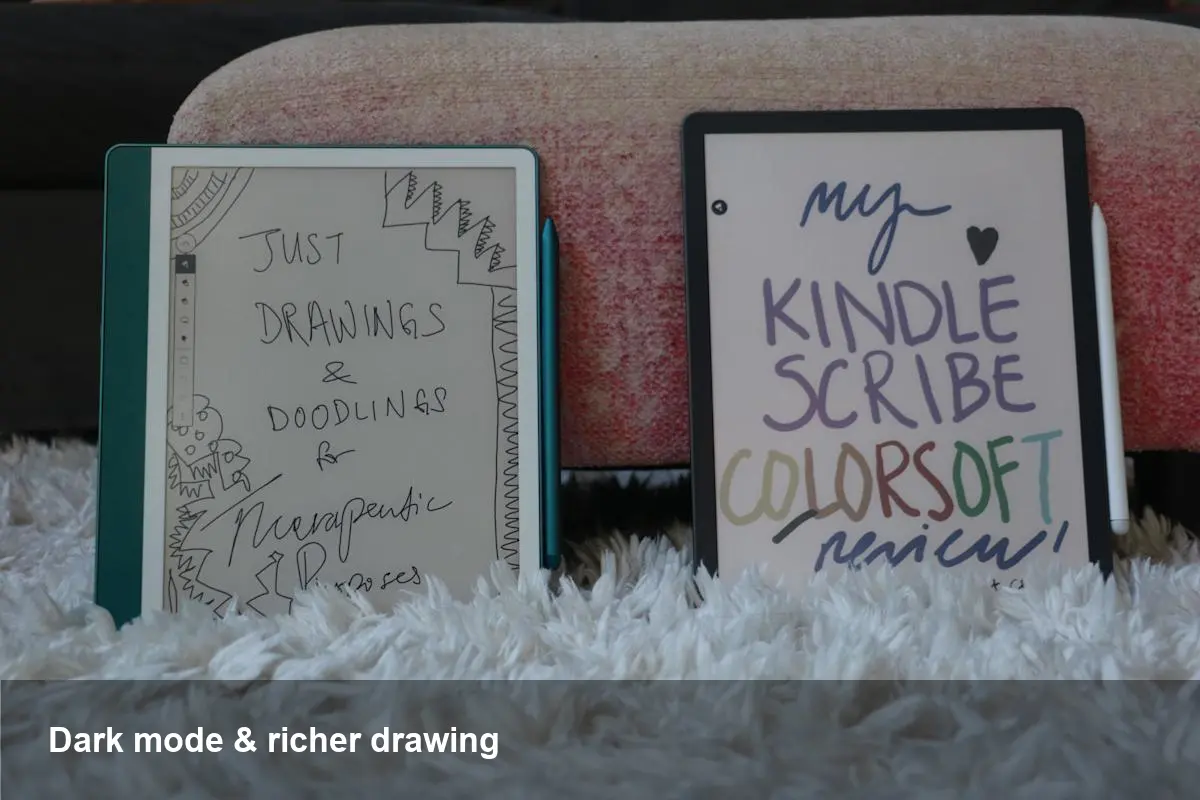
- Expanded drawing tools: additional pen and brush options, more sizing and opacity control, and improved selection/erasing behaviors that make handwriting and sketching feel more flexible.
Amazon hasn’t repositioned these devices as full tablets — e‑ink’s strengths (readability, battery life, paper-like feel) and weaknesses (color gamut, refresh speed) remain — but this update narrows the gap between a reader and a productivity device.
Practical scenarios: how people will use this
- Students annotating textbooks: Dark mode reduces glare during late study sessions, while enhanced drawing tools let students highlight, underline, and sketch diagrams with greater nuance directly on PDFs and textbooks.
- Designers and product managers: Quick wireframe sketches and markups on screenshots or exported mockups become easier. Improved erasing and stroke controls speed iterative work without switching devices.
- Readers with light sensitivity: Dark mode isn’t only aesthetic — for users sensitive to bright backgrounds, a darker interface lowers discomfort and can make long reading sessions more sustainable.
- Field notes and journaling: Writers who use the Kindle Scribe Colorsoft for daily notes will see handwriting feel more natural with a broader palette of pen types and pressure-like adjustments.
Concrete example: imagine a grad student reviewing a color PDF at night. With dark mode enabled, page backgrounds are darker and text contrasts are adjusted for legibility; they can sketch a quick concept on the margin using a finer pen preset, then switch to a soft marker preset to shade a figure — all without pulling out a separate tablet.
Developer and business implications
For developers and teams building content or workflows around Kindles, these updates nudge several practical considerations:
- Content design: E‑book publishers and educational platforms should test color-heavy assets against dark backgrounds. Charts, images, and color-coded annotations may render differently when the system applies darker UI elements or inverts backgrounds.
- Instructional design & courseware: EdTech vendors can leverage the improved annotation tools to create interactive PDFs and worksheets optimized for handwriting and stylus input on the Scribe Colorsoft.
- Enterprise and field work: Companies using Kindles for checklists, forms, or manuals benefit from more reliable on-device markups — fewer misreads in low light, and annotations that are quicker to produce and review.
Note: Amazon’s ecosystem remains comparatively closed. There’s still no broadly available third‑party app store or deep SDK for the Kindle OS in the way tablets offer. Expect improvements to boost in-house workflows and content formats Amazon already supports (PDF, mobi/azw, etc.), but don’t count on full app extensibility yet.
Trade-offs and limitations
- Color e‑ink isn’t the same as LCD/AMOLED: Dark mode does not magically equal OLED black levels. The darker UI reduces emitted light and perceived glare, but color fidelity, contrast, and refresh characteristics still lag behind full‑color tablets.
- Latency and nuanced pressure: While the drawing tools are improved, they’re still constrained by the display technology and stylus sampling rates. Complex painterly brushes or rapid strokes may show slight lag compared with high‑end tablets.
- Battery impact: Dark mode on e‑ink doesn’t save power the same way it does on OLED devices. Most e‑ink devices use front lights and refresh cycles that dominate power consumption; you should expect marginal battery differences depending on usage patterns.
What this means for the market
These updates are part of a broader trend: e‑ink devices are diversifying from single‑purpose readers into multi‑modal productivity tools. Amazon is leveraging software to extract more utility from hardware that otherwise has a very stable physical design. That’s low-cost product evolution — improvements delivered over the air can meaningfully extend the usable life and appeal of existing models.
Three likely implications:
- Greater adoption in education — as annotation and night‑study features improve, institutions may be more willing to pilot color e‑ink devices for coursework that blends text and diagrams.
- Content and UX optimization — publishers will need to prepare assets that render well in both light and dark themes, mindful of color contrast and accessibility.
- Incremental competition with tablets — not to replace them, but to attract users who prioritize battery life and eye comfort over multimedia performance.
How to get the update and what to check
If you own a Kindle Colorsoft or Scribe Colorsoft, check Settings > Device Options > Software Updates (or follow Amazon’s on-device prompts). After updating, test with a range of documents: color PDFs, image-heavy magazines, and multi-page manuscripts. Pay particular attention to annotation export and synchronization if you rely on Amazon’s cloud backups for notes.
A practical recommendation
If you use a Kindle primarily for reading but occasionally sketch or annotate, install the update and experiment with night reading and the new pen presets for a week. For power annotators and illustrators, the Scribe Colorsoft might now be worth considering as a secondary device for ideation and margin work — just don’t expect it to replace your color tablet for detailed artwork.
The update shows Amazon’s approach: iterative software refinements that nudge hardware into new use cases. For many users, that’s exactly the kind of polish that turns a good e‑reader into a daily workflow tool.



