
How Framework’s OCuLink turns the Laptop 16 into a modular desktop

Why this matters now
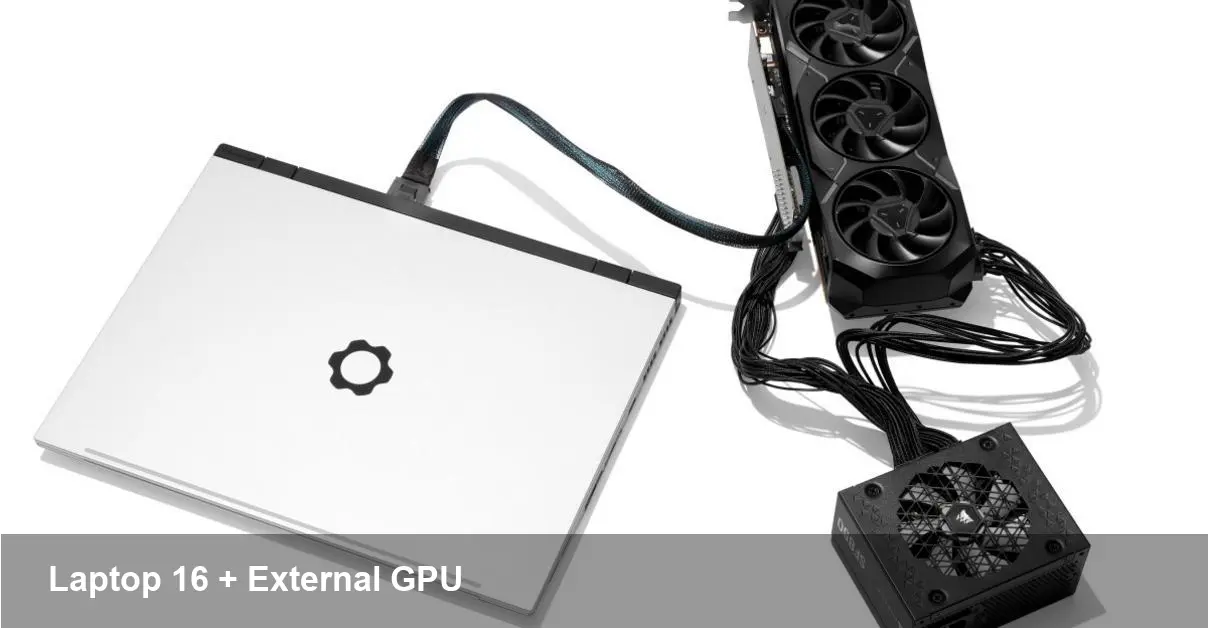
Framework's modular ethos has been clear since its first repairable laptops: give users choice over upgrades and longevity. The company’s new external OCuLink expansion for the Laptop 16 takes that idea further by letting a laptop act as a genuine PCIe host for external GPUs and other full‑height PCIe cards. For people who need desktop-class performance occasionally — creators, engineers, and developers — this changes the tradeoffs between portability and power.
A quick primer on Framework and the Laptop 16
Framework built a reputation selling user‑repairable, upgradeable laptops with swappable modules and a parts‑friendly design. The Laptop 16 is their larger model aimed at power users who want a 16‑inch screen with a configurable internal layout. The new external PCIe option uses OCuLink, a cable and connector standard that carries native PCIe lanes over a short cable, enabling external enclosures to behave more like internal PCIe slots than bandwidth‑limited docking technologies.
What OCuLink brings to the table
- Native PCIe over cable: Unlike USB‑based docks, OCuLink exposes raw PCIe lanes to the host. That means peripherals in the chassis — GPUs, NVMe arrays, capture cards, FPGAs — have direct PCIe access, minimizing overhead and latency.
- Flexibility: You can plug in an eGPU, a capture card for streaming, a pro audio DSP card, or even an FPGA accelerometer board. That turns the Laptop 16 into a small workstation without sacrificing mobility.
- Upgrade path: Instead of buying a whole new laptop for a new GPU generation, you can swap cards in the external chassis as needed.
Practical scenarios where an OCuLink eGPU matters
- Creative professionals: A freelance video editor can travel with the Laptop 16 for client meetings and then plug into an OCuLink enclosure at the home studio for GPU‑accelerated rendering or color grading on Premiere or DaVinci Resolve.
- Machine learning on the go (sort of): Data scientists who primarily code on the road can carry the laptop and use the external GPU at a desk for model training. It’s not a substitute for a full on‑prem cluster, but it’s a versatile option for prototyping and smaller experiments.
- Live production and streaming: Broadcasters who need hardware capture and encoding can add dedicated PCIe capture/encode cards in the enclosure, reducing CPU load and improving stream stability.
- Hardware development and testing: Engineers who need to test PCIe devices can use the enclosure as a flexible lab tool, inserting different add‑in cards without swapping out machines.
Developer and workflow implications
- Faster iteration for GPU workloads: Developers building CUDA/OpenCL workflows or GPU‑accelerated libraries can run code locally with near‑desktop performance when docked, shortening edit–compile–test cycles.
- Easier reproducibility: Teams can standardize on a single external enclosure configuration to ensure everyone tests on the same hardware (helpful for QA and benchmarking).
- Local edge compute: For prototypes that will run on edge devices, plugging in accelerators makes it straightforward to validate performance without provisioning remote hardware.
Real limits to consider
- Power and cooling: External GPUs need substantial power and thermal headroom. Expect an enclosure to require an external PSU and for the GPU to run hotter than in a full tower with aggressive cooling.
- Cable length and placement: OCuLink supports short‑range cabling. This is great for desk setups but not for long‑distance placement like some Thunderbolt setups.
- Driver and OS support: External GPUs and certain PCIe cards can behave differently across operating systems. Windows generally has broader eGPU support; Linux users might face driver quirks and manual configuration.
- Hot‑plug and sleep behavior: Not all software and firmware handle hot‑plugging PCIe devices seamlessly. Some workflows will require a reboot or careful disconnect procedures.
Business and procurement advantages
- Longer device lifecycles: Companies can extend a laptop’s usable life by centralizing performance upgrades in an enclosure rather than replacing laptops whenever GPU needs grow.
- Cost efficiency: For teams that don’t need desktop performance constantly, letting users share a small number of enclosures reduces capital spend compared with issuing desktops to everyone.
- Modular upgrade path: IT teams can upgrade compute capacity by swapping cards in enclosures across a fleet, minimizing downtime and inventory complexity.
Downsides for certain buyers
- Portability tradeoff: While the Laptop 16 remains portable, the enclosure is not. If a user needs high performance continuously in the field, a dedicated workstation might still be preferable.
- Ecosystem fragility: OCuLink adoption is smaller than Thunderbolt/USB4. That means fewer off‑the‑shelf enclosures and accessories in the near term.
Three future implications to watch
- Greater modularity in laptops: If external PCIe via cable becomes more commonplace, laptop makers may design thinner systems that assume periodic docking for peak performance rather than packing the highest TDP components internally.
- New professional workflows: Studios and dev teams might adopt “shared GPU pools” where enclosures live in offices and are checked out as needed, similar to how some organizations manage test servers today.
- Standard convergence pressure: Vendors will feel pressure to bridge OCuLink, Thunderbolt, and USB4 performance gaps, or build adapters that make it easier to mix and match docks and laptops.
Who should consider this setup
- Creatives and developers who split time between travel and a fixed desk, and who need bursts of desktop GPU power.
- Small companies that want to centralize heavy compute while keeping team members mobile.
- Hardware engineers and hobbyists who want a flexible way to test PCIe cards without maintaining multiple PCs.
The OCuLink expansion option turns the Framework Laptop 16 into more than a portable device — it becomes a gateway to a desktop‑class ecosystem. It won’t replace a full desktop for every user, but for anyone who values upgradeability and wants a single machine that can serve both as a laptop and as an occasional workstation, it’s a pragmatic step toward more modular, sustainable computing.



