
DJI Mic Mini 2: practical guide for creators and teams

A compact microphone that makes setup easier
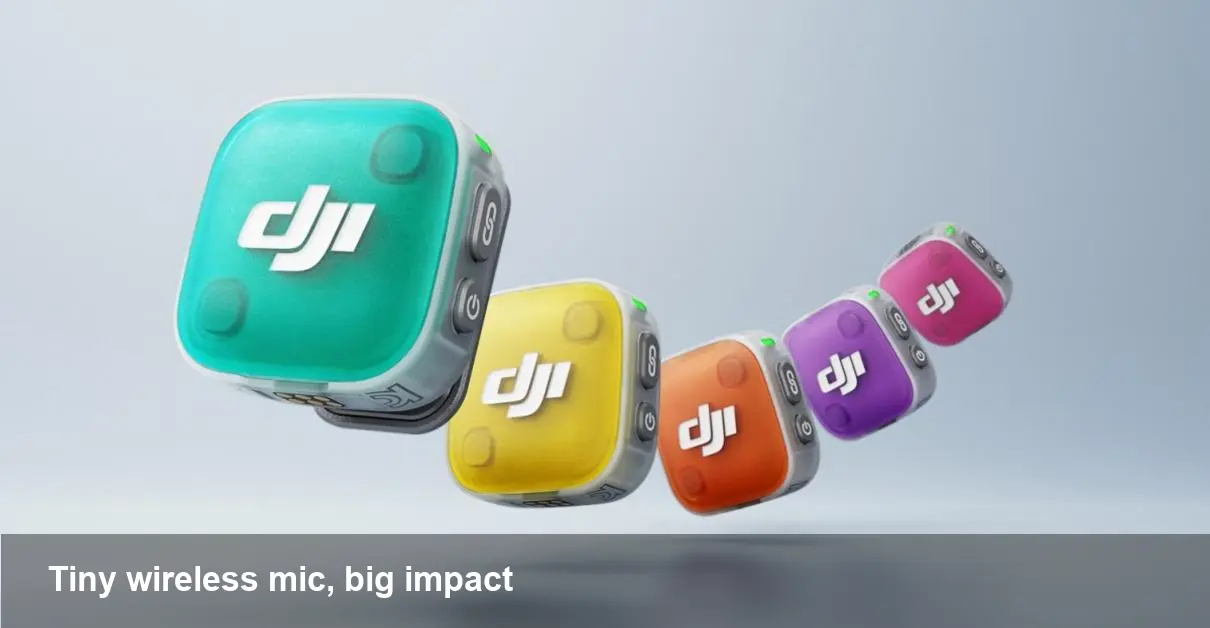
DJI’s Mic Mini 2 is the company’s latest move into ultra-compact wireless audio for creators. It keeps the core promise of tiny transmitters and receivers but adds two practical touches: removable colored covers so you can visually match or hide units, and voice-presets that let you favor clarity or warmth without diving into EQ settings. For anyone who shoots fast, runs a small video team, or needs an unobtrusive microphone, those small changes can save minutes—or headaches—on set.
Why the design tweaks matter
Color-coded hardware isn’t just an aesthetic flourish. For multi-person shoots, wedding coverage, or multi-channel interviews, quick visual identification speeds up setup and troubleshooting: which talent has battery left, which transmitter pairs with which receiver, or which mic belongs to the videographer. Alternatively, if you want your gear to disappear on camera during close-ups, neutral or skin-tone covers help the transmitter blend into clothing.
Meanwhile the voice presets remove a common barrier: not every creator is comfortable with equalizers or post-production processing. Ship a clip that’s already biased toward intelligibility or a richer low end and you reduce edit cycles and review time. For social creators producing short-form, the net result is faster publishing.
How voice presets change on-the-go recording
DJI’s approach to presets is practical: choose a setting that emphasizes speech clarity for interviews, or one that brings out low frequencies for fuller-sounding narration. That’s not the same as replacing a trained sound mixer, but it’s useful when you’re solo or on a tight deadline.
Concrete example: a solo travel vlogger interviewing locals on a windy street can pick the clarity preset and focus on mic placement; the preset will prioritize frequencies that make consonants and intelligibility stand out, so subtitles and post-processing work better. Conversely, a corporate explainer recorded in a quiet room might use the warmth preset to give a voice a more broadcast-like presence without extra processing.
Integration: where Mic Mini 2 fits in a workflow
The Mic Mini 2 is best thought of as a run-and-gun tool. It belongs in the kit of:
- Single-operator YouTubers and TikTok creators who shoot handheld or on gimbals.
- Small corporate video teams producing employee profiles, event coverage, or internal communications.
- Podcasters and streamers who need a mobile backup or field recorder.
Practically, you’ll pair the receiver with a camera, phone, or audio recorder. The color covers help if you use multiple transmitters on one shoot; the presets make files more publish-ready out of the camera. For teams, that means less time in the mixing stage and clearer sync notes for editors.
Example workflows
- Solo documentary maker: mount one transmitter on the subject and one on the interviewer; use the clarity preset on the subject during noisy scenes and switch to warmth in quiet sit-down segments.
- Event coverage for marketing: hand transmitters to speakers; use color covers to ensure each speaker’s track is labeled properly during ingest so editors don’t have to guess who’s who.
Trade-offs and limitations to consider
No compact wireless system is a perfect replacement for a studio-grade setup. Some practical limitations:
- Microphone size and capsule quality impose physical limits on sound fidelity—you may still want lavalier or shotgun alternatives for critical audio.
- Color covers add convenience but can wear over time or collect dirt; plan for replacement covers if you rely on them heavily.
- Presets are helpful defaults but can’t fix poor gain staging or extreme room acoustics; proper placement and levels remain essential.
Also consider compatibility and accessory needs. If your camera or recorder lacks the right input, you’ll need adapters. The tiny transmitters may also be easier to misplace—consider tagging or a small carrying case for multi-device shoots.
Business value for small teams and startups
Adopting smaller, smarter audio tools like the Mic Mini 2 brings measurable gains for businesses that produce video regularly:
- Faster turnaround: fewer audio fixes in post means content reaches stakeholders or audiences sooner.
- Lower training overhead: presets help non-audio staff capture usable sound with minimal coaching.
- Cleaner production tracking: color-coding reduces confusion during ingest and logging.
For agencies, the device can also lower marginal costs for field shoots: cheaper to replace a compact transmitter than a full wireless rig, and cheaper to outfit several crews with small units than a single expensive kit.
A glance at future implications
- Customization as a hygiene feature: Expect more small audio gadgets to offer tactical personalization—color, mounts, and presets—that directly improve team workflows rather than just performance specs.
- Smarter onboard processing: Presets are a first step. The next iterations are likely to lean on on-device DSP and machine learning for dynamic noise suppression, automatic gain leveling, and even context-aware EQ tailored to voice vs. music.
- Standardization across ecosystems: As compact wireless mics proliferate, integration with smartphone apps, automatic metadata tagging (who wore which transmitter), and cloud-based ingestion workflows will become differentiators.
Practical recommendations
If you already use on-camera mics and occasionally need a lighter option, the Mic Mini 2 is worth trialing for its convenience wins. For teams that handle many short-interview shoots, color covers plus presets will reduce friction during capture and post. But for high-end audio needs—film sound, music, or critical broadcast—keep professional options in your toolkit.
Whether you’re a one-person studio or running a small video team, this generation of compact wireless mics shifts some effort from post-production back to capture. That’s a win for speed, and for creators who value simplicity as much as sound quality.



