
Apple's Foldable iPhone (iPhone Ultra): What to Expect

Why the foldable iPhone story matters now
Rumors and hands-on mockups of a book-style foldable iPhone — often referred to in the press as the iPhone Ultra — have been circulating, and they matter for more than tablet-shaped curiosity. If Apple ships a device with an inner OLED display that opens to an iPad mini-sized 4:3 canvas, it repositions where phones, small tablets and laptops overlap. That affects users, app developers, accessory makers and enterprise buyers.
Quick background on the product and the players
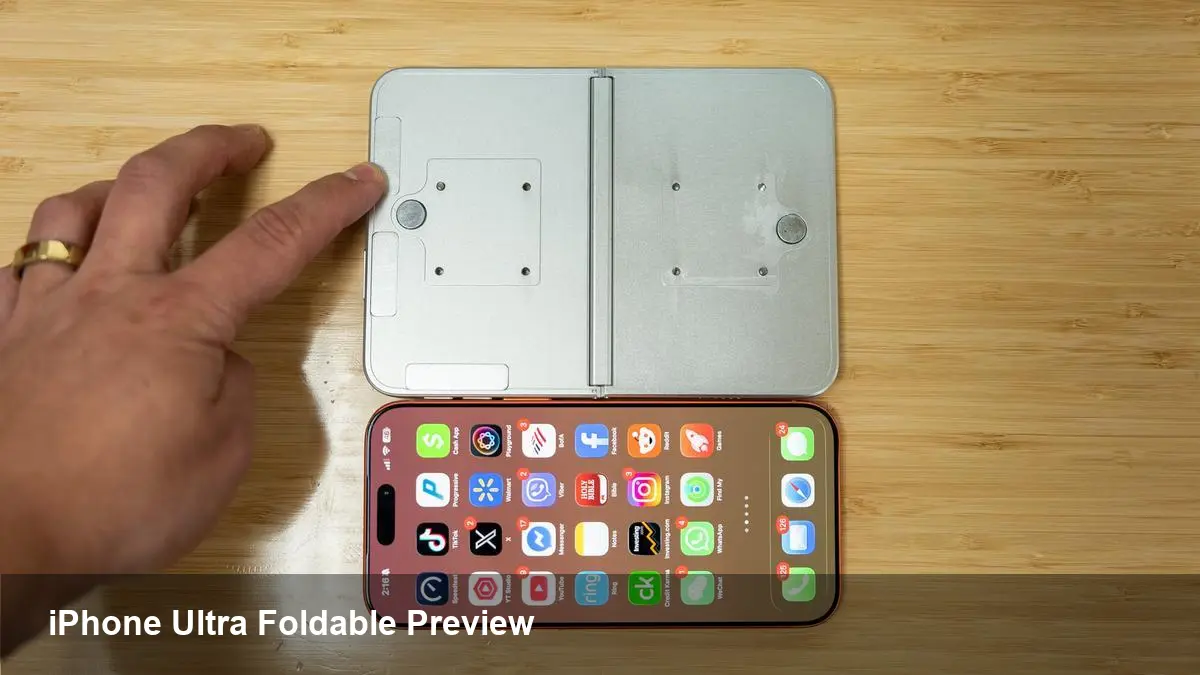
Apple has a track record of entering crowded hardware categories and redefining user expectations. The name "iPhone Ultra" has appeared in speculation as Apple’s premium experiment beyond the Pro/Pro Max tier. Recent images and video of dummy models shared online, including clips from tech channels, show a book-like folding form factor with an inner display closer to the iPad aspect ratios — signaling Apple wants more than a longer phone screen.
Across the industry, foldables have been explored by Samsung, Huawei and others for years. What’s different if Apple does it: ecosystem continuity (iOS/iPadOS), developer tooling and the company’s focus on polish and supply-chain scale.
What the hardware cues tell us
From the recent mockups and leak-driven descriptions, a few consistent cues stand out:
- The inner display uses a squarer 4:3 aspect ratio, similar to iPads, rather than the elongated 21:9 style of many smartphones. That suggests a design optimized for reading, creative tools and multi-column layouts.
- When unfolded, the inner screen approximates an iPad mini in footprint. That’s large enough for split-screen, drawing, and robust multitasking without being a full-size iPad.
- Expect an OLED panel for contrast and efficiency; Apple will likely prioritize color fidelity and HDR.
- The outer shell likely retains a usable external display for quick tasks without opening the device — an important user experience consideration.
These cues imply Apple is designing for tablet-like interactions more than just a large phone screen.
Practical scenarios where a foldable Apple device changes daily workflows
- Fast content creation: Journalists and content creators could draft longer pieces, edit photos in a near-tablet workspace, and use external or on-screen keyboard setups with fewer context switches.
- Sketching and note-taking: A 4:3 inner canvas is more natural for drawing apps and whiteboarding. If Apple supports Apple Pencil on that screen, the device becomes a compact creative tool.
- Multipurpose field device: Sales reps or consultants can show presentations on a larger screen, take notes, and handle calls from one device instead of juggling tablet and phone.
- Reading and research: A squarer aspect ratio means less cramped text columns, making long-form reading and PDF review easier on a device you can still pocket.
These are realistic gains for people who want tablet capability without carrying two devices.
What developers need to prepare for now
Apple already supports adaptive layouts across iPhone and iPad. But a foldable introduces new considerations:
- Flexible layouts: Design UI to handle aspect ratio transitions and multiple viewports — e.g., folded outer display vs. unfolded inner display. Use size classes and layout constraints aggressively.
- Continuity and state: Preserve user state across open/close events. Users expect apps to resume where they left off when they fold or unfold the device.
- Multitasking and multiwindow: Prepare for apps to be used side-by-side on a compact inner display. Optimize for split views and draggable content.
- Testing surfaces: Invest in simulators or physical test rigs that mimic the crease and mid-fold behaviors. Emulate the outer-screen to inner-screen handoff.
- Touch targets and input: Account for different touch ergonomics when the device is held as a closed phone versus open tablet; consider pencil and keyboard scenarios.
For many existing iPad apps, making the leap could be modest. For phone-first apps, it may require rethinking information density and navigation.
Business and market implications
- Pricing and positioning: If Apple brands this as "Ultra" and sets a premium price, the device may start as a niche product for power users and pros, similar to how the first iPad Pro models were positioned.
- Accessories and services: New cases, hinges, screen protectors and docking stations will emerge. Apple could bundle or promote new software features for productivity customers.
- Channel strategies: Carriers and enterprise sales teams will need to consider trade-in paths and finance offers, since a foldable will likely be at the high end of device portfolios.
Companies building SaaS or enterprise apps should start evaluating how their interfaces behave in wider, squarer viewports and whether workflows could be consolidated onto a single foldable device.
Downsides and practical limitations to watch
- Durability: Hinges, flexible screens, and long-term reliability remain open questions. Early models from other manufacturers have shown progress but not perfection.
- Weight and thickness: Packing two usable displays, a hinge and battery tends to add bulk. That undermines pocketability and could affect long-session ergonomics.
- App fragmentation: Developers must maintain multiple layouts and ensure parity of features across outer and inner screens.
- Battery life trade-offs: Driving a larger inner OLED and additional sensors can strain battery budgets unless Apple adapts the power architecture.
These are solvable, but they matter for buyer expectations and replacement cycles.
Three implications for the next few years
- Platform convergence: A successful Apple foldable would accelerate the blurring between phone and tablet app models, nudging more apps to be designed for adaptable viewports.
- New developer patterns: Foldable-aware UX patterns — reversible states, continuity across folding, and dual-screen interactions — will become part of standard design toolkits.
- Competitive ripple effects: If Apple proves a premium foldable can sell, other vendors will push on hardware and software differentiation, speeding innovation in hinges, displays and pen interaction.
Who should care most — and what they should do
- App teams: Start auditing layouts and session continuity. Prototype using existing iPad layout tooling to find edge cases.
- Creatives and power users: Wait for hands-on reviews, but plan workflows that could consolidate devices — especially if you rely on drawing, long-reading sessions or frequent multitasking.
- IT and procurement: Factor potential price premiums into refresh cycles and pilot small programs before wide rollout.
Apple’s foldable device — whether called iPhone Ultra or something else — is shaping up to be a strategic bridge between phone and tablet. If you design software or buy hardware for productivity, now is the time to rehearse the adjustments you’ll need when a pocketable, tablet-sized screen becomes available in an iPhone form factor.



