
What's New in iOS 26.4 Beta: Nine Emojis and What They Mean

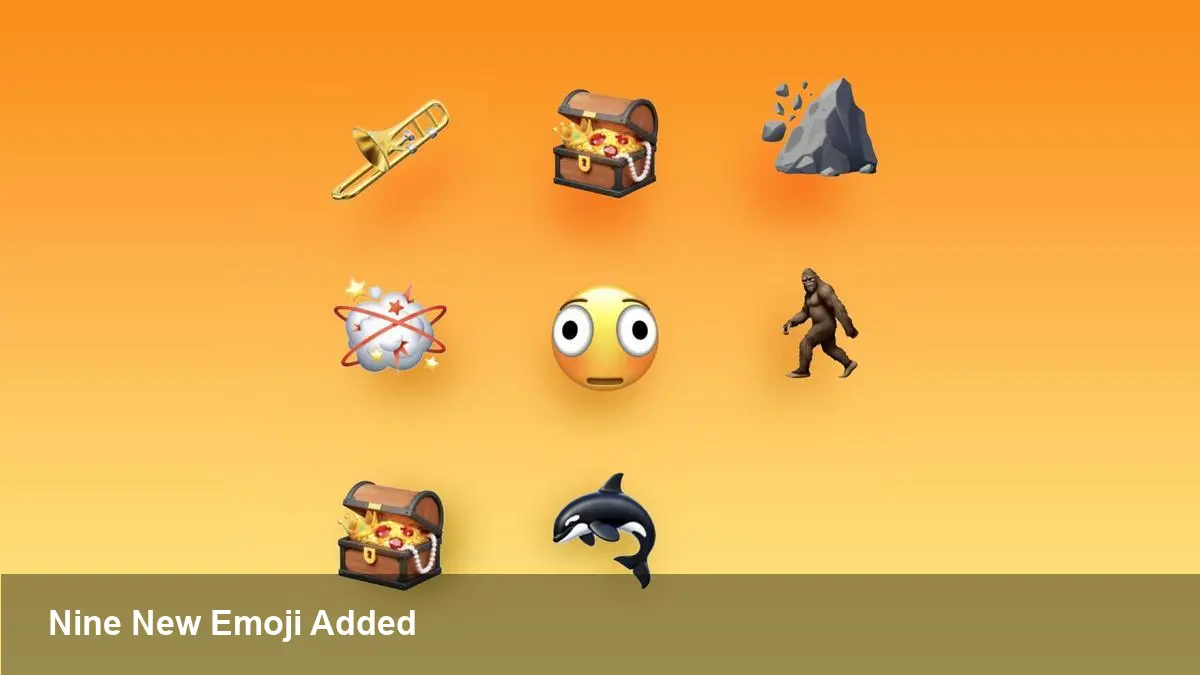
A quick look at the update
Apple's latest developer preview — the fourth beta release of iOS 26.4 (alongside iPadOS 26.4 and macOS Tahoe 26.4) — expands the emoji palette. The update adds nine distinct pictograms and several skin-tone and gender options to existing sequences, giving users and designers more expressive building blocks for conversations and interfaces.
Below I unpack what landed in the beta, why it matters beyond a few new images, and what developers and product teams should check before the public release rolls out.
What arrived in the beta
The new characters introduced in the fourth iOS 26.4 developer beta include:
- Trombone
- Treasure chest
- Distorted face
- Hairy creature (commonly associated with Bigfoot/Sasquatch)
- Fight cloud (the little cartoon thwack cloud used in comics)
- Orca
- Landslide
In addition to those standalone glyphs, Apple added new skin-tone modifiers for the people-wrestling emoji and for dancers wearing bunny ears, plus a gender-neutral option for the ballet dancer.
Why these additions matter for everyday users
Emoji are part language and part visual shorthand. Adding things like an orca or a landslide does more than pad the emoji keyboard — it lets people communicate more precisely and culturally. Practical user-level effects include:
- Niche conversations become richer: marine biologists, coastal communities, outdoor enthusiasts, and gamers can use symbols that fit their context.
- Expressive nuance: a “distorted face” offers a different tone than a generic frown; the fight cloud provides comic-style emphasis in playful messages.
- Representation and inclusivity: gender-neutral dance options and broader skin-tone support mean users can see themselves reflected in UI elements and in casual messaging.
For most people the change will be subtle — a new option in the emoji keyboard — but for communities that rely on compact visual communication, the additions can be meaningful.
Developer checklist: what to test and change
If you build apps that accept, display, or search text (social apps, chat, forums, content moderation tools, analytics platforms), this beta signals a few practical tasks:
- Rendering and font fallbacks
- Test emoji rendering on your app across the new betas. Apple supplies updated color glyphs at the system level, but apps using custom fonts, emoji images or text-rendering libraries may need updates to avoid missing-glyph boxes.
- Storage and indexing
- Verify your storage and search indices treat the new characters correctly. Some back-end encodings and legacy databases can mishandle the new sequences or skin-tone modifiers, which can break search or user profile displays.
- Input and UX
- Update any custom emoji pickers and UIs to include the new entries and modifiers. Ensure the picker’s layout and search handle composite sequences (e.g., a dancer + bunny ears + skin tone) without truncation.
- Moderation and content policies
- Add new emoji to moderation dictionaries and sentiment analysis models. An innocuous pictogram in one culture might carry different connotations elsewhere, and automated classifiers need to be aware of the expanded set.
- Push notifications & analytics
- Test how notifications display the new glyphs on different OS versions. Track emoji usage if your product uses them for engagement signals; new characters can produce spikes or change sentiment signals.
Business and product implications
- Marketing and social features: Brands can leverage fresh emoji in campaigns or stickers to feel timely and relatable. For instance, an ocean-conservation NGO might use the orca in awareness posts; a music school could adopt the trombone.
- Accessibility and localization: Adding culturally specific icons (like an orca or landslide) underscores the need to localize patterns and alt text for assistive technologies. Make sure screen readers and alt attributes describe new emoji adequately.
- Platform fragmentation: Not every platform will show the same glyph immediately. If users on older Android releases or web clients don’t have the glyph, they may see empty boxes or fallback glyphs. That affects cross-platform UX and may require fallbacks in marketing imagery and message previews.
Limitations and likely issues
- Backward compatibility: New emoji sometimes appear as blank boxes or text descriptors on older OS versions. Expect some users to see fallback text, especially if they haven't updated.
- Misinterpretation: Emoji are not always unambiguous. A distorted face or hairy creature could be used in playful, ironic, or critical contexts. Design and moderation teams should watch for unintended connotations.
- Update timing: Apple’s addition in a developer beta doesn’t guarantee the exact same set will ship in final releases or be immediately recognized by other platforms. Coordination across ecosystems is slow.
Three future implications to watch
- Emoji as UX primitives: As emoji diversify, expect designers to treat them like UI icons — short, context-rich visuals that can carry specific actions or states in conversational interfaces and microcopy.
- Growing pressure on standardization: Platform differences will increase pressure on the Unicode Consortium and vendors to harmonize releases and visual representations so cross-platform communication doesn’t break.
- Data and moderation complexity: Richer emoji sets complicate content moderation and sentiment analysis. Teams should plan for retraining models and expanding taxonomies to include new pictograms.
Practical example scenarios
- A chat app should add the new dancer and skin-tone combinations to its emoji search and ensure composite sequences are clickable and copyable.
- A music education startup can add the trombone emoji to in-app badges and push templates to make achievement notifications feel more playful and domain-specific.
- A news or weather app with community reporting might add the landslide emoji to quick-report buttons for faster, more accurate citizen reporting during events.
Apple’s fourth developer beta of iOS 26.4 is mostly a modest but meaningful enhancement to the visual vocabulary people use every day. For product teams and developers the work is less about the novelty and more about ensuring compatibility, accessibility, and sensible UX as emoji continue to evolve.



