
macOS Tahoe 26.4 Beta Brings MacBook Neo Wallpapers

A quick snapshot
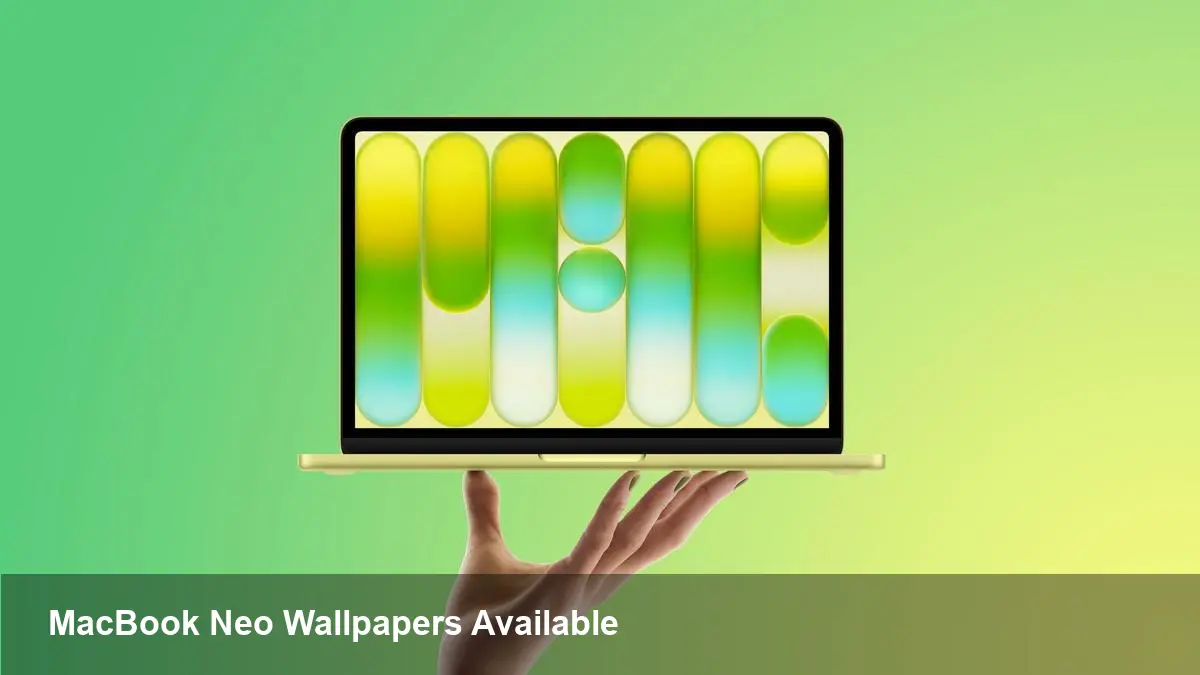
Apple has made the colorful wallpaper set introduced alongside the MacBook Neo available to any machine running the developer beta of macOS Tahoe 26.4. The pack includes four new static images—Mac Purple, Mac Blue, Mac Pink, and Mac Yellow—built from soft, bubble-like strokes and layered gradients that subtly form the letters “Mac.” If you’re running the fourth developer beta of 26.4, these assets appear in the wallpaper picker and can be applied system-wide.
Why a wallpaper update matters more than it seems
At first glance this is a cosmetic tweak. But Apple uses wallpapers as part of the product narrative: consistent color palettes and shapes make devices feel part of the same family and reinforce a launch’s visual identity. For users the immediate benefit is personalization; for designers and developers it’s an opportunity to see how new colorways behave across display types, scaling, and UI treatments.
From a business and IT perspective, wallpapers are a low-risk, high-visibility touchpoint you can use for branding or environment control. Whether you’re a creative freelancer, a product designer, or an IT admin managing hundreds of Macs, a small image change can have outsized perceptual impact.
What’s included and where it came from
The images first surfaced with Apple’s MacBook Neo announcement. They use a playful, bubble-line motif and four distinct colorways—Purple, Blue, Pink, and Yellow—that echo the MacBook Neo’s marketing colors. The designs intentionally spell out “Mac” when viewed closely, reinforcing the device name through purely visual means.
Apple has now folded those wallpapers into macOS Tahoe 26.4’s wallpaper catalog. In the current developer beta (the fourth seed of 26.4), they show up alongside Apple’s existing set of dynamic and static backgrounds.
How to try them (developer beta users)
If you have the appropriate developer beta installed, getting the wallpapers is straightforward:
- Open System Settings (or Desktop & Screen Saver on older macOS UI versions).
- Select Wallpaper or Desktop & Screen Saver.
- Browse the new collection and choose the Mac Purple, Blue, Pink, or Yellow background.
If you don’t see them immediately, check for the latest beta update or restart — new assets sometimes install alongside an OS seed and require a log-out to appear.
Practical scenarios and examples
- Designer testing: A UI designer can apply each colorway as a backdrop to validate legibility and contrast for their app’s light and dark modes. This helps catch issues where colorful wallpapers clash with translucent UI elements.
- Marketing teasers: Startups showing their app running on MacBook Neo imagery can use the official wallpaper set for product screenshots that match Apple’s launch visuals.
- Enterprise deployment: IT teams using MDM solutions such as Jamf or MobileIron can package a chosen wallpaper and push it as a locked desktop background across a fleet to maintain consistent branding in shared labs or customer kiosks.
- Accessibility QA: QA engineers can test whether the new wallpapers impact text readability in accessibility modes (increased contrast, VoiceOver focus) and whether color choices are friendly for users with common forms of color vision deficiency.
Tips for developers and admins
- Extracting the images: Beta wallpapers usually reside in /Library/Desktop Pictures or within the system bundle for wallpapers. Administrators can copy those files out for distribution.
- Packaging for MDM: Convert the PNG/JPEG images into a configuration profile or use your MDM’s wallpaper deployment feature to set and, if desired, lock the desktop background.
- Consider dark mode interplay: These new wallpapers are bright and colorful. Test app translucency, title bars, and menu contrast to ensure UI elements remain legible with the wallpaper applied.
Design and accessibility considerations
Bright, gradient-rich wallpapers can look great, but they carry potential UX trade-offs:
- Contrast: Semi-transparent UI elements (menus, notifications) can lose contrast against busy backgrounds. Designers should verify system text, controls, and app chrome remain readable.
- Color blindness: Yellow and pink palettes can be problematic for certain color vision deficiencies. If accessibility is a priority, provide alternative high-contrast wallpapers in managed environments.
- Eye strain and night use: Saturated backgrounds can be tiring over long sessions, especially for users working late. Encouraging users to try darker or desaturated variants can improve comfort.
What this signals about Apple’s direction
- Cohesive hardware-software skins: Apple continues to treat wallpaper design as part of a broader device identity. Expect future launches to include tailored desktop art that echoes device finishes and marketing colors.
- Greater consistency across devices: Making device-specific wallpapers available to all Macs running the same macOS creates a unified look across old and new hardware, reducing visual friction for developers and creators who work across multiple machines.
- Small culture wins matter: Little touches—wallpapers, soundscapes, launch animations—are inexpensive to ship but help Apple define a product’s personality. Competitors and app makers will continue to borrow this playbook by aligning visual assets with hardware narratives.
What to watch next
This update is primarily aesthetic, but keep an eye on whether Apple pairs future wallpaper releases with dynamic or adaptive behaviors (time-of-day variants, wallpaper APIs for third parties, or system-level animation controls). Those additions would create new hooks for developers and businesses to customize user experiences in a more contextual way.
If you’re running the developer beta, try the new MacBook Neo wallpapers and use them as a low-effort way to test UI contrast, strengthen marketing imagery, or unify a shared fleet. For everyone else, these visuals will likely arrive in a public seed of macOS Tahoe 26.4 later in the beta cycle.



