Streamlined Location Sharing in Google Maps: What Changes and Why It Matters

Why this small change is meaningful
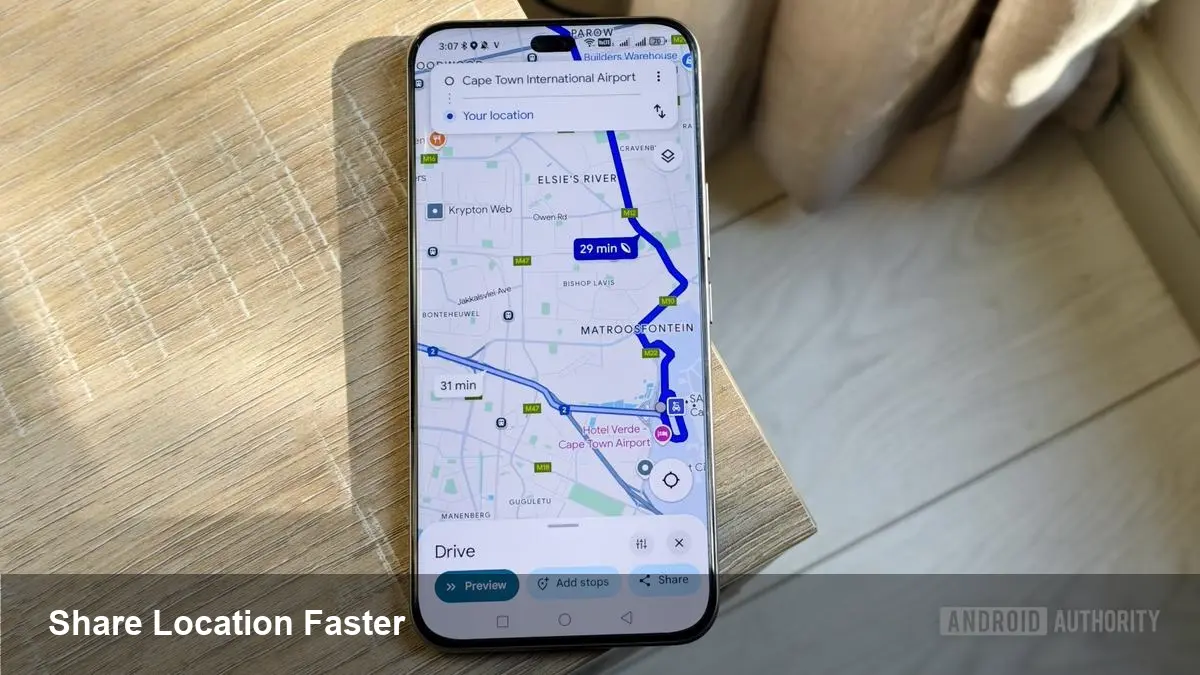
Google is testing an update to Google Maps that reduces friction when you share your current location. At first glance it’s a minor UI tweak: fewer taps and a simpler flow. In practice, though, shaving off a step in a ubiquitous app like Maps affects how quickly people coordinate, how businesses use location links, and how developers think about location-based workflows.
This article explains what the change means, shows practical examples for everyday users and businesses, and highlights privacy and integration considerations to keep in mind.
Quick background: Google Maps location sharing
Google Maps has offered the ability to share your real-time location for years. The feature lets users broadcast their live location to specific contacts for a chosen duration, or send a one-time snapshot link. That capability has been useful for meeting friends, coordinating rides, tracking deliveries, and handling logistics for field teams.
Because Maps sits at the center of navigation, communications, and local discovery, even small refinements to how sharing is invoked can have outsized effects on usability.
What the test changes (in plain terms)
In the current test, Google is simplifying the steps required to create and share a current-location link. Previously you might have had to tap a place or your blue-dot, choose a share option, then confirm or copy a link before pasting into a messaging app. The updated flow reduces or removes that intermediary confirmation/copy step, letting you pick a contact or app and send your live location more directly.
Important caveat: this is a live experiment in limited builds and may change as Google evaluates feedback. Expect a staged rollout (A/B tests, beta channels) rather than an immediate global release.
Everyday scenarios where this helps
- Meeting a friend in a busy neighborhood: Instead of fumbling between apps to copy and paste a location link, you tap a contact in Maps and they immediately receive your real-time position. Faster sharing reduces the chance they wander off while you finish the workflow.
- Carpooling or pickup logistics: Parents coordinating school pick-ups or colleagues meeting at an event can start sharing their ETA and live location with a single flow, reducing status messages like “I’m five minutes away.”
- Solo runners or cyclists: When out for exercise, sending live location quickly to a family member can feel more natural and less intrusive — you don’t need to stop to perform extra steps.
- Small businesses and local services: Independent couriers, mobile service providers, and food vendors can more easily broadcast a one-time live link to customers so they can track an approaching vehicle.
How it changes developer and product thinking
- Design for fewer taps: If users grow accustomed to a leaner UI in Maps, other apps that rely on location sharing will face higher usability expectations. Developers building ride-hailing, delivery, or meetup apps should streamline their own share flows to match.
- Deep-link and intent handling: Apps that accept location links (messaging, scheduling, CRM) should ensure incoming location links open smoothly and preserve context (ETA, accuracy, expiration). Expect growth in usage of Maps-generated share links.
- Privacy-first integrations: As sharing becomes easier, developers must consider time limits, explicit consent screens, and easy revocation mechanisms in their apps’ location features.
Privacy and safety considerations
A faster sharing flow is convenient — but convenience can increase accidental sharing. Here are practical privacy questions to watch for:
- Confirmation vs. speed: Does the new flow still show you which contact will receive the link and how long location access lasts, or does it send immediately? Good design balances immediacy with a clear confirmation step.
- Defaults and durations: Time-limited sharing (e.g., 1 hour, until turned off) should remain the default for real-time broadcasts. Persistent sharing should require an explicit opt-in.
- Visibility of precision: Users need control over whether to share precise GPS coordinates or an approximate area. Apps should make this distinction visible and reversible.
- Link security: One-time tokens, automatic expiry, and revocation are important for preventing stale shared links from being abused.
Limitations and potential snags
- Platform inconsistency: A streamlined flow on Android might not appear the same on iOS or web immediately, leading to confusion across devices.
- Integration gaps: Not every messaging or social app will handle Maps links the same way. Some might preview the exact location; others may only show a link.
- False sense of safety: Faster sharing can encourage users to broadcast location in circumstances where they’d prefer privacy. Education and default protections are essential.
Practical recommendations for users and small teams
- Review sharing defaults: Check your Maps settings to confirm how long location sharing lasts and who can request access.
- Use time-limited shares: For personal safety or ad-hoc meetups, prefer ephemeral sharing windows instead of indefinite broadcasts.
- Test how recipients see your link: Send test shares to different messaging apps you use to confirm how maps links render.
- For businesses: If you rely on location links for deliveries or service visits, document the customer experience and ensure staff know how to revoke shares if needed.
Two future implications worth watching
1) Normalizing location-as-first-class communication: If Maps and other platforms make quick location sharing standard, developers will find new, lightweight patterns for coordinating meetups — for example, calendar invites that include optional live location pins or real-time location snippets embedded inside chat threads.
2) Increased demand for privacy controls and verification: As live links propagate more easily, there will be pressure for more granular controls (approximate vs exact, per-contact defaults) and better verification (proving a shared link is still controlled by the sender).
Practical next steps
If you’re a user, keep an eye on your Maps app for beta or staged updates and review your sharing settings. If you build apps that consume location links, run usability tests to ensure your consumers receive and interpret Maps links correctly.
Friction in everyday tools is often invisible until it’s removed. This Maps experiment is a quiet reminder that interface tiny wins can translate to real-world time saved — and new responsibilities for privacy and design.