
Snapseed's New iPhone Camera: Manual Controls and Film Looks

Why this matters now
Snapseed, Google's long-standing image editor, just turned the tables on the single-purpose photo app model by adding a built-in camera to its iPhone release. For creators and pro hobbyists who already rely on Snapseed's editing toolkit, this removes one of the most frictional steps in mobile photography: switching between capture and edit. The result is a more contiguous workflow from raw capture to finished image.
A quick look at the product background
Snapseed began as a highly regarded mobile photo editor, acquired by Google years ago and loved for precise tools like selective adjustments and filmic filters. The app's reputation has been that of a powerful, user-friendly editor rather than a camera replacement. With the new camera module for iPhone, Snapseed is repositioning itself as an all-in-one photo solution—capture, process and stylize—inside a single app.
What the new camera brings to the table
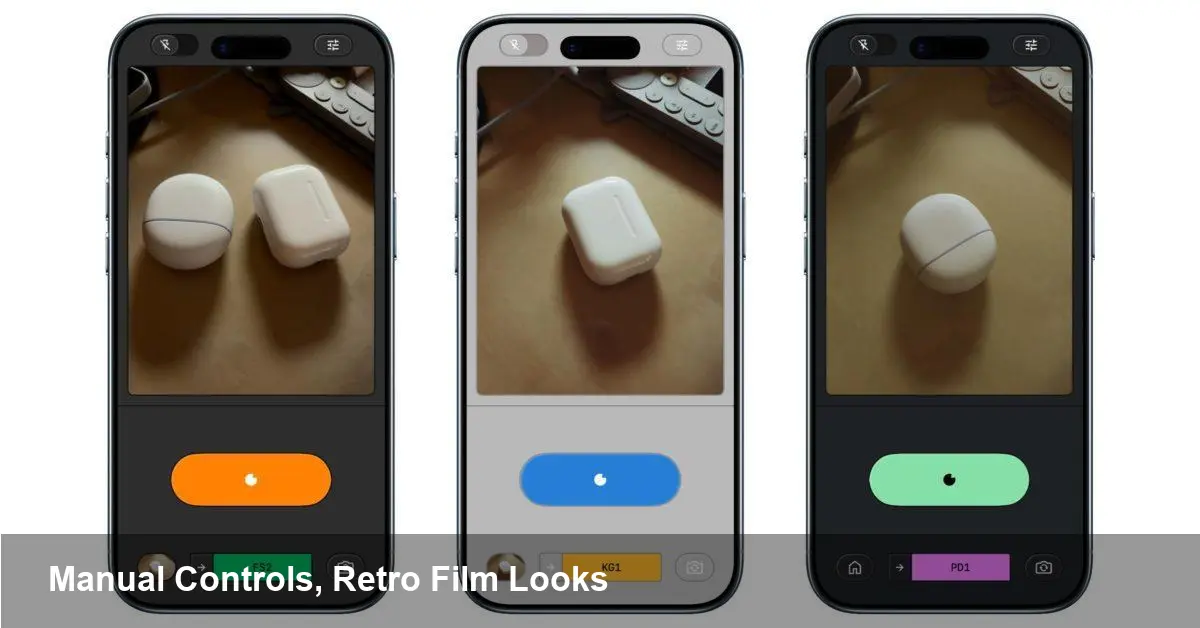
The updated Snapseed camera focuses on two things: giving users more control over image capture, and offering in-camera stylistic options that match the editor's aesthetic.
- Manual controls: The camera exposes typical pro parameters such as ISO, shutter speed, white balance and manual focus. For photographers used to DSLRs or advanced mirrorless features, these controls make it possible to lock exposure or freeze/blur motion before import.
- RAW capture and higher-fidelity files: Snapseed supports RAW (DNG) capture on compatible iPhones, preserving more highlight and shadow detail for deeper edits in the app.
- Film-inspired looks in-camera: Rather than relying solely on post-capture filters, the camera offers vintage/film-style presets so you can preview stylized results while shooting.
- Live histogram and exposure feedback: Visual tools like histograms, focus peaking or exposure indicators help photographers make technically sound captures on the phone.
Taken together, these additions convert Snapseed from a finishing tool into a capture-first workflow partner.
How this changes everyday workflows (three scenarios)
1) Travel photographer on a tight schedule Imagine you're traveling and want to minimize app-swapping. Open Snapseed, compose a RAW shot, tweak shutter speed to capture a waterfall blur, and apply a muted film preset before saving. There's no need to bounce between camera, Files, and an editor—everything happens inside one interface.
2) Social creative preparing a grid A content creator shooting a series of product or flat-lay images can now match white balance and exposure across shots at capture time, then apply a consistent film look in-camera. That reduces post-editing time and keeps a consistent aesthetic.
3) Enthusiast learning manual exposure For photographers transitioning from automatic phone modes to manual photography, Snapseed's in-app controls provide a low-cost sandbox. You can experiment with ISO and shutter speeds, then immediately see how those decisions affect edits downstream.
What this means for developers and competing apps
Snapseed’s expansion highlights a broader trend: app makers are converging capture and editing functionality. That has a few implications:
- Increased competition for specialized camera apps: Players like Halide and ProCamera have positioned themselves around capture excellence. With Snapseed adding pro controls and film previews, niche camera apps may need to further differentiate via unique computational photography tricks, UX polish, or subscription services.
- Opportunity for integration with platform APIs: Developers building photo-driven apps should revisit platform photo APIs (e.g., Apple’s PhotoKit and AVFoundation) and their own import/export pipelines. Smooth raw file handling and metadata fidelity become more important as capture-to-edit workflows consolidate.
- UX expectations rise: Users will expect editing conveniences (non-destructive edits, version history, export presets) combined with reliable capture interfaces. That puts pressure on smaller teams to either specialize or expand.
Business and creator implications
For individual creators and agencies, the main benefit is speed. A single app means faster turnaround for social posts, tighter control over brand aesthetics, and fewer compatibility issues when moving between devices.
For Google and Snapseed specifically, embedding a camera deepens user engagement. The longer someone spends in the app capturing and refining images, the greater the opportunity for upsells (if any), data-driven feature improvements, and stronger brand loyalty.
However, there are trade-offs. Consolidation inside one app can make it harder for third-party plugin ecosystems to flourish. Also, power users who rely on highly specialized capture features may still prefer dedicated camera apps.
Practical tips for getting the most out of Snapseed's camera
- Start in RAW when you plan heavy edits—this preserves detail and gives more latitude in recovery.
- Use manual white balance to speed up consistent color across a shoot; you’ll spend less time color-correcting in post.
- Preview film presets while framing; if a look depends on exposure or shadow detail, you can adjust capture settings before you shoot.
- Learn to read the histogram—it’s the quickest way to avoid clipped highlights or crushed shadows when shooting in variable light.
A few constraints to watch
No app rewrite is perfect. Expect limitations such as device-dependent feature availability (older iPhones will lack full RAW support or some low-level camera controls). Also, integrating a camera increases app complexity; there may be a learning curve for users who only knew Snapseed as an editor.
Privacy and permissions matter too: apps that handle live capture will request camera and microphone access, and developers should be mindful of how captured image data is stored and whether uploads occur by default.
What comes next
Snapseed’s move signals that the line between capture and edit will continue to blur. We can expect several likely outcomes:
- More photo-editing apps will add camera modules to keep users inside their ecosystems.
- Advanced, AI-driven capture aids—scene-aware exposure suggestions, automated bracketing for HDR—could soon appear inside editing apps.
- Competition may push innovation on mobile RAW workflows and color management, improving the technical quality of smartphone photography overall.
If you already use Snapseed as your go-to editor, give the new camera a spin on iPhone to see how it fits your workflow. For photographers who prize consistency and convenience, the trade-off of consolidating capture and edit in a single app can be a real productivity win.



