MacBook Neo vs Windows 11: Parallels, A18 Pro and gaming

Why this experiment matters
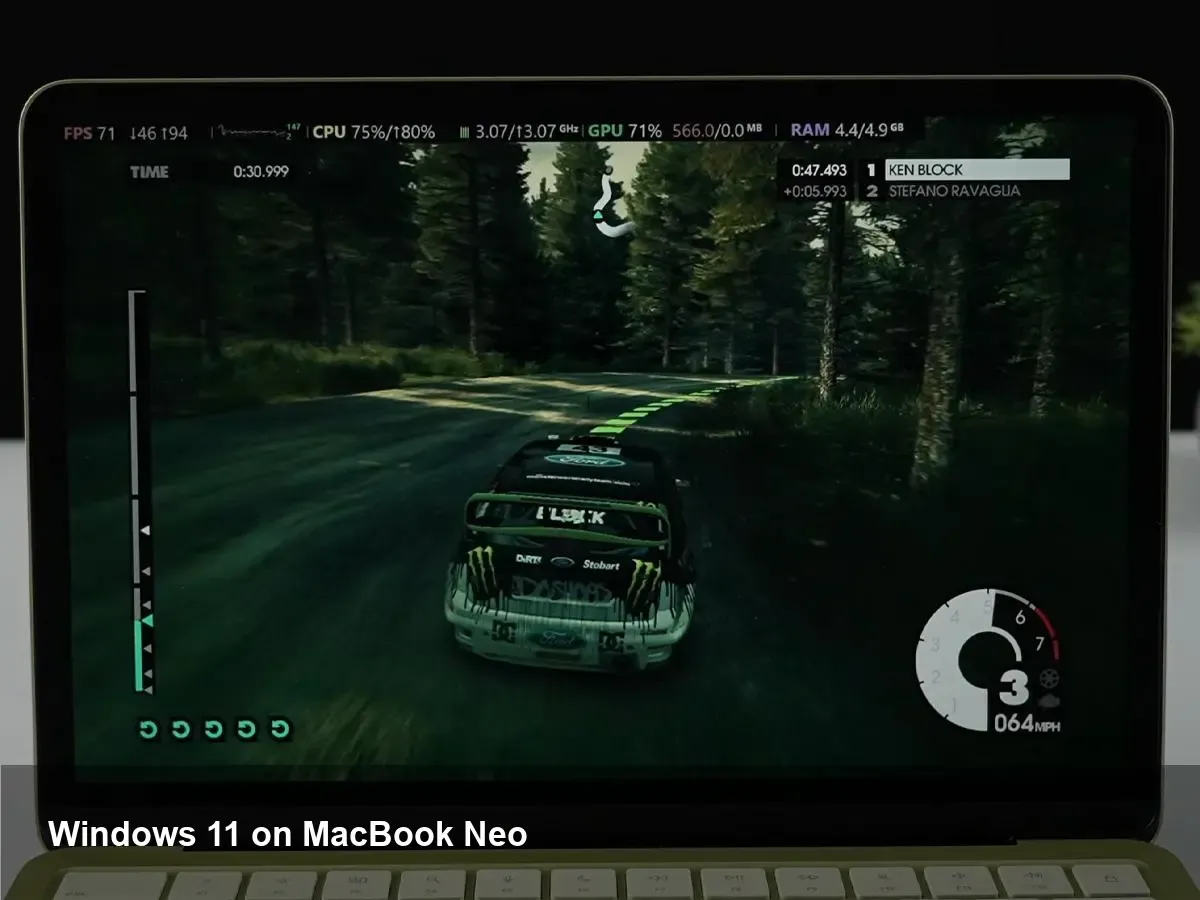
Apple’s move to its own silicon reshaped what macOS machines can do, but it also broke the old Boot Camp path for running Windows natively. Parallels Desktop has been filling that gap by virtualizing Windows on Apple silicon for users who need a Windows environment. A recent hands-on test running Windows 11 on the MacBook Neo with the Apple A18 Pro under Parallels caught attention because it demonstrated surprisingly capable 3D hardware acceleration — and that has practical implications for both gamers and developers.
This article walks through what’s happening under the hood, what kinds of games and apps currently work well, real-world scenarios where this setup makes sense, and the trade-offs you should be aware of.
How Parallels virtualizes Windows on Apple silicon
On Intel Macs, running Windows via Boot Camp used native x86 execution. On Apple silicon the story is different: processors are ARM-based, so running Windows requires either an ARM build of Windows or translation. Parallels Desktop virtualizes an ARM version of Windows 11 or an ARM-enabled preview of Windows. The virtualization layer exposes virtual hardware and, crucially, offers a graphics path that translates DirectX calls into Apple’s Metal API so GPU workloads can run on the A18 Pro’s GPU.
That translation layer is where most of the modern magic happens. Parallels provides a driver stack inside the VM that accepts DirectX 11 (and some DirectX 12 via translation) and maps it to Metal. Because the A18 Pro is a modern mobile SoC with a strong integrated GPU, this approach can yield surprisingly smooth results for many titles — especially those that aren’t pushing ray tracing or the latest DirectX 12-only features.
What the gaming tests showed (practical summary)
Hands-on tests showed that a selection of Windows games could run at playable frame rates with 3D acceleration enabled. Expectations should be calibrated: this setup won’t replace a desktop gaming PC for AAA maxed-out settings. But the MacBook Neo/A18 Pro combo virtualized via Parallels handled a mix of older and mid-range PC titles quite well.
Typical outcomes you can expect:
- Older or well-optimized titles (e.g., e-sports, indie games) are likely to be smooth at medium settings.
- Heavily GPU-bound triple-A games may run, but with reduced settings and frame-rate targets.
- Features that depend on specialized drivers (advanced anti-cheat, some VR runtimes, DirectX 12 feature level 12_2 or vendor-specific extensions) may fail or be unsupported.
The practical takeaway: casual gaming, testing, and running non-proprietary Windows applications that depend on 3D APIs are all viable on a MacBook Neo via Parallels, as long as you manage expectations about top-end performance.
Concrete scenarios where this helps
- Developer cross-testing: Mobile and desktop developers who need to verify Windows-specific graphical behavior (UI rendering, DirectX output) can use Parallels to check builds without a separate Windows PC.
- Game dev prototyping: Small teams can rapidly iterate on Windows builds on a single MacBook Neo without switching hardware.
- University and student use: Students who need Windows-only engineering or graphics tools can use the VM for classwork and light projects.
- Travel-friendly gaming: If you want to play a Windows-only title on the road without a gaming laptop, the MacBook Neo in Parallels can be a practical compromise.
Important limitations and gotchas
- Windows licensing: Running Windows on ARM requires an appropriate Windows license. Microsoft’s licensing for Windows on ARM and virtualized instances can be nuanced — check terms.
- Anti-cheat and DRM: Many games with aggressive anti-cheat or DRM systems will not run in virtualized environments or lack supported drivers. Competitive online titles may block play.
- DirectX coverage: While Parallels’ translation covers a lot, not all DirectX 12 features or vendor-specific extensions are available. High-end graphics effects and ray tracing support are limited.
- Peripheral and driver support: Some hardware — USB peripherals, gamepads, specialized input devices — may need extra configuration or fail to passthrough perfectly.
- Throttling and battery life: The MacBook Neo is powerful, but sustained heavy GPU/CPU loads will hit thermals and battery life. Expect fan noise and dropped performance if thermal limits are reached.
- No eGPU support on Apple silicon: You can’t attach an external GPU the same way you might on older Intel Macs, so you are limited to the internal A18 Pro GPU.
Tips for getting the best experience
- Use the ARM build of Windows 11 supplied or recommended by Parallels for best compatibility.
- Allocate enough vCPU and RAM in Parallels’ settings, but leave headroom for macOS — don’t starve the host OS.
- Enable 3D acceleration in the VM configuration and install Parallels Tools inside Windows for driver integration.
- Choose medium graphics presets in games and test resolution scaling before maxing textures.
- If you need maximum stability for online competitive titles, use a native Windows PC — virtualization may introduce incompatibilities.
What this means for the future
1) Windows-on-ARM is gaining real, practical ground. As ARM-based PCs and SoCs improve and Parallels (and similar layers) refine translations to Metal, more Windows software will become usable on Apple silicon without recompilation.
2) Game developers should expect growing demand to test ARM-targeted deployments and translation-layer behavior. This could push studios to ensure broader API compatibility or offer native ARM builds.
3) Virtualization as a bridge will stay relevant. For many users — students, developers, business users — a single machine that can run macOS and a functional Windows VM reduces hardware costs and simplifies workflows.
If you own a MacBook Neo and occasionally need Windows apps or want to try some PC gaming without another machine, Parallels is a strong option. Just plan for the limits, tune your VM settings, and treat it as a highly capable convenience rather than a full replacement for a dedicated gaming rig.