Google Messages' RCS Mentions and Trash Folder Explained

What landed in Google Messages
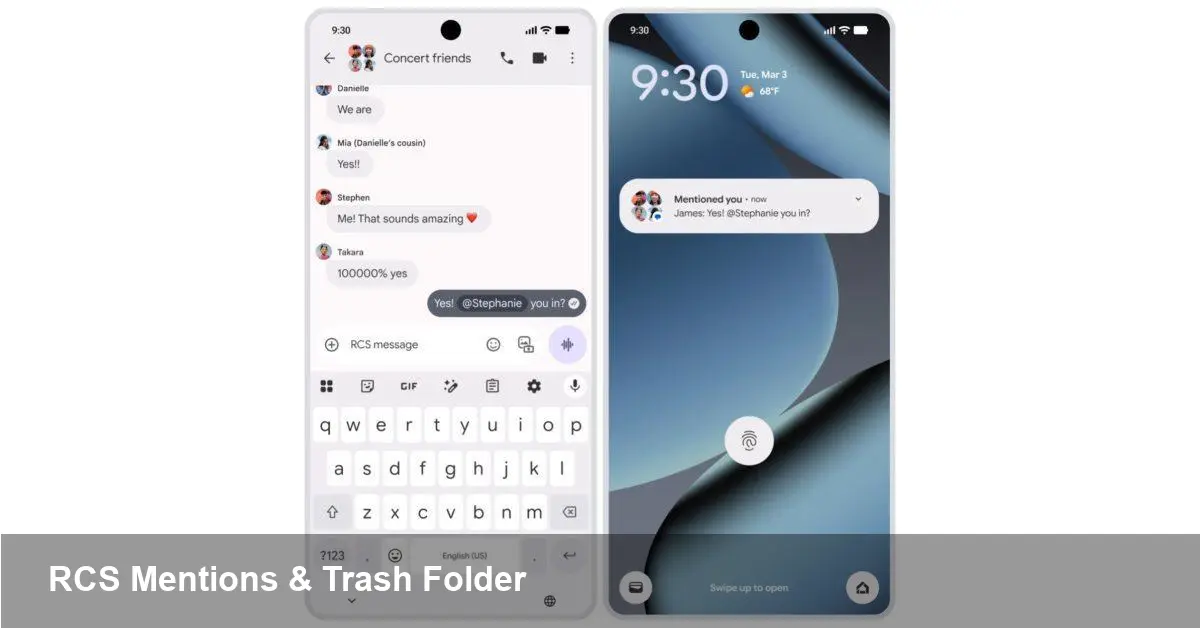
Google rolled out two user-facing features to its Messages app: RCS-powered Mentions in group conversations and a dedicated Trash folder for deleted messages. These additions finished a period of beta testing and are now available broadly to Android users running the Google Messages client with RCS enabled.
Both features are modest on the surface but significant for day-to-day messaging. Mentions give you a straightforward way to call attention to a single participant inside a busy group thread. The Trash folder provides a safety net when a message, photo, or link was removed prematurely.
Quick background: RCS and why it matters
Rich Communication Services (RCS) is the successor to traditional SMS/MMS. It brings modern chat features — read receipts, typing indicators, higher-quality media, and group chat improvements — to the native messaging layer on Android. Google Messages is one of the biggest clients that implements RCS, either via carrier support or Google’s own network fallback. Because these new features are built on RCS, they behave differently depending on whether a conversation uses RCS or falls back to SMS/MMS.
That context matters: some participants in a thread may see the new behaviors, while others won’t if their device or carrier doesn’t support RCS.
How Mentions change group conversations
The Mentions feature works like mentions in many chat apps: you type an @ and select someone in the group to address them directly. The practical benefits:
- Reduced ambiguity: In multi-person threads where messages cross, an @mention signals clearly who you’re addressing.
- Notification targeting: Mentions can trigger targeted notifications so users don’t have to scroll through every message to find when they’re being asked something.
- Smoother coordination: For teams, family planning, or event groups, mentions help surface requests and action items.
Real-world example: imagine a parent group coordinating pickup times for kids. Instead of writing “Does anyone pick up Luke?” in a long thread, you can write “@Sasha, can you pick up Luke today?” The targeted nature of the mention helps Sasha see the message quickly and respond.
Caveat: mentions rely on RCS features. If any participants in the same group are connected via SMS or a non-RCS client, the mention may not render or trigger the same targeted notification for them.
How the Trash folder improves message recovery
The Trash folder is a simple but useful addition: deleted messages aren’t immediately lost forever. Instead, they’re moved to a temporary recovery area where you can restore or permanently delete them. This protects against accidental deletions — particularly for attachments like photos or important links.
Typical scenarios where this helps:
- Restoring a photo you deleted by mistake after a group chat photo dump.
- Recovering a link or address someone removed while cleaning up the thread.
- Reinstating a message needed for a later reference or conversation audit.
Google’s implementation places deleted items into the Trash before final removal. The specifics around retention windows and whether Trash content is included in device backups can vary by Android version and account settings, so check your Messages settings to see how long items are kept and how they sync with Google backups.
Product and developer implications
These features matter beyond the surface UX. For product managers, designers, and developers building messaging experiences or integrating with RCS Business Messaging, there are a few implications:
- Expectations of parity: Users already compare Messages to apps like WhatsApp, Slack, or Telegram. Mentions reduce a gap in group management features, but businesses should still expect differences in behavior depending on RCS availability.
- Notification control: Mentions change how users expect notifications to work. App teams should ensure mention notifications are configurable and don’t bypass Do Not Disturb inappropriately.
- Data lifecycle and compliance: Trash introduces a new short-term data retention state. If your service profiles or syncs message metadata, consider whether deleted messages in Trash should appear in analytics or logs. For companies with compliance requirements, the presence of a Trash folder may require policy updates.
For developers integrating with Android’s messaging flows or building companion apps, it’s worth testing flows with mixed RCS/SMS participants and ensuring your UI handles missing mention metadata gracefully.
Limitations and interoperability
RCS is not yet universal. That means:
- Mentions may not appear for everyone in heterogeneous groups that include non-RCS recipients.
- The Trash behavior is client-side. If another client or carrier removes a message remotely, your local Trash may not capture it.
- End-to-end encryption and mention metadata: depending on the encryption state and client implementations, some metadata may be visible only to RCS-capable participants.
If your workflows depend on guaranteed delivery or consistent rendering across devices, messaging through a dedicated collaboration app or encrypted enterprise platform remains the more predictable choice.
Practical tips for users and teams
- Turn on RCS: To get full benefit, make sure RCS features are enabled in Google Messages (Settings > Chat features). If your carrier doesn’t provide RCS, Google’s fallback option may still supply the functionality.
- Check Trash settings: Look at how long deleted items are retained and whether they’re included in backups so you don’t run into surprises when restoring.
- Use mentions sparingly: In large groups, too many mentions can be disruptive. Reserve @ for direct requests or actions that need attention.
- Test mixed groups: If you coordinate with users on older phones or iPhones, test how mentions look for them. Where guaranteed behavior is required, use a dedicated app.
What this signals for the future
1) RCS feature parity will continue to grow. Google appears focused on closing gaps between native Android messaging and modern chat apps, which benefits casual users and small teams.
2) Expect more message lifecycle features. Trash is a natural next step; we may see scheduled message deletion, message pinning, or more granular moderation controls in group chats.
3) Interoperability and privacy remain open issues. Wider carrier adoption and standardized behavior across clients are needed before RCS features behave identically in every conversation.
For most Android users, Mentions and Trash make Google Messages feel more like a modern chat app while keeping conversations in the phone’s native messaging environment. That’s a small but meaningful shift for coordination, recovery, and day-to-day communication on mobile devices.