3 Habit-Tracking Apps That Actually Stick This Year

• Key Takeaways:
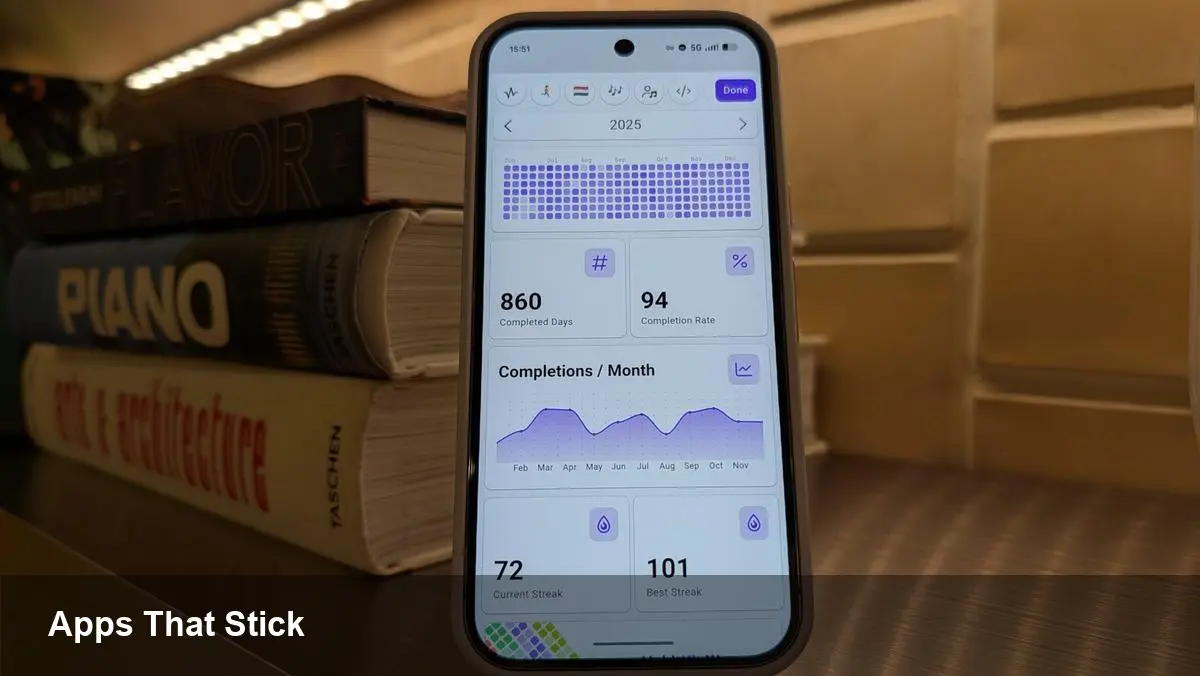
- HabitKit uses a GitHub-style contribution grid and analytics for clear visual progress tracking.
- Finch gamifies self-care with a digital pet that grows as you complete healthy habits.
- Google Calendar + Tasks offers cross-device scheduling but requires manual discipline for progress metrics.
Why the right app matters
Picking a habit or goal-tracking app is less about features and more about fit. Some people need simple visual cues and analytics to stay motivated, while others respond better to gamification or calendar-based scheduling.
HabitKit: clean visuals and solid analytics
What it does
HabitKit presents each habit as a contribution-style grid where each square represents a day. Color intensity reflects how many completions you logged, giving a fast, year-long view of momentum.
Why it works
The interface reduces friction: add a habit, pick a color and icon, set daily targets, and you’re tracking. Built-in analytics reveal long-term trends so small daily wins feel meaningful.
Practical tip
Place HabitKit’s widget on your home screen to make progress visible without opening the app. HabitKit is available for Android and iOS.
Finch: gamified self-care that motivates
What it does
Finch turns habit-building into a pet-care game. Your digital companion improves as you complete real-life routines like hydration, breathing breaks, or short walks.
Why it works
Gamification reduces resistance. Finch emphasizes low-pressure, wellness-focused habits rather than productivity metrics, making it easier to sustain emotionally driven goals.
Practical tip
Customize your pet and invite friends for light accountability. Use Finch for mental-health and self-care routines you want to make automatic.
Google Calendar + Tasks: simple, everywhere access
What it does
Built-in Tasks inside Google Calendar lets you schedule recurring habits and see them in your daily timeline across mobile and desktop.
Why it works
Accessibility is the main benefit: every device that supports Google services shows your scheduled habits. Integrating habits with your calendar turns intentions into planned events.
Practical tip
Create a dedicated Tasks list for habits and set repeat rules. Expect to trade off analytics and streak indicators for the convenience of cross-device availability.
How to choose
Decide whether you need visual analytics (HabitKit), playful nudges (Finch), or cross-device scheduling (Google Calendar/Tasks). Try one consistently for several months before switching — habit formation takes time.
Find the app that complements your workflow, and stick with it long enough to see real change.