Nvidia DLSS 5: Performance Leap, Creative Trade-offs

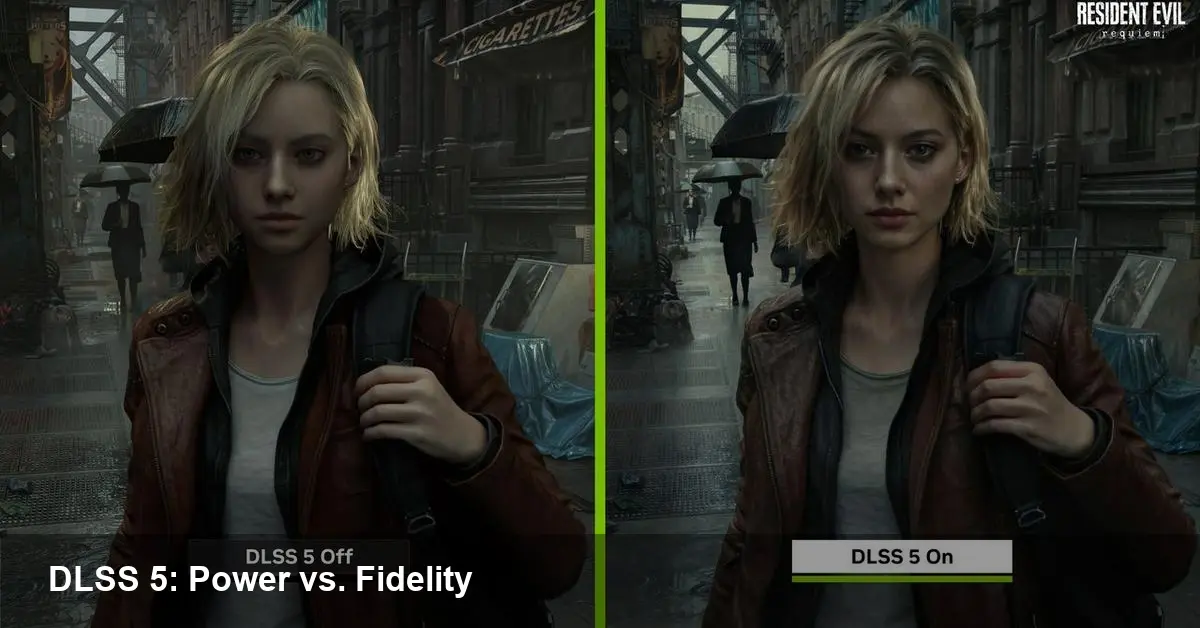
What DLSS 5 changed — and why it matters
Nvidia's latest leap in image reconstruction, DLSS 5, pushes AI from conservative upscaling toward more aggressive neural reconstruction. Instead of only sharpening or filling in missing pixels, the system can synthesize fine detail based on learned priors. That gives big performance wins — but also creates visible changes in texture, facial detail, and motion that some players call "uncanny."
For studios and engine teams, DLSS 5 isn't just an optional performance toggle. It touches art direction, QA workflows, and how games are marketed. Below I unpack what the technology does, show practical scenarios, and give tactical steps for teams and players.
A quick history for context
Nvidia's DLSS family has been an iterative attempt to let games run faster at high resolution by using machine learning to reconstruct frames. Earlier versions focused on improving frame rates while preserving fidelity; recent iterations added frame generation and more ambitious reconstruction capabilities. DLSS 5 is the most assertive step yet — trading conservative accuracy for larger efficiency gains and the ability to synthesize plausible detail rather than strictly reconstruct existing pixels.
That technical choice is the heart of the debate: synthesize aggressively and get bigger frame-per-second improvements, or be cautious and preserve every artist-coded pixel.
Typical developer and studio scenarios
- Indie studio on a tight budget: They can target a mid-range GPU, then use DLSS 5 to deliver a 4K experience on consumer rigs. But characters and close-up assets might look "off" compared with hand-tuned shaders, requiring extra art and QA cycles to compensate.
- AAA studio with cinematic scenes: DLSS 5 can save mountains of render time in cutscenes, yet those same cutscenes are where players notice subtle facial or lighting differences. Teams may choose to render critical cinematics natively and use DLSS 5 in gameplay.
- Multiplayer or competitive games: Predictability and responsiveness are paramount. Any temporal instability or artifacting from upscaling can be distracting or disadvantageous, so competitive titles tend to be conservative or provide explicit opt-outs.
- Cloud streaming providers: The performance gains are attractive because they reduce server GPU costs and raise density. But providers must balance the risk of user backlash if perceived image quality dips.
Practical integration guidance for engineers
If you’re evaluating or integrating DLSS 5, here are practical steps to reduce risk and keep players happy:
- Offer granular user controls. Let players choose from multiple reconstruction presets (quality, balanced, performance) and allow a full off toggle. Transparency builds trust.
- Treat faces and UI as special cases. Bake critical cinematic renders or UI elements natively where fidelity matters most. Provide engine-level flags so artists can mark assets that should bypass reconstruction.
- Strengthen QA around motion and temporal stability. DLSS-style temporal methods rely on motion vectors and history buffers; mismatches show up as ghosting or micro-flicker. Add automated visual regression tests that compare native frames to upscaled output.
- Use artistic masking. Small post-process tweaks — subtle film grain, tuned depth-of-field, or slight chromatic adjustments — can mask artefacts without compromising the performance benefits.
- Collaborate with upstream vendors. Work closely with Nvidia’s SDK and drivers, and allocate time to handle platform-specific quirks and future updates.
What players should know
If you’re a PC gamer seeing unsettling results when DLSS 5 is enabled, try these quick fixes:
- Toggle the quality preset. Lower performance settings often produce fewer synth artifacts.
- Turn off DLSS for cutscenes or close-ups where detail matters; keep it on for fast-paced gameplay.
- Provide feedback. Game studios pay attention to consistent reports of artifacts; detailed bug reports with screenshots or capture clips help.
Studios that communicate clearly about where and how DLSS 5 is used tend to suffer less user backlash.
Business implications and wider impact
DLSS 5 accelerates a broader industry trend: software increasingly replaces brute GPU horsepower. That has several business implications:
- Lower hardware requirements open games to a wider audience and might slow upgrade cycles for consumers.
- Cloud and subscription services benefit from lower GPU-per-stream costs, shifting economics in favor of streaming platforms.
- Game budgets will shift: some art and rendering costs drop, but QA and engineering time to integrate and tune AI reconstructions will increase.
There are also less tangible effects. We may see changes in how studios think about visual authenticity; when an AI can plausibly invent detail, art direction becomes a negotiation between the creative team and the reconstruction model.
Risks, responsibilities, and future signals
Three future-facing observations to keep in mind:
- Standards for fidelity and provenance will matter. As AI-generated pixels become common, players and creators will ask for clarity about what was artist-authored and what was synthesized.
- New tooling and QA processes will emerge. Expect middleware and asset-pipeline plugins that let artists mark "do not synthesize" regions and automated tests that validate temporal consistency across hardware.
- Hardware-design shifts continue. If aggressive reconstruction becomes mainstream, GPU vendors will prioritize specialized AI hardware and memory architectures optimized for neural upscaling workloads.
As with many transitions, the initial reaction is divided: some players dislike DLSS 5’s aesthetic choices, while many engineers and studios recognize the practical gains. The productive response is pragmatic — treat DLSS 5 as a powerful tool that requires careful application rather than a one-click solution.
If you’re shipping or playing a title today, the best advice is to test broadly, be explicit with players about where AI reconstruction is used, and keep control mechanisms in the UI. The technology will mature, but the teams that manage the artistic and technical trade-offs now will set the tone for how upscaling feels to players in the years ahead.