DLSS 5 and the Developer Surprise: What It Means

Why DLSS matters again
NVIDIA's DLSS technology has been a major lever for PC graphics since its first public iterations — compressing rendering workload by using machine learning to upscale lower-resolution frames to sharp, high-resolution output. Each new version has shifted the balance between raw performance and perceived image quality. The latest iteration, DLSS 5, introduces generative techniques that go beyond traditional upscaling and have prompted an unusual reaction from game studios: many developers learned about the announcement at the same time as consumers.
That mix of technical progress and communication friction is important to unpack. For developers, it’s not only about whether the tool improves framerates; it’s about whether it alters the look, tone, or intent of the art they've crafted.
A short history to set context
- DLSS began as a neural-network-based upscaler that reconstructs higher-resolution frames from lower-resolution inputs. It prioritized temporal stability and artifact reduction.
- Later versions introduced more aggressive frame-generation and latency-management features, pushing both performance gains and debates about visual fidelity.
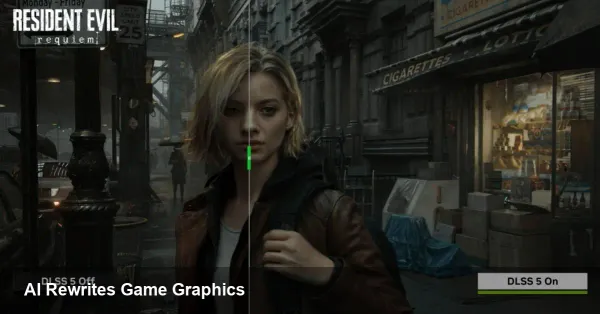
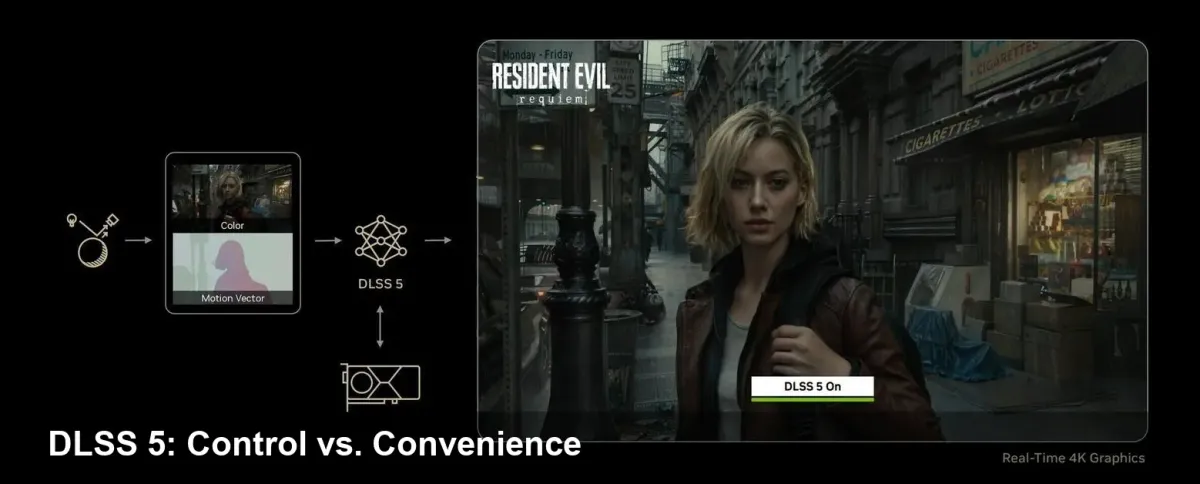
- DLSS 5, as presented by NVIDIA, leans into generative models that can reconstruct or re-synthesize image content in ways that can change a scene's micro-details — which is why artists and designers are watching closely.
The real problem: communication and creative control
What caused the strongest reaction was not the technology alone but how the news reached studios. Several teams reported they were not briefed before DLSS 5’s public reveal. That situation exposed two structural issues:
- Hardware vendors often assume new middleware will be welcomed simply because it increases performance. But for content creators, the question is whether the middleware respects artistic intent.
- When a platform-level feature can rewrite pixels using learned priors, studios want explicit guarantees and preview windows before it reaches players.
From a practical perspective, developers need clear opt-in and opt-out controls, robust QA tools to compare the native render against the AI-augmented output, and auditability so they can attribute changes to specific layers of processing.
Concrete scenarios — how DLSS 5 could change game development
- AAA single-player narrative title
- Scenario: A cinematic cutscene uses carefully tuned lighting and facial micro-expressions. DLSS 5's generative reconstruction subtly alters skin texture or specular highlights.
- Impact: Directors and narrative designers might feel the emotional tone is shifted, breaking immersion or misrepresenting actors' performances.
- Live-service online game
- Scenario: Cosmetics and skins are sold directly to players. Content creators are concerned that generative adjustments could alter the look of purchased items.
- Impact: Marketplace disputes and customer complaints if paid content looks different post-processing.
- Indie studio with limited QA bandwidth
- Scenario: The indie team enables DLSS 5 by default because of the performance gains, but lacks the resources to profile every asset.
- Impact: Unexpected visual regressions ship, creating support overhead and potential reputational damage.
- Cloud streaming and mobile-edge deployments
- Scenario: Server-side rendering combined with generative upscaling can reduce bandwidth, but also introduces a layer that may alter visuals for thousands of concurrent users.
- Impact: Operators need tooling to lock fidelity and to validate that stream output is faithful to the developer’s intent.
Recommendations for studios and middleware vendors
- Treat generative upscalers like any other post-processing pipeline change: include them in tech art signoffs and build toggles. A single boolean flag for "AI upscaling on/off" is not enough — versioned options and fine-grained parameters are essential.
- Build automated visual diff suites that compare ground-truth frames to DLSS-processed frames and flag perceptible divergences. Use perceptual metrics and human-in-the-loop validation for critical scenes (cutscenes, UI, cosmetics).
- Negotiate early with platform and GPU vendors. Integration APIs must expose control over which rendering layers the AI is allowed to touch and must support a developer preview window.
- For live-service titles or paid cosmetics, include an explicit QA gate for any client-side AI transformation and consider presenting an in-game disclosure or toggle so players can choose fidelity vs. performance.
Business implications
For studios, DLSS 5 can be a win for performance budgets: higher frame rates and potentially lower hardware requirements translate into smoother gameplay and broader market reach. But there's a tradeoff — the risk of brand damage if visual intent is lost. For middleware and engine vendors, the pressure is on to expose clear hooks and to maintain parity across GPU vendors. For platform operators and storefronts, there may be a need to clarify policy around post-render content changes to prevent disputes over paid assets.
A few industry-level lessons and predictions
- Expect new roles and workflows: "AI fidelity lead" or checklist items in release pipelines that specifically cover generative render steps. Studios will formalize responsibilities for approving AI-mediated visuals.
- Transparency will become a differentiator: companies that provide clear, developer-centric tools and early access will win trust. Hardware vendors that communicate roadmaps and offer robust testing tools will see quicker adoption.
- Standards and provenance: As generative post-processing becomes common, there will be a push for standards around labeling processed frames or embedding provenance metadata so consumers and regulators can see what was altered.
What players should know
Gamers will generally benefit from improved frame-rates and smoother experiences. But if you’re a content creator or buy cosmetic items, you should check whether a title exposes toggles for upscaling or whether the developer has certified non-destructive visuals. Look for transparency notes in patch logs or settings menus.
Adapting to generative graphics is more than a performance story — it’s a workflow and trust story. The technology can deliver big gains, but it also demands better communication between hardware vendors and the teams who make the art. How the industry responds to this round of surprises will shape whether generative upscalers become a reliable tool in the creative toolkit or a fast route to second-guessing the finished product.