DLSS 5 and Real-Time AI Rewriting Game Visuals

A turning point for real-time rendering
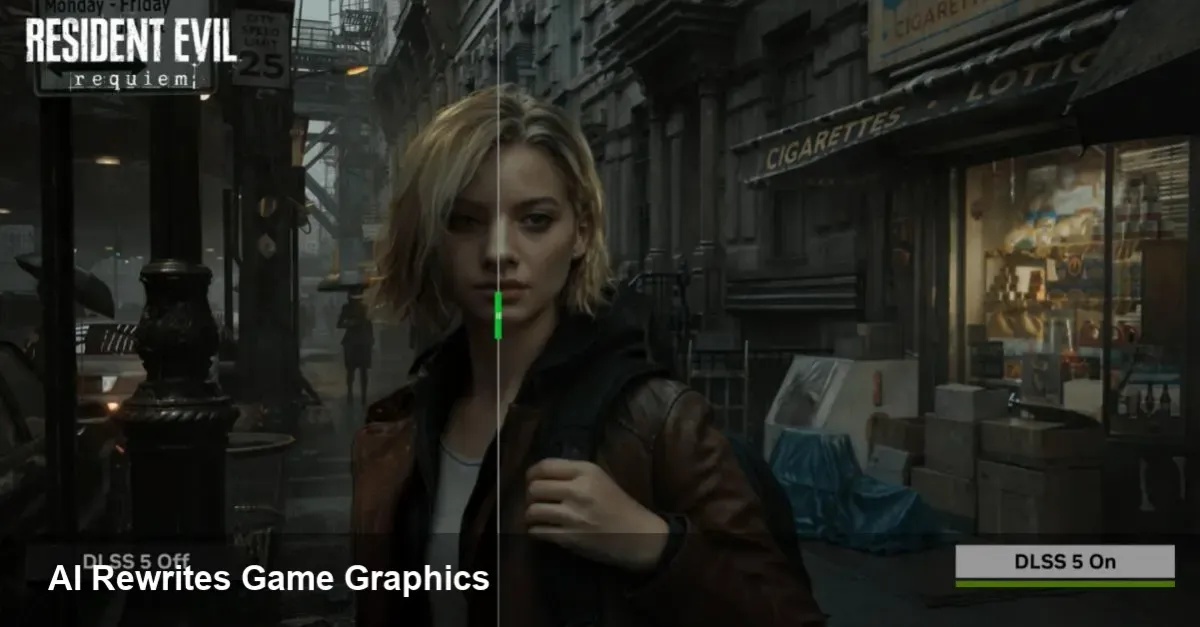
Nvidia's DLSS family has been an influential force in PC graphics for years. Its latest iteration, DLSS 5, marks a qualitative shift: rather than improving framerate by upscaling pixels, it applies generative AI to modify a scene’s appearance in real time, pushing toward photorealism. That capability promises big wins — and some thorny trade-offs — for players, studios, and the broader game industry.
What DLSS 5 actually does for a game
Think of DLSS 5 as a real-time artistic filter powered by neural networks. Instead of only reconstructing higher-resolution frames from lower-resolution inputs (as earlier DLSS versions did), DLSS 5 can alter lighting, textures, reflections and other visual cues to drive a more photographic look. It runs inference on the GPU during gameplay and adapts scenes dynamically — which means a single game scene can be rendered in different visual styles depending on performance budget, player settings, or developer choices.
Practical outcomes:
- Improved apparent fidelity without a linear increase in GPU cost — the engine can render cheaper base geometry and let the AI refine the final frame.
- Dynamic toggles: a studio can ship multiple presets (original look, photoreal, cinematic) and switch between them instantly.
- Potential to rescue visuals on lower-end hardware or in cloud-streaming contexts while preserving a premium look.
Why many players pushed back
When you change how a game looks at a fundamental level, you risk altering the artistic intent. That’s the core of the current backlash: players notice familiar environments, characters or lighting behaving differently and conclude the game is “not the same.” Specific concerns include:
- Artistic drift. Stylized games lose their personality when converted toward photorealism.
- Consistency problems. AI re-rendering can introduce artifacts or inconsistencies between cutscenes and gameplay.
- Competitive fairness. In multiplayer titles, visual changes could affect visibility or target contrast, raising fairness questions.
For players who value the original texture, color grading and composition—especially in beloved franchises—the surprises are jarring. The emotional reaction isn’t purely technical; it’s about authorship.
How studios should approach DLSS 5 in production
Integrating DLSS 5 requires a different workflow than previous upscaling tech. It’s not plug-and-play for every project — it’s a creative tool that needs governance.
Concrete steps for developers:
- Add an opt-in/opt-out toggle. Let players choose the rendering mode per-session and store it in profile settings.
- Maintain an art-approved baseline. Ship an “original” look as a reference and require sign-off when AI-altered presets are used in marketing materials.
- Build comprehensive QA tests. Automated visual regression tests should compare gameplay, cutscenes, and HUD rendering across modes to catch artifacts.
- Train-and-validate datasets. If the tech allows training or tuning, use in-house art assets and representative gameplay captures to reduce stylistic drift.
- Consider competitive sensitivity. For PvP modes, prefer conservative use or ban photoreal filters that affect gameplay cues.
Scenario example: An open-world RPG allows players to toggle DLSS 5 photoreal mode for exploration segments but enforces the original art style during story-driven cutscenes and promotional trailers. QA teams run nightly comparisons to detect drift and regressions.
Business implications and cloud gaming
DLSS 5 can lengthen the relevance of older hardware and improve cloud streaming quality. Operators can process frames server-side to deliver high-fidelity visuals while using fewer physical GPU resources per stream. For publishers, that means lower hosting costs and a wider addressable audience for premium-looking experiences.
Monetization dynamics may also shift. If AI-enhanced visuals become a differentiator, studios could offer it as a premium feature or bundle it with performance packs. That raises questions about parity (who gets the “best” visual mode) and transparency in marketing.
Limitations and risk areas
- Inference cost: Running generative models in real time has nontrivial GPU/thermal overhead and could reduce achievable framerates if not well-optimized.
- Artifact risk: Neural rendering sometimes hallucinates details incorrectly — a pattern on the background might appear where there shouldn’t be one.
- IP and credit: AI re-rendering can change how original assets are perceived, complicating credit for concept artists and texture teams.
Three near-term implications for the industry
- Tooling becomes part of the art pipeline: Game studios will add AI-visualization stages to their asset pipelines, with specialized QA and approval steps.
- Player choice becomes a feature: Games that expose granular control over AI rendering will be perceived as more respectful of artistic intent and player autonomy.
- Policy and multiplayer rules will evolve: Esports organizers and competitive studios will need explicit guidelines about AI-altered rendering to ensure fair play.
What to do if you’re a player or a developer
- Players: Try DLSS 5 modes, but use the toggle. If the photoreal version changes a game you love, switch back. Report specific artifacts so studios can patch or tweak the models.
- Developers: Treat DLSS 5 as an extension of your art toolkit rather than an invisible performance hack. Invest in validation, give players control, and be clear in marketing about which visuals represent the shipped art.
DLSS 5 is a technical milestone: it shows AI can do more than accelerate pixels — it can reinterpret visual scenes at runtime. That power will unlock creative possibilities and business efficiencies, but it also requires fresh thinking around artistic ownership, QA, and player agency. The next few years will be as much about social and design choices as about performance numbers.