Why Apple’s Colorful Entry MacBook Is the Right Fit

A fresh look at everyday computing
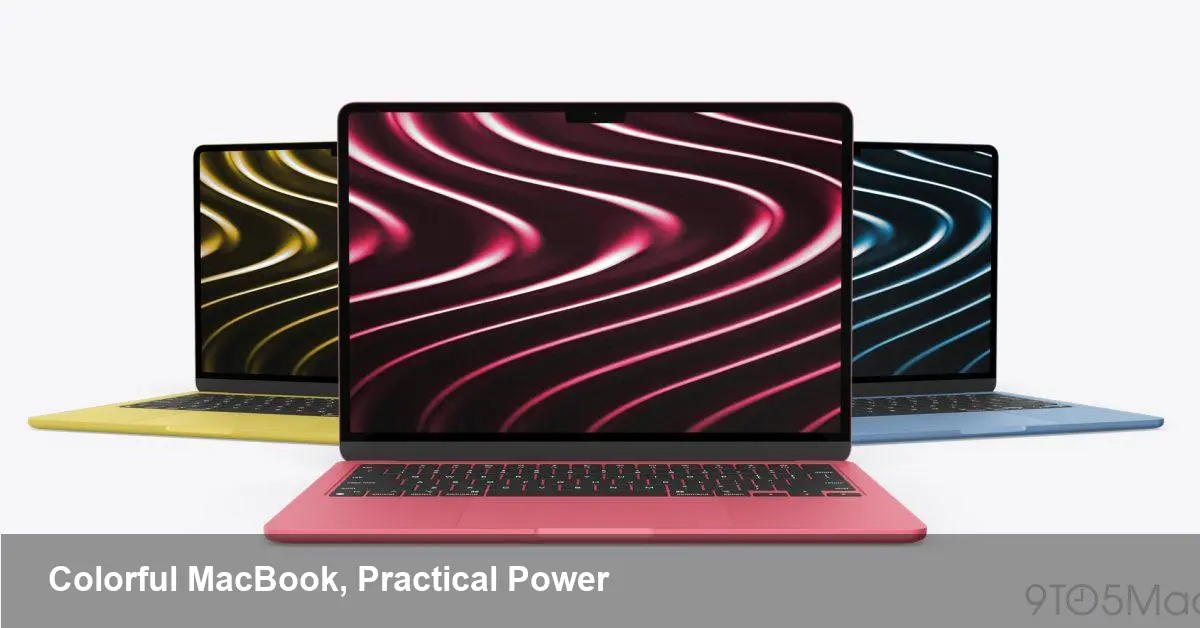
Apple’s recent push to offer an entry-level MacBook in multiple colors has a surface appeal — bright lids and more personalization — but the practical implications go deeper. For many users, this model hits a sweet spot: it packages modern Apple silicon performance, excellent battery life and a lower price in a design that feels personal rather than purely professional.
This piece walks through who benefits from this MacBook, how it changes workflows for developers and knowledge workers, and what businesses should weigh when choosing devices for teams.
Brief background: Apple’s strategy with the entry MacBook
Apple has steadily expanded its Mac lineup around its homegrown M-series chips, moving most of its Mac models away from Intel. The company’s entry MacBook — distinct from the Pro line — targets everyday users: students, freelancers, product managers, and small-business owners who value portability and battery life over the highest possible CPU/GPU cores or maximum RAM.
Offering the model in “fun” colors is an evolution of a product strategy: bring emotional appeal to mainstream devices while keeping the hardware and software tight and integrated. That matters not only for consumers but also for teams that provision devices at scale.
Who this MacBook is actually best for
- Students and creatives: Lightweight, long battery and a friendly aesthetic make it ideal for classes, note-taking, and light photo or video editing.
- Remote and hybrid workers: The combination of reliable battery life and a compact chassis suits people moving between home, office and co-working spaces.
- Small businesses and startups: Lower cost per unit plus Apple’s ecosystem reduces friction for teams who need consistent tools without a heavy investment.
It’s less appealing for video editors working on large timelines, game developers building heavy engines, or researchers running complex simulations that still benefit from desktop-class cooling and expandability.
Real-world scenarios
- A UX designer uses the MacBook for Figma, Slack, Chrome and occasional Affinity Photo edits. The machine sleeps through a full day of meetings and creative work without needing frequent charging.
- A product manager keeps multiple browser windows and a VS Code instance open, runs a couple of local dev servers via lightweight containers or node tooling, and reviews pull requests—workflows that perform comfortably on this machine.
- A college freshman picks one color to stand out on campus. The device handles writing, streaming, virtual lectures, and light Photoshop with no perceptible slowdowns.
Developer workflows: where this MacBook shines and where it doesn't
Apple silicon has matured: most mainstream developer tools are natively supported or work well under translation layers like Rosetta. For many development tasks, this MacBook is more than adequate.
- Fast iteration for web and mobile apps: Local dev servers, frontend builds, and simulators for iOS are very usable. Tools such as Homebrew, Node.js, Python, and Docker (with Apple Silicon support) all run well with small caveats.
- Cross-platform testing and virtualization: Running many VMs or heavy Docker Compose setups can tax memory and I/O on entry models. Developers who rely on multiple heavyweight containers, large databases, or emulation of other architectures might find the base configurations limiting.
- Native toolchains: Recent releases of major IDEs and developer tools have optimized for M-series chips, so things like compile times for smaller projects are excellent. For large C++ or compiled codebases, higher-end hardware will yield faster build times.
Practical tip: Developers should consider upgrading RAM and storage at purchase if their workflows include multiple simultaneous VMs or large local databases. Apple’s devices have limited post-purchase upgradability.
Business perspective: procurement, branding, and total cost of ownership
When companies evaluate devices for staff, form factor and initial price are only part of the equation. The colorful MacBook introduces a few interesting considerations:
- Employee satisfaction and retention: Offering devices that feel personal can be a small but meaningful perk that improves morale — especially for creative teams.
- Inventory and procurement logistics: Multiple color options complicate bulk ordering slightly (teams have to track preferences), but organizations can also use colors as a simple way to denote roles or departments.
- Support and lifecycle: Apple’s hardware tends to have strong resale value and long OS support windows, which can lower total cost of ownership over a 3–5 year cycle despite a potentially higher upfront cost than equally spec’d Windows laptops.
For IT teams, the decision remains workload-driven: choose cost-effective entry MacBooks for knowledge-worker roles and reserve higher-end MacBook Pros for developers and creators who need raw performance.
Pros, cons and practical trade-offs
Pros:
- Personality without compromising core productivity features.
- Strong battery life for all-day use.
- Smooth integration with Apple services and sick ecosystem benefits (AirDrop, Handoff, continuity).
Cons:
- Limited ports and expandability compared to larger MacBook Pros.
- Not ideal for heavy compute tasks (large-scale video rendering, simulation, big data processing).
- Upgrades to RAM and storage are set at purchase and can be costly.
If you need portability, dependable daily performance, and a device that feels personal, the entry MacBook is a solid choice. If your priority is raw performance and modular upgrade paths, a Pro or Mac mini/Mac Studio class machine is better.
What this signals about the market and developer tools
- Personalization is becoming product strategy: Color options aren’t just cosmetic — they’re a lever for segmentation and consumer engagement. Expect other vendors to follow with more tailored design options for mainstream models.
- ARM-first ecosystems are maturing: The broad compatibility of developer tools with Apple silicon shows a longer-term shift. Developers should lean into native toolchains where possible and test cross-platform pipelines early.
- Device choice will be more role-based: Companies will likely streamline fleets by job function rather than make one-size-fits-all decisions — colorful entry MacBooks for generalists, and beefier Pros for specialists.
How to decide if you should buy one
Ask these questions: Are your daily tasks primarily browser, document, collaboration, and light media editing? Do you value battery life and portability more than raw compute? Will a color option materially change the user experience (morale, brand fit, or user preference)? If you answered yes, the colorful entry MacBook is a practical, modern pick.
For teams, pilot a small batch for a month: measure support tickets, satisfaction, and real-world performance. That short trial will reveal whether the device fits your workflows or if a Pro is justified.
The new MacBook’s blend of personality and practicality makes it more than a fashion statement — it’s a thoughtfully positioned product that will be the right tool for many people and roles. Whether you’re a student, a PM, or a small-business owner, the question becomes less about specs and more about how the device supports the work and the people doing it.