What Amazon’s Fire TV Redesign Means for Users and Devs

A quick reality check
Amazon has started rolling out a major redesign of its Fire TV interface to viewers in the United States. This is a headline change for anyone who interacts with the platform — from casual streamers to independent app developers and media companies — because the home screen is where discovery, engagement and ad dollars converge.
Below I break down what this release is, who it benefits, and what you should do whether you run an app, sell ads, or just want less scrolling at night.
Why this matters now
Fire TV is one of the leading streaming platforms, powering Amazon’s own streaming devices and many third‑party smart TVs. The home and guide experience is the primary surface where content is discovered. A redesign isn’t just visual polish: it shifts the rules of discovery, how content is surfaced, and where engagement happens.
For users, a refined home screen can reduce friction and surface things they’ll actually watch. For developers and content owners, it changes how your show or app gets seen — and how you should present metadata, images, and promotions.
What’s changing (practical view)
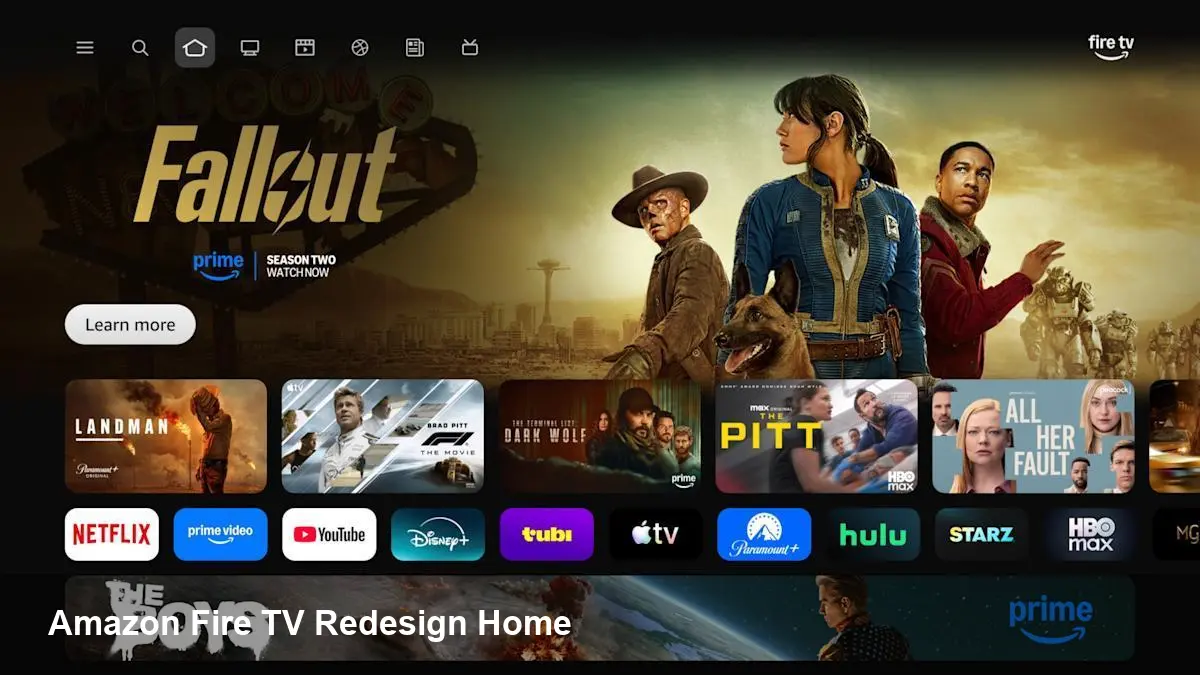
Amazon’s update reorganizes the Fire TV home experience with an emphasis on:
- Cleaner navigation that reduces menu layers and speeds access to apps, live channels and on‑demand titles.
- More personalized rows and recommendations driven by watch history and subscriptions.
- Stronger integration of live TV channels and free ad‑supported offerings alongside paid apps.
- Reworked artwork and metadata presentation — featured tiles take up more real estate, which affects thumbnail composition.
Technically, the update is a new shell on top of existing Fire OS builds. It’s being delivered as an over‑the‑air update to eligible U.S. devices; wider international availability will arrive later.
A few real‑world user scenarios
- Evening family viewing: Instead of navigating app by app, parents get a combined row that shows “Continue watching” across multiple services, so the family resumes a movie from a single place.
- Sports fan: Live and upcoming sports events are more prominent, making it easier to jump between a subscription channel, free highlights, and a paid PPV event.
- Cord‑cut startup subscriber: A new user who watches only two apps will see tailored recommendations and fewer irrelevant rows — lowering time to first play and increasing perceived value.
These are small UX changes from the outside, but they materially change how long people engage with content on Fire TV each session.
What developers and content owners need to do
A home screen redesign is a business event more than just a product update. Here are concrete actions teams should prioritize:
- Audit artwork and thumbnails. Larger feature tiles mean your 16:9 posters and 1:1 icons may be cropped or reflowed. Provide optimized assets where possible.
- Re‑check metadata hooks. Ensure your title, synopsis, and deep links are up to date so Fire’s recommendation engine can surface your content accurately.
- Update app banners and promo cards. If you run promotions or new season pushes, adapt creative to the new layout and prominence model.
- Instrument discovery metrics. Track impressions and click‑throughs from home rows versus in‑app search to understand the redesign’s impact. Expect a period of volatility as Amazon rebalances placements.
- Test voice and remote interactions. If your app supports voice search or specific remote intents, verify they work with the redesigned navigation to avoid regressions.
If you’re a smaller developer, prioritize the thumbnail and metadata check first; those are low effort and high impact.
Business and advertising impacts
The home screen is prime real estate. When a platform changes that real estate, several downstream effects follow:
- Ad placement shifts: Amazon can repackaged slots and auction positions differently, which may change CPMs and fill rates.
- Bundling opportunities: Deeper integration between free, live and paid content makes it easier for Amazon to promote its own services (e.g., Prime Video, Freevee), which could increase pressure on third‑party discovery.
- Measurement changes: With a new UI, viewability and attribution windows may shift. Expect advertisers and analytics vendors to revalidate conversion signals.
For content owners, leaning into Amazon’s promotional programs (featured placements, featured rows) during the rollout can help maintain visibility while algorithms adapt.
Limits and immediate caveats
- Not all devices will get the redesign immediately. Older Fire TV hardware and certain OEM smart TVs may be excluded or receive a pared‑down version.
- Rollouts often include A/B tests. Your app might see a different home layout than a competitor for a short while — so don’t jump to conclusions from a single data point.
- Privacy and personalization: More personalized recommendations mean more data processing. If your business relies on cross‑service syndication, be prepared for stricter controls around user identifiers.
Three implications for the next 12–24 months
- Discovery, not content, will increasingly determine winners. Platforms will compete on how quickly they connect viewers to watchable content. Apps that optimize for home‑screen visibility will have an edge.
- Streaming ecosystems will consolidate around curated home experiences. Expect tighter partnerships and paid promotional programs to secure prime slots on these redesigned surfaces.
- New UX patterns will create opportunities for ancillary tools. Metadata optimization services, thumbnail testing platforms, and analytics suites that can measure home‑screen performance will gain demand.
Actionable checklist (for teams)
- Update key visual assets for larger tiles.
- Verify deep links and remote/voice intents on updated firmware.
- Run a 2‑week measurement window post rollout to collect baseline impressions and CTRs.
- Reach out to your Amazon partner manager if you need expedited placement or creative guidelines.
If you’re an average viewer, expect a cleaner, faster way to find shows and channels with less menu hopping. If you build for or sell on the Fire TV platform, treat the rollout as a product launch: audit, adapt, and measure.
How you respond in the first weeks will determine how visible you are when Amazon finishes rolling deployment across its ecosystem.