Pixel 11 Pro Fold: Design leaks and real-world uses

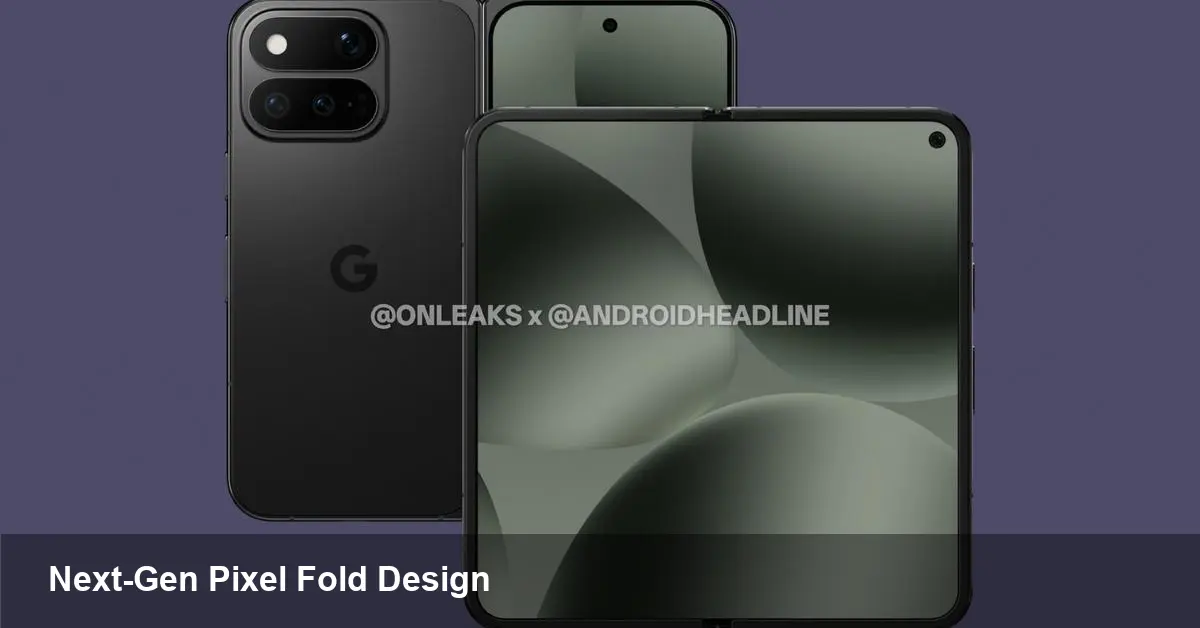
A new look at Google's next foldable
This week CAD-based renders attributed to OnLeaks and published by Android Headlines offered what may be our first clear visual hint at Google's follow-up to last year's Pixel 10 Pro Fold: the Pixel 11 Pro Fold. The images don't shout dramatic reinvention — instead they suggest iterative refinement. That matters: for users and businesses, incremental improvements to a form factor that still has growing pains can be more valuable than headline-grabbing novelties.
Below I unpack what those renders imply, who benefits, and how product teams and developers should prepare for a Pixel foldable that seems poised to nudge the category forward rather than disrupt it.
What the renders show (and what they don't)
The CAD images primarily deliver physical design cues: general proportions, hinge styling, camera module placement, and display layout when folded and unfolded. There are no definitive specs in the leak — no confirmed chipset, battery numbers, or screen technologies — so treat hardware expectations as informed guesses rather than facts.
Key visible signals:
- The external and internal display layouts look familiar, signaling continuity with last-generation foldables rather than a radical rethink.
- Camera bump placement and module size hint Google is still prioritizing imaging hardware as a headline feature.
- Hinge design appears refined, which may reduce the gap and crease-related complaints users have had with first-gen foldables.
Those are small but meaningful indicators. In a product category where durability, pocketability, and hinge behavior drive user sentiment, modest hardware evolution can dramatically improve day-to-day experience.
Why developers and product managers should care
Foldables are not just bigger phones — they change interaction patterns. The Pixel 11 Pro Fold (if it follows the expected trajectory) will likely ship with Android features tuned for large, flexible displays. That has direct consequences for app design, QA, and product roadmaps.
Concrete implications:
- Responsive layouts become mandatory. Test app UIs across folded and unfolded states, and ensure transitions preserve context and state.
- Multi-window and drag-and-drop workflows will be more common. Think about how your app behaves when it's one of two active panes. Can users copy content between instances? Do background processes survive split-screen transitions?
- Pointer and keyboard input from external accessories matter more. Developers should verify shortcut mappings and focus behaviors for productivity users.
Example scenario: A mobile-first CRM app can improve efficiency by showing a contact's timeline on the left pane and editing forms on the right. With a Pixel foldable, the difference between clumsy modal overlays and a true split editing surface determines whether users adopt the app for on-the-go sales work.
Real-world use cases where a refined Pixel foldable shines
- Field sales and demos: A single-device demo that unfolds into a tablet-sized display simplifies product walkthroughs and note-taking. Sales reps can run a native app simultaneously with a browser or slide deck.
- Photo and video capture: Larger preview area and a flexible hinge enable new compositional angles and tripod-free selfie workflows. Paired with Google's computational photography, an improved foldable can be a creative handheld tool.
- On-the-go productivity: Freelancers and executives may prefer a foldable for email, spreadsheets, and video calls without carrying a separate tablet.
These use cases emphasize that foldables can replace multi-device workflows when the software and hardware are in sync.
Business value and cost trade-offs
For enterprises deciding whether to adopt foldables for employees, the calculus includes productivity gains against higher device costs and potential repair complexity. A more refined Pixel 11 Pro Fold could justify the premium in roles where screen real estate directly translates to faster task completion — think consultants, creative contractors, and sales teams.
Security and manageability remain standard enterprise concerns: MDM support, OS update cadence, and repairability will influence procurement decisions as much as raw specs. Google's software commitment and update track record for Pixel devices will be a deciding factor for IT buyers.
Limitations and open questions
Leaks and renders are useful, but they can't confirm durability, battery life, or real camera performance. Other points to watch:
- Hinge longevity: CAD details can suggest mechanical improvements, but only long-term wear testing reveals the real story.
- Software polish: Google's integration of foldable-specific UI conventions — continuity, multi-window behavior, and adaptive notifications — will shape whether the device feels like a true productivity tool or a novelty.
- Price point: Foldable premiums have historically limited mainstream adoption. The value proposition must be clear for each target audience.
What developers should do now
- Prioritize adaptive and stateful UI: Ensure layouts scale fluidly between compact and expanded states, and that the app preserves user progress across transitions.
- Test multi-window flows: Implement and validate drag-and-drop, copy/paste, and inter-activity communication when your app is alongside another.
- Add keyboard and pointer support checks: Some productivity users will pair foldables with Bluetooth keyboards and mice; ensure shortcuts and focus navigation work as expected.
These changes are low-effort relative to the upside of being a well-behaved app on a device category where a good experience stands out.
Broader implications for the foldable market
- Iteration over reinvention: If the Pixel 11 Pro Fold follows the pattern suggested by the renders, it signals that major players believe refinement and software synergy will drive adoption more than radical hardware gambles.
- App ecosystem maturation: As more mainstream devices adopt foldable layouts, developers and design systems will bake in large-screen patterns, improving the experience across Android.
- Component and repair industries will adapt: Better hinge designs and convergent layouts encourage third-party accessories and repair services to standardize around a smaller set of design templates.
The renders from OnLeaks, echoed by Android Headlines, are just a first look. They don't tell the whole story, but they help product teams, IT buyers, and app makers plan for a near-term future where Google's next foldable refines usability rather than reinventing it.
If you build apps or buy devices for teams, now is a good time to audit your product's large-screen behavior and prioritize fixes that improve multi-window and state continuity. The hardware may be familiar, but the user expectations are evolving — and a small set of changes can make your app feel native on the next generation of foldables.