Older Galaxy phones get AirDrop compatibility — but with limits

Why this matters
Samsung and Apple historically used different quick‑share systems: Android phones leaned on Nearby Share, Samsung on Quick Share, and Apple on AirDrop. A push toward cross‑device file exchange removes friction that used to mean emailing photos, using cloud uploads, or fumbling with cables. That’s valuable for teams, events, and everyday consumers who switch between iPhone and Galaxy devices.
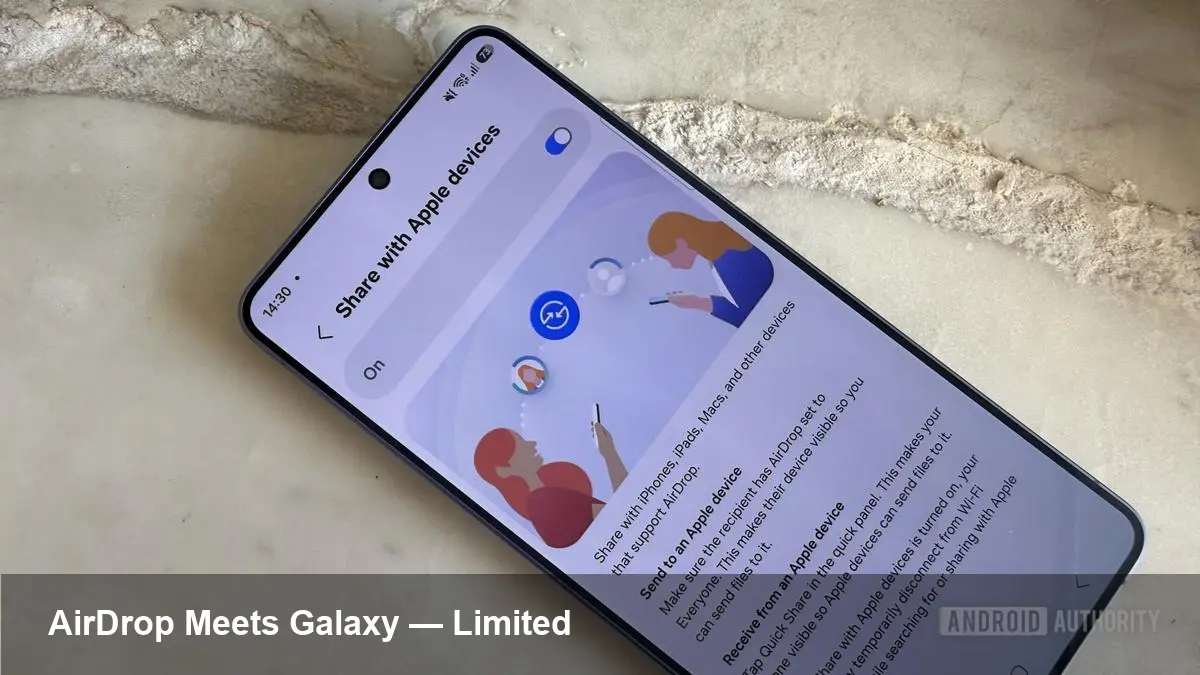
Recently, Samsung began rolling a compatibility update that allows certain older Galaxy handsets to participate in AirDrop-style transfers with iPhones. That’s a big UX win — but the rollout comes with limitations that change how useful it is in real world use.
What the update actually delivers (practical view)
- Cross‑platform transfers: With the update, some Galaxy phones can accept files from iPhones that use AirDrop. In practice this looks like letting an iPhone discover a Galaxy handset in the iOS share sheet and push a photo or document.
- No app install required on the sending iPhone: iPhone users use the native AirDrop UI they already know.
- Works over local wireless interfaces: Transfers happen over Bluetooth/Wi‑Fi direct (peer‑to‑peer), so files don’t go through cloud servers.
These are the visible benefits. But the catch is that the compatibility at launch is intentionally narrow.
The current limitations and why they matter
- Partial functionality: Early builds often support receiving files but not sending them back to iPhones. That means Galaxy users can be a sink for iPhone shares but can’t initiate a transfer to iPhones using AirDrop. For two‑way convenience, users still need Nearby Share or Quick Share.
- Privacy and discoverability tradeoffs: To be discoverable by an iPhone, a Galaxy device may need to expose itself in a more permissive mode (equivalent to AirDrop’s “Everyone” rather than “Contacts Only”). That increases convenience but can make the device discoverable to anyone nearby, creating a privacy risk in crowded places.
- Limited model and OS support: The rollout covers a subset of Galaxy devices and firmware versions. Expect flagships and recent midrange phones to receive the update first; older budget models may be excluded. If your Galaxy is a couple of OS releases behind, it might not qualify.
- Reduced feature parity: Features Apple users expect from AirDrop — such as continuity with Messages/Contacts or transfer persistence across devices — may not port over. The Galaxy receives a file but doesn’t necessarily integrate that transfer into iOS-style workflows.
- Enterprise policy friction: Corporate phones governed by EMM/MDM policies may have device discovery or peer‑to‑peer file transfer disabled. IT teams will need to adjust policies intentionally to permit these interactions.
Two realistic scenarios
- Casual meetup: At a party, an iPhone user wants to send a batch of photos to a friend with a Galaxy phone. If the friend’s device has the update and the iPhone sender sets AirDrop to Everyone, the copy is straightforward. But if the sender has AirDrop set to Contacts Only, or if the Galaxy user wants to share back, the workflow breaks down.
- Small business or event staff: A small retailer expects staff to exchange SKUs or receipts between iPhones and Galaxy phones. Receiving is possible, but staff will need training. They’ll have to make sure devices are discoverable, that sensitive items aren’t sent over permissive modes, and that MDM policies allow peer transfers.
What developers and product teams should do
- Plan for graceful fallbacks: If your mobile app relies on peer sharing between iOS and Android, don’t depend solely on AirDrop compatibility. Keep Nearby Share, Quick Share, or an in‑app solution (upload + share link) as a fallback.
- Implement clear UX states: If you surface an OS‑level “Share to nearby” action, inform users which directions (send/receive) are supported and whether the peer is in a permissive discoverable mode. Bad error messages kill adoption faster than missing features.
- Respect enterprise controls: If you build for B2B customers, provide guidance on how EMM administrators should configure policies to enable safe peer sharing and offer ways to opt out or audit transfers.
Security and privacy considerations
The AirDrop model includes identity checks (Contacts Only) and time‑limited discovery to limit exposure. When cross‑platform compatibility is limited to more permissive discovery states, organizations and users must be aware that:
- Files can be pushed to a device by strangers in range if discoverability is broad.
- Metadata and temporary identifiers used to negotiate a transfer can leak presence information in public places.
- Enterprises will likely require toggles at the OS or MDM level to block automatic discovery in sensitive environments.
How to test it yourself (quick checklist)
- Update both devices: Ensure the Galaxy has the Samsung update and the iPhone runs a recent iOS build.
- Set device discoverability: Set the iPhone’s AirDrop to Everyone if the Galaxy is not in Contacts. Be prepared to revert after testing.
- Try a simple file: Send a single photo first and verify it lands in the expected Gallery or file location.
- Try a reverse transfer: Attempt to send from the Galaxy back to the iPhone. If it fails, use Nearby Share/Quick Share instead.
- Check MDM policies: If devices are managed, confirm peer sharing isn’t blocked.
What this means for the future
- Push toward a standard: Cross‑vendor friction around quick‑share is likely to accelerate work on interoperable protocols or platform APIs that preserve security and contacts privacy while making UX seamless.
- Enterprise policy work: IT departments will need new policies and monitoring tools tailored to peer transfers, especially in regulated industries.
- App-level hybrid sharing: Expect apps to offer hybrid workflows — native peer transfers when available, and cloud link fallback when not — to deliver consistent experience across mixed device fleets.
If you rely on quick, in‑person exchanges across iPhone and Galaxy devices, the compatibility update is a meaningful step forward. But for everyday reliability — two‑way sharing, privacy controls, and enterprise readiness — there’s still work to do. Try it out on noncritical files first, and watch how Samsung and Apple iterate over the next updates.