Inside Galaxy S26 Ultra’s Privacy Display

What just appeared in stores — and why it matters
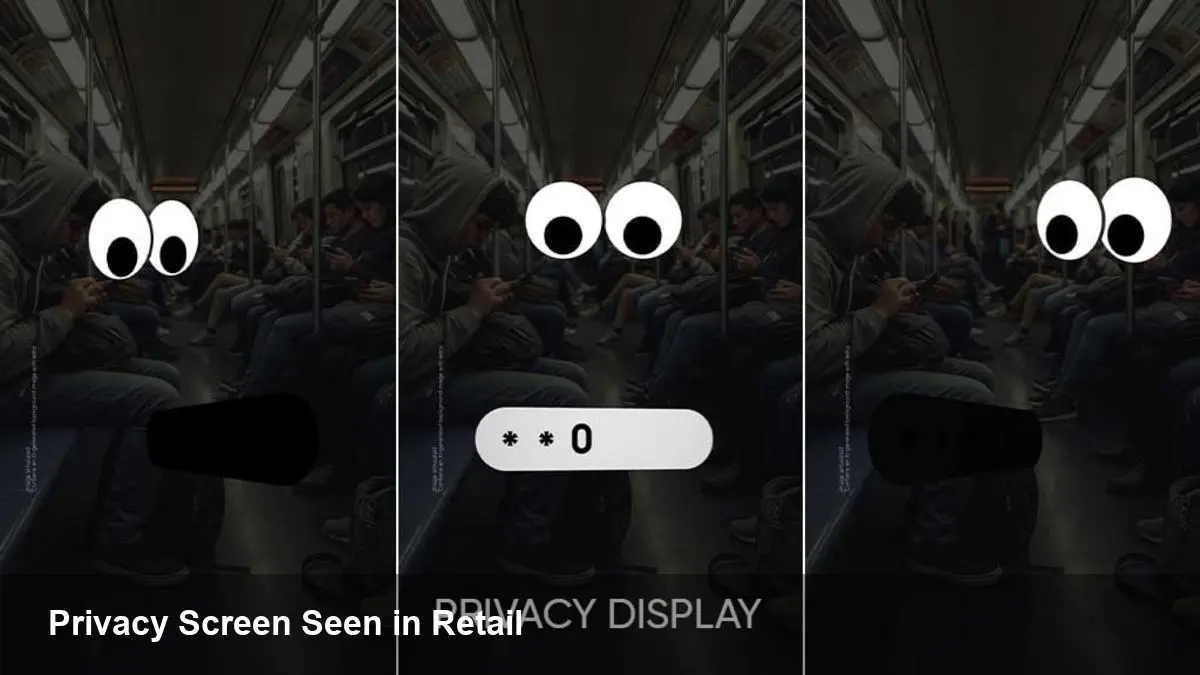
A handful of retail units of Samsung’s upcoming Galaxy S26 Ultra have surfaced in Dubai days ahead of the formal launch, and the standout detail people are talking about is the handset’s new Privacy Display. Unlike a leaked press render or a staged demo, these are retail devices functioning in the wild — which gives us a clearer sense of how Samsung plans to bake privacy directly into the display hardware and software.
If you work in product, security, or mobile UX, this isn’t just another spec to tick off. It signals how hardware-level privacy is becoming a mainstream selling point for flagship phones.
Quick background: Samsung and the S-series trajectory
Samsung’s Galaxy S line has long pushed the envelope on camera hardware, displays and performance. The S26 Ultra is positioned as the company’s premium showcase: incremental refinements to camera systems, battery chemistry, and — in this case — a suite of privacy-focused features centered on the screen itself.
The “Privacy Display” concept appears to follow a trend where vendors augment software protections with physical limitations (like narrow viewing angles or selective dimming) to prevent shoulder-surfing and casual visual eavesdropping.
How Privacy Display likely works (based on the retail sightings)
From hands-on observations of the retail unit, the Privacy Display seems to combine hardware and software techniques:
- Viewing-angle control: the screen narrows readable angles so content is easy to read only when viewed head-on.
- App-aware behavior: privacy mode can activate per app — for instance, enabled automatically when you open banking or messaging apps.
- On-screen indicators: subtle UI elements show when privacy mode is on, preventing accidental exposure.
These capabilities point to a collaboration between panel engineers and OS-level APIs so apps (and possibly MDM solutions) can trigger or respond to the display’s privacy state.
Real-world scenarios where this helps
Here are concrete situations where a Privacy Display adds tangible value:
- Commuters on trains: reading confidential email or documents without exposing content to standing passengers.
- Coffee-shop collaboration: sharing a device with a colleague while keeping private notifications and messages concealed.
- Field work for professionals: healthcare or legal staff using phones in public areas where HIPAA or client confidentiality matters.
For many users the benefit is immediate: fewer awkward moments where a glance from the side reveals sensitive information.
What developers and product teams should consider
Privacy Display is more than a hardware novelty — it affects app behavior and user experience. If you build mobile apps, consider these practical actions:
- Design for variable legibility: text and UI elements should remain readable when the viewing angle is constrained or contrast changes.
- Opt-in privacy hooks: expose your app’s sensitive screens (payment flows, 2FA codes, health data) to system APIs to enable automatic privacy mode activation.
- Test edge cases: how does your app behave when privacy mode is toggled mid-flow? Do screenshots, video capture, or screen sharing respect the privacy state?
Enterprises managing fleets should ask MDM vendors about support for this feature — it can be a policy knob that triggers hardware privacy on certain apps or networks.
Business and product implications
For Samsung, shipping a visible privacy feature on a marquee device gives a competitive differentiator that aligns with growing consumer and regulatory focus on privacy. For businesses:
- Differentiation: Privacy Display can be a reason for customers to upgrade, particularly those in regulated industries.
- Support burden: carriers and retailers will need scripts and FAQs to explain when and why the display limits viewing angles — otherwise users may mistake it for a defect.
- Partnership opportunities: security and banking apps could partner with Samsung to certify “privacy-optimized” flows.
However, merchandising a hardware privacy feature requires careful UX education — users must understand when it’s active and why their screen looks different.
Limitations and trade-offs to watch
Hardware privacy isn’t magic. Be mindful of trade-offs:
- Brightness and color shifts: narrowing viewing angles or adding micro-louvre layers can reduce peak brightness and affect color accuracy.
- Accessibility concerns: users with limited mobility or who share devices may find strict viewing-angle restrictions frustrating.
- Social verification: features like “show to another person” may require temporary overrides — workflow needs to be frictionless.
Manufacturers must balance protecting casual privacy with preserving usability in social or collaborative contexts.
What the Dubai retail leak implies about launch and supply chain
Units appearing early in Dubai suggest the region’s retailers either received display stock ahead of schedule or inventory controls loosened during distribution. Historically, pre-release retail sightings can mean:
- Accelerated local shipments for marketing partners or demo programs.
- Potential firmware and hardware variations across regions until the global launch locks down configurations.
- Greater risk of leaks that reveal UX details and limit the surprise factor at launch.
From an organizational perspective, Samsung will likely accelerate messaging around how the Privacy Display works and why this isn’t a defect.
Where this could lead next
A few forward-looking implications to keep an eye on:
1) Hardware–software privacy will spread beyond flagships. Once mainstream users recognize the value, mid-range models will likely adopt scaled-down versions.
2) APIs for privacy-aware apps will become standard. Expect mobile OS vendors and enterprises to push for hooks that let apps declaratively mark sensitive content.
3) New accessibility and sharing UX patterns will emerge. Devices will need simple, fast ways to temporarily disable privacy mode for legitimate side-viewers while preserving protection for others.
The Privacy Display on the S26 Ultra is a practical indicator that privacy engineering is moving closer to the hardware layer. For developers and product leaders, it’s an invitation to rethink how apps communicate sensitivity and to build experiences that integrate smoothly with new device capabilities.
Whether you’re designing an enterprise app, advising a product roadmap, or just shopping for a new phone, this is a feature worth testing in person when the S26 Ultra reaches official launch channels.