Galaxy S26 and Buds 4: Privacy, design, and real-world impact

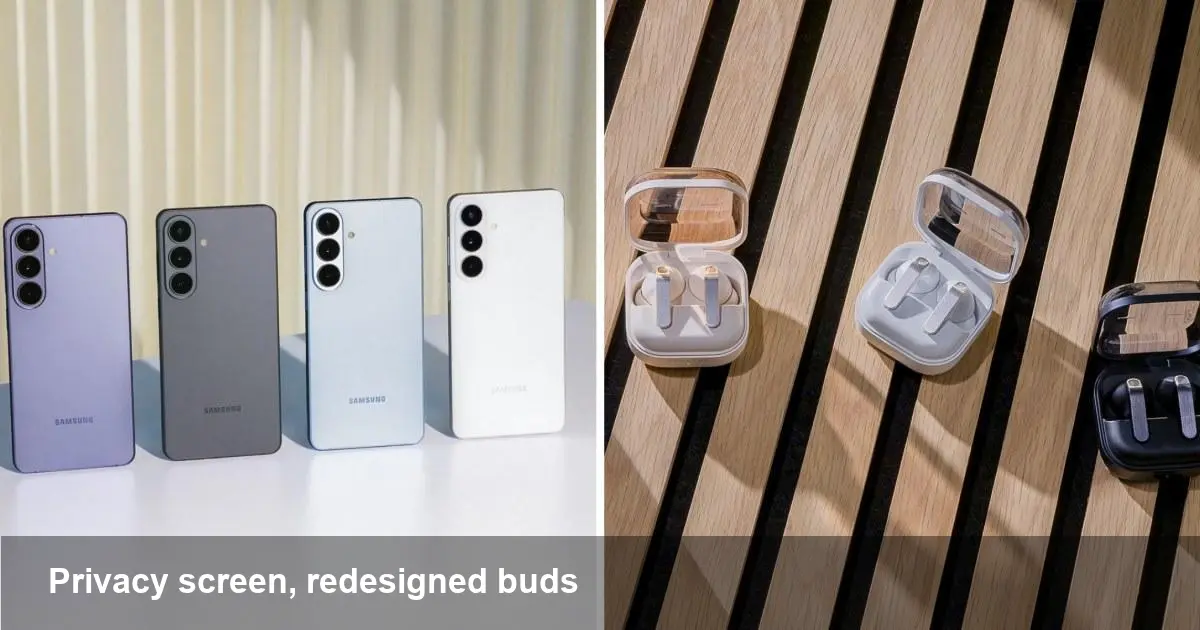
What Samsung just announced — at a glance
Samsung expanded its flagship family with the Galaxy S26 series and updated its earbud line with the Galaxy Buds 4. The highest-end S26 Ultra introduces a hardware privacy screen option, while the Buds 4 arrive with a redesigned fit and refreshed styling. These moves are small individually, but together they signal a shift toward hardware-level privacy and tighter integration across devices.
A short background: why this matters
Samsung’s Galaxy S line has long been a bellwether for Android’s high-end hardware: first-to-market camera features, premium materials, and close collaboration with Google on Android. The Galaxy Buds family has similarly evolved from value wireless earbuds to a core piece of Samsung’s device ecosystem, competing with Apple’s AirPods and other premium TWS options. Bringing privacy features into the hardware layer and refreshing accessory design are strategic: consumers want both better security by default and accessories that feel like an extension of their phones.
What the privacy screen actually changes for users
A hardware privacy screen reduces the viewing angle so content is visible to the person directly in front of the phone but becomes hard to read from the side. For everyday users that means:
- Safer commuting: No more shoulder-surfing on trains or buses when checking messages, passwords, or banking apps.
- Better confidence in public spaces: Using navigation, reading emails, or viewing sensitive documents feels more private without carrying a physical filter.
- Trade-offs on brightness and legibility: Privacy layers often reduce peak brightness and can alter contrast. Expect slightly different display tuning when privacy mode is enabled.
Practical scenario: if you frequently work on sensitive documents in cafes, enabling the privacy screen makes it less likely a nearby stranger can glance at your content. But if you often share the screen with a colleague, you’ll need to disable it or use screen-sharing features.
What developers and designers need to know
A hardware privacy screen changes the effective viewing angle and perceived contrast for users. That has three immediate implications:
- UI testing across angles: App teams should include tests that simulate narrower viewing angles to ensure critical information remains readable and interactive elements aren’t accidentally hidden by color/contrast changes.
- Accessibility considerations: Users relying on screen magnification, large text, or custom contrast modes might see different behavior with a privacy layer. Offer adjustable font sizes and robust audio descriptions for critical flows like authentication and notification content.
- Feature toggles and detection: There’s no standard Android API that universally announces a privacy filter; Samsung may expose controls or flags in its One UI. Developers targeting Galaxy S26 or S26 Ultra users should watch for OEM-specific APIs or settings and test on hardware when possible.
Concrete developer scenario: a banking app should test PIN entry screens under reduced-angle viewing to confirm digits are visible to the rightful user and not truncated or contrast-washed, and should avoid relying on tiny color changes to convey critical status.
Enterprise and security benefits (and limits)
For IT teams managing fleets, hardware privacy can be an attractive addition to existing security controls. It complements software protections like encryption, mobile device management (MDM), and secure containers by adding a physical deterrent against visual data leakage.
But it’s not a silver bullet. Cameras, shoulder-surfing from head-on positions, or malicious screen-capture apps remain threats. Companies should view the privacy screen as layered security: a useful UX feature that reduces casual exposure, while MDM, VPNs, and secure app containers handle deeper protections.
Deployment note: MDM vendors and enterprise app developers should verify whether the privacy mode is controllable or detectable via device management APIs to align user policies and training.
Galaxy Buds 4: design refresh with practical implications
The Galaxy Buds 4 update focuses on fit and finish. A redesigned shell and ear tip geometry aim to improve comfort and passive noise isolation. For users this translates into:
- More secure fit for workouts and commuting
- Better passive isolation meaning ANC (if present) can be more effective, and battery use for ANC may be more efficient
- Easier prolonged wear for calls and listening
For developers and product teams building companion apps, incremental design changes in earbuds mean you should keep UI flows flexible for frequent hardware refreshes. Expect differences in touch control sensitivity, ear detection, and fit-test behaviors.
Practical use case: a remote worker who spends hours on conference calls will appreciate clearer call audio and better long-term comfort, while a commuter will notice fewer distractions from city noise.
Ecosystem and accessory thinking
Samsung’s moves remind device makers that hardware and accessories are increasingly co-designed. If you build apps or services in this ecosystem, consider:
- Multi-device experiences: Leveraging the Galaxy ecosystem (phone, buds, tablet, watch) for seamless handoff and continuity.
- Accessory-aware UX: Detect and adapt to accessory presence — route audio, offer spatial audio toggles, adapt playback quality based on earbud battery.
- Testing across device generations: Small physical changes in earbuds and screen layers can alter behavior; maintain a testing matrix for flagship devices.
Looking ahead: three implications for the next wave of devices
- Hardware privacy becomes a standard expectation. Once mainstream flagships ship with privacy options, users will start expecting privacy-by-default in more device categories — laptops, tablets, and even car infotainment.
- Design changes in accessories will be more incremental but more frequent. Companies will iterate on fit and ergonomics to win retention rather than competing only on specs like ANC decibels.
- Developers will need to broaden device testing beyond specs. Visual filters, narrower viewing cones, and subtle hardware tweaks require UI and accessibility testing to remain reliable across OEM customizations.
Who should upgrade, and when
If you work frequently in public, handle sensitive information on your phone, or want the absolute newest Galaxy features, the S26 Ultra’s privacy screen is a compelling reason to consider an upgrade. For users who prioritize everyday comfort and improved earbuds behavior, the Galaxy Buds 4 are worth evaluating, especially if you already live inside Samsung’s ecosystem.
If your workflow depends heavily on shared viewing—creative collaboration, demos, or frequent in-person screen-sharing—hold off or test the privacy mode first.
The latest Galaxy models aren’t just incremental spec bumps: they push a subtle change in how hardware protects and complements user privacy, and they remind developers and businesses to test for those hardware-led UX differences as part of their product and deployment plans.