
Pixel 9 Now Supported by AirDrop on Android

What changed and why it matters
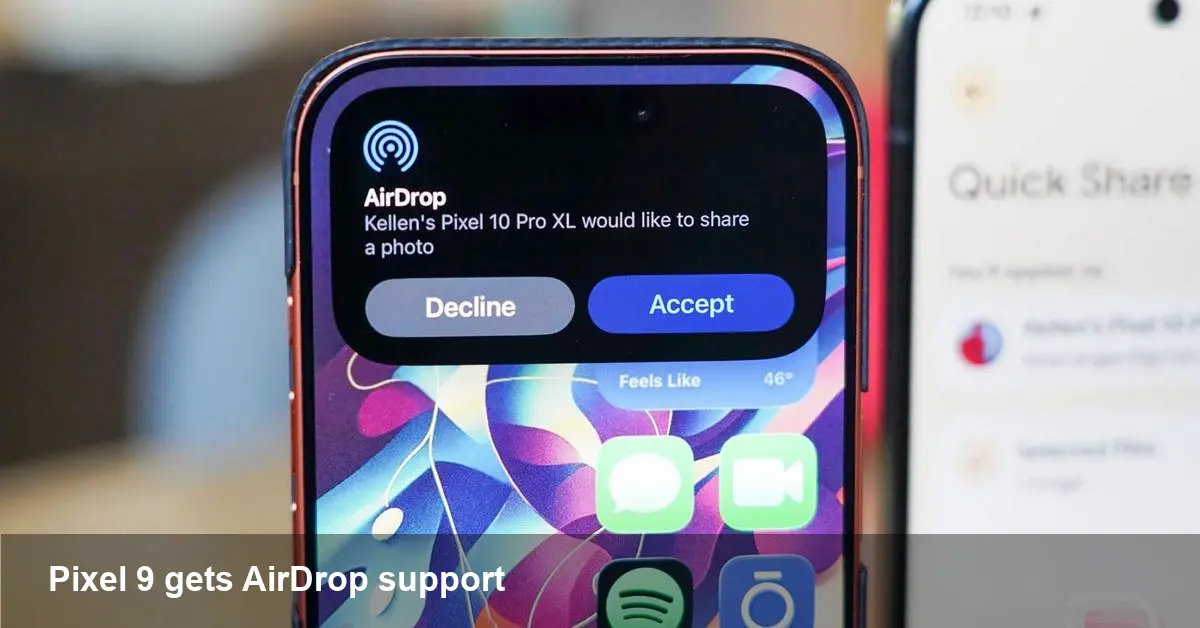
Google has expanded the list of Android models that can participate in its “AirDrop on Android” program to include the Pixel 9 series (Pixel 9 and Pixel 9 Pro), while the Pixel 9a remains excluded. For users who frequently exchange files between iPhones and Android phones, that’s a practical step toward smoother cross-platform sharing.
This isn’t just a device compatibility bullet point. Adding flagship Pixels to the program signals Google is prioritizing parity for devices that people use in professional and creative contexts. It also raises expectations for developers, IT admins, and businesses that want simple, secure frictionless file transfers without relying on third‑party apps.
Quick background: what is “AirDrop on Android”?
Apple’s AirDrop is a longstanding, well-known way to send photos, links, and files between Apple devices using a combination of Bluetooth for discovery and direct Wi‑Fi for transfer, with encryption by default. “AirDrop on Android” is Google’s move to make Android phones visible and reachable from an iPhone’s AirDrop sharing sheet — in other words, enabling native AirDrop-to-Android handoffs.
On Android’s side this typically requires OS-level support and specific hardware or firmware capabilities for discovery, peer connection, and secure transfer. That’s why Google maintains a compatibility list and rolls support out by model.
Practical scenarios where Pixel 9 support helps
- Conference networking: Attendees often have mixed iPhones and Pixels. With Pixel 9/Pro available as AirDrop targets, presenters and attendees can exchange slides, contact cards, and demo apps faster.
- Cross-platform creative workflows: Photographers and designers who get quick proofs from iPhone-toting collaborators can accept assets directly on a Pixel 9 without asking the sender to switch to another method.
- Education and small business: Teachers or staff using Pixel 9 devices can receive student projects or receipts from iPhones without installing extra software.
These are simple scenarios, but they add up: removing the “ask them to email it to me” step improves productivity.
Why the Pixel 9a is left out (likely reasons)
Google didn’t include the Pixel 9a in this wave, and several plausible technical and product reasons explain that omission:
- Hardware constraints: Some discovery and transfer features rely on Wi‑Fi chipsets, Bluetooth stacks, or other hardware that may not be present or certified on lower-cost models.
- Firmware and driver support: Even when hardware is capable, manufacturers need drivers and firmware updates to support a new cross-platform protocol.
- Product segmentation: Companies sometimes reserve premium capabilities for flagship lines to differentiate products.
For users, that means owning a Pixel 9 or 9 Pro gives you the new cross‑platform convenience; budget buyers with a 9a may need to rely on Nearby Share, cloud links, or third‑party apps for now.
Developer and IT implications
- App developers: If your app has file‑sharing flows, account for both native cross‑platform transfers and fallbacks. Detecting available transfer methods and offering a graceful alternative (Nearby Share, email, or messaging) improves UX.
- MDM/IT admins: Rolling this out in managed environments requires updating policies and testing. Check whether your management tools control Nearby Share or AirDrop interactions and whether additional OS updates are required for enrolled devices.
- QA teams: Test sharing flows with mixed fleets (iPhone ↔ Pixel 9, iPhone ↔ Pixel 9a) — behavior will differ. Automated test scripts should simulate discovery and transfer failures to verify fallback messaging.
Security and privacy considerations
AirDrop’s model includes discovery settings (Everyone/Contacts Only) and encrypted transfers. When extending that model to Android, watch for:
- Visibility controls: Users should be able to control when their device is discoverable to nearby iPhones to prevent unwanted contact requests.
- Consent flows: Both sender and receiver should explicitly accept transfers to avoid silent file pushes.
- Enterprise policy: For managed devices, IT may want the ability to control discoverability or to whitelist trusted networks.
Google’s implementation must preserve these controls to maintain user trust — and enterprises should test policies on updated Pixel 9 devices before enabling broad use.
Shortcomings and practical limits
- Not universal yet: Only some models are supported so fragmentation remains. Expect gaps across carriers and regional variants.
- Dependence on updates: Older models may gain support only through system updates, if at all.
- Cross‑platform quirks: Not every file type or app data will transfer seamlessly; developers should handle partial or failed transfers gracefully.
What this means for the broader ecosystem
1) Faster adoption in mixed-device environments: Companies with both iPhone and Android users can reduce friction for simple file exchanges without standardizing on one platform. 2) Pressure to widen support: Seeing flagship Pixels supported increases expectations that mid-range models will follow — otherwise the experience will remain patchy. 3) Opportunity for third-party tooling: Until support is universal, specialized apps that sync or broker transfers across platforms can still add value by covering edge cases and enterprise needs.
How to prepare (user and admin checklist)
- Users: Update your Pixel 9/Pro to the latest system build and check sharing/discovery settings. If you own a 9a, install updates and configure Nearby Share as your fallback.
- Developers: Add detection and fallback logic for AirDrop-to-Android transfers. Test file integrity and partial-transfer recovery.
- IT admins: Validate MDM policies around device discoverability and train staff on when to use native sharing vs. managed channels.
Looking ahead
Expanding support to the Pixel 9 series is an incremental but meaningful step toward smoother iPhone ↔ Android sharing. The bigger question is whether this becomes a broad, cross‑device standard or remains a best‑effort interoperability layer that relies on vendor cooperation. In practical terms, if you use a Pixel 9 or 9 Pro, expect fewer awkward file-sharing workarounds. If you’re on a 9a or older Pixel, keep familiar tools ready until your device is explicitly supported.
Whichever device you carry, the trend is clear: reducing friction between ecosystems benefits users and businesses alike. If you manage a mixed-device environment, now’s a good time to test the flows and decide whether policy or training needs an update.



