Why Intel’s Core Ultra 7 270K Plus Matters: Gaming, Apps, Value

What Intel just put on the table
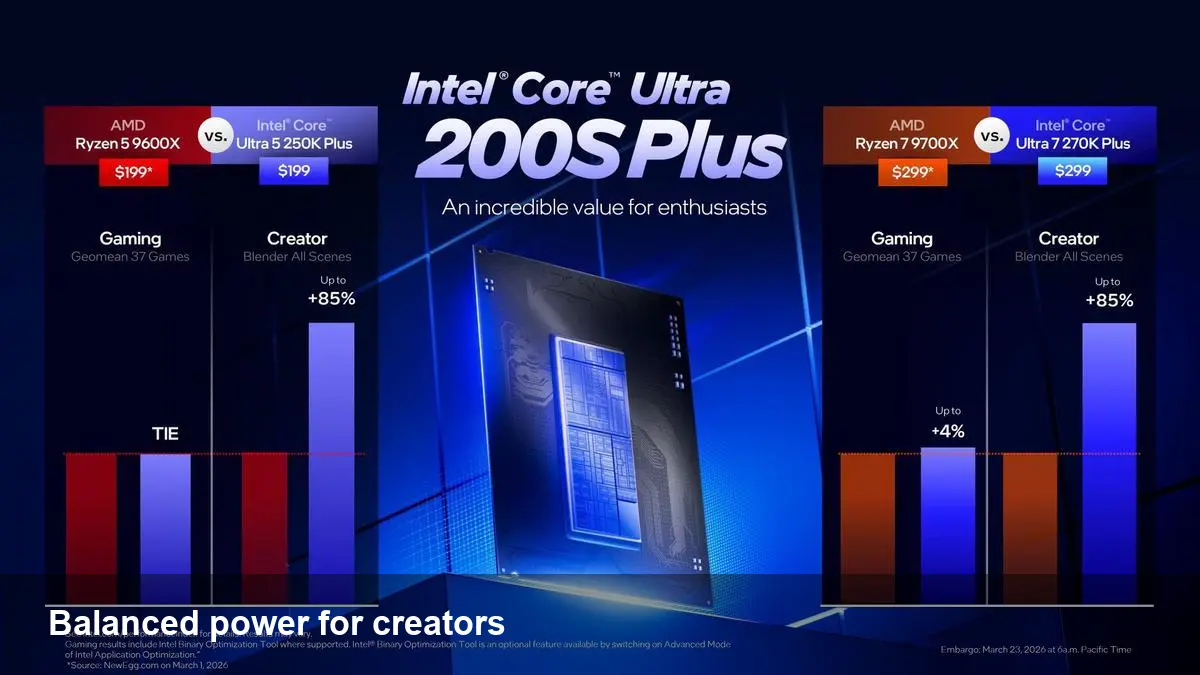
Intel has published official benchmark results for two new client chips: the Core Ultra 7 270K Plus and the Core Ultra 5 250K Plus. According to Intel’s data, both parts deliver stronger application performance than the high-end Intel Core i9-14900K, while showing gaming performance that’s comparable with AMD’s Ryzen X. That’s a notable positioning: the company is pitching these Core Ultra Plus SKUs as a balance of desktop-class compute for creators and competitive gaming on mobile-class or small-form-factor platforms.
A quick primer: where these chips sit
The Core Ultra family is Intel’s recent push into more heterogeneous client silicon: hybrid core layouts, integrated accelerators for media and AI, and power-sipping efficiency targets for thin-and-light laptops. The two new Plus models are positioned above Intel’s mainstream mobile parts and aim to bring higher sustained performance for multithreaded applications and content creation workflows while still being attractive in gaming.
Why that balance matters
- Many creators and pros need strong single- and multi-threaded CPU performance for compiles, renders, photo and video processing. Historically that’s been desktop territory.
- Gamers care about frame rates and latency. If a mobile chip can match desktop gaming CPUs in real titles, it changes hardware purchasing decisions.
- Value-oriented buyers want both strong apps and solid gaming without paying the desktop i9 premium.
Real-world use cases
1) Video editor on the move A freelance video editor who frequently works at client sites or travels will value the Core Ultra 7 270K Plus if Intel’s app-centric gains translate to faster exports and previews. Faster application performance shortens iteration loops — meaning less time waiting and more time creating.
2) Indie studio dev and streamer An indie game developer who codes, builds, and streams on one machine benefits if the CPU delivers high render/compile throughput while keeping gaming performance competitive with Ryzen-class parts. The Plus SKUs may let them run local builds and a live stream without dropping frames.
3) Power users who want a laptop, not a desktop Someone who wants desktop-like application speed in a laptop (photo editing, large spreadsheets, virtualization for local testing) will find the value proposition compelling, especially if OEMs price systems competitively.
Interpreting Intel’s benchmarks: what to watch for
Official vendor benchmarks are useful as a directional signal but they’re not the final word. When reading Intel’s figures, consider:
- Test configuration and cooling: performance depends heavily on the laptop chassis, thermal headroom, and sustained power limits. A well-cooled machine can sustain higher clocks than a thin chassis.
- Workload mix: "much faster in apps" could mean big gains in heavily-threaded content workloads while gaming differences remain small.
- Platform features: integrated AI engines, media encoders, and faster memory can skew results in app workloads that take advantage of them.
Until independent third-party testing is available, treat the official numbers as optimistic but plausible, given Intel’s investments in hybrid architectures and accelerators.
Benefits and trade-offs for developers and businesses
Benefits
- Faster turn-around on CPU-heavy tasks reduces development and production cycles.
- Fewer machines may be needed for certain workflows (e.g., one laptop for development + testing + light content work).
- Potentially better price/performance for mobile workstations could cut equipment budgets.
Trade-offs
- Platform maturity matters: driver stability and software support for new accelerator blocks (AI/media) will affect real-world gains.
- Thermal envelopes on laptops vary widely; the quoted performance may not be universal across all SKUs or vendors.
- Gaming parity with Ryzen X in marketing benchmarks doesn’t always translate to consistent advantages across all titles or resolutions.
Practical buying guidance
If you need consistent app throughput — compiles, rendering, batch media conversion — wait for independent benchmarks focusing on sustained performance and thermals. For buyers prioritizing a mix of content work and gaming on a single machine, the Core Ultra 7 270K Plus looks promising as a balanced option if OEM implementations keep thermals reasonable and prices competitive.
If your workflow is latency-sensitive gaming at the highest frame rates with a discrete GPU, check game-by-game comparisons. Small margins in CPU-bound scenes can still matter in competitive play.
Where this pushes the market next
1) Client CPUs will lean more on heterogeneous compute Expect future client chips to include more specialized blocks (NPUs, media engines) and for software vendors to invest in using them. That will amplify the lead for chips where those blocks are both faster and well-supported.
2) Pricing pressure on high-end desktop parts If mobile or small-form-factor parts can match or beat desktop i9s in real productivity tasks, OEMs and consumers may demand better value at the desktop end. AMD and Intel will have to respond on price, performance, or platform features.
3) The software ecosystem becomes a differentiator Vendors that get libraries, compilers, and apps optimized for accelerators will deliver disproportionate benefits. For developers, investing time in supporting the new hardware blocks could be a competitive advantage.
Caveats and the next steps
Intel’s official results are an encouraging sign that the Core Ultra 7 270K Plus and Core Ultra 5 250K Plus are tuned for app-heavy workloads without compromising gaming capability. But the decisive tests will come from independent reviewers, OEM laptop implementations, and, most importantly, real user feedback on thermals and battery life.
If you’re shopping: balance the raw performance numbers with chassis cooling, battery life targets, and price. If you’re building software: start experimenting with the new accelerators and profile real workloads — the performance gains are only as good as the software that uses them.
Which workflows would you like to see profiled first: content creation, game development, or machine learning on-device?