When Claude Code Takes Over Your Computer

What Claude Code does and why it matters
Anthropic's Claude Code expands the boundaries of what language-model agents can do: it can interact with your operating system, run commands, open apps, and perform multi-step workflows on a local machine. Released as a research preview, the capability shifts the AI role from assistant to active operator — which opens productivity gains but also introduces a new set of safety, governance, and engineering trade-offs.
This article explains practical uses, developer and business implications, risk controls you should expect, and concrete recommendations for teams thinking about deploying desktop-controlling agents.
A quick primer on the product and context
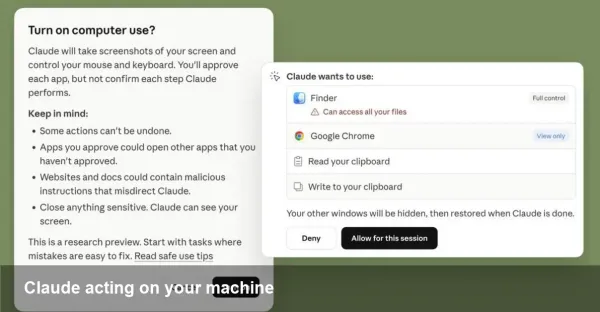
Anthropic is one of the major AI labs building large language model (LLM)–driven assistants. Claude Code is a variant of their Claude family configured to take actions in a user’s environment rather than only returning text. As a research preview, Anthropic is intentionally limiting scope and urging caution: safeguards exist, but they are not absolute.
Why this matters: previously AI mostly produced instructions you executed. With agent-style control, the AI can carry out whole processes — configure environments, run tests, manipulate files, or prepare and send reports — cutting hours of manual work into minutes.
Concrete scenarios where this changes workflows
- Developer workflow: Imagine asking the agent to run the test suite, apply a small refactor, update imports, run linters, commit the change, and open a PR. Instead of copying-and-pasting commands, the agent performs the sequence and returns logs and a link to the PR.
- Data/analytics tasks: Point Claude Code at a local dataset or spreadsheet, ask it to derive specific metrics, generate charts, and export a PDF report to a shared folder.
- Desktop productivity: Let the agent triage your inbox, draft replies, fill expense forms with data from receipts, and place the results into your accounting software.
- Troubleshooting and ops: For junior support engineers, the agent can run diagnostic commands, collect logs, annotate them, and recommend fixes — or escalate with a reproducible report.
These are illustrative examples; actual behavior depends on the permissions and integrations you grant.
What Anthropic means by "research preview"
Labeling Claude Code a research preview signals several things:
- The feature is experimental and may still have unexpected behaviors.
- Safety measures are in place but considered imperfect; users must remain cautious.
- The company expects to iterate on capabilities and guardrails rapidly as it gathers real-world feedback.
Treat any preview deployment as unsuitable for handling highly sensitive data or performing destructive operations in production without extra controls.
Safety trade-offs and real risks
Giving an AI the ability to operate your machine creates attack surfaces and failure modes:
- Data leakage: The agent could read files containing secrets, then accidentally expose them if it’s connected to external networks or services.
- Accidental damage: Errant commands might delete files, misconfigure services, or alter databases.
- Exploitation: If the agent’s execution channel is compromised, it could be turned into a remote-access vector.
Anthropic’s safeguards — permission prompts, scoped APIs, and monitoring — reduce but do not eliminate these hazards. The onus remains on users and organizations to combine those controls with strong engineering practices.
Practical guidance for users and teams
If you plan to experiment with Claude Code, consider these steps:
- Start in an isolated environment: Use a disposable VM, container, or a sandboxed user account that mimics production without exposing critical data.
- Enforce least privilege: Grant only the file and network access the agent needs to complete its task. Avoid broad admin rights.
- Require confirmations for destructive actions: Configure the workflow to present reviewers with dry-run outputs and explicit prompts before executing state-changing commands.
- Enable logging and audit trails: Capture every command and output the agent produces. Logs are essential for debugging and forensics.
- Rotate and restrict keys: Any API tokens or credentials exposed to the agent should be short-lived and limited by scope.
- Human-in-the-loop for critical flows: Keep humans responsible for final approval on high-risk operations, such as deployments or billing changes.
Developer integration tips
For teams building agent-powered features into products:
- Use capability-based tokens linked to narrow scopes (file paths, APIs) instead of broad credentials.
- Emulate the agent in CI for tests: make sure automated tests verify the agent’s safety checks and permission prompts behave as intended.
- Build a sandbox API: allow developers to run a fake environment with canned responses so they can validate agent logic without touching production systems.
- Surface explicit intent and a dry-run mode in the UI so operators understand the exact commands the agent will run.
Business value and operational impact
When safely managed, desktop-controlling agents unlock clear productivity benefits:
- Faster task completion and fewer context switches for knowledge workers.
- Reduced toil for engineers and faster ticket resolution in operations teams.
- New automation pathways for SMBs without the engineering resources to build bespoke scripts.
However, the costs are non-trivial: governance overhead, the need for sandboxing infrastructure, and potential regulatory scrutiny where data access is involved.
Limitations and where humans still lead
Agents like Claude Code are powerful at executing deterministic sequences and pattern-based reasoning, but they struggle with ambiguous priorities, nuanced judgment, and value-laden decisions. Expect to keep humans in control for:
- Legal, regulatory, and compliance choices.
- Business decisions with trade-offs that require domain expertise beyond surface data.
- Any operation where irrecoverable state changes could occur without easy rollback.
Two to three forward-looking implications
1) Standardized agent governance will emerge. Enterprises will demand role-based policies, auditable action logs, and standardized permission models for agents across vendors.
2) Agent ecosystems will become composable. Expect marketplaces for verified agent plugins (connectors to ticketing systems, CI/CD, ERP) with signed, confined capabilities.
3) Regulation and safety standards will accelerate. Governments and industry bodies will focus on norms for agent behavior, security certification, and notification requirements when AI controls critical infrastructure.
How to experiment responsibly
If you want to try Claude Code: begin with low-stakes automation (file formatting, report generation), keep a human in the loop, and progressively expand scope after validating controls. Combine Anthropic’s built-in safeguards with your own sandboxing, auditing, and least-privilege design.
AI agents that can operate desktops are a step-change in automation. They can be transformative in productivity and developer tooling, but only if organizations treat them as mission-critical systems that require the same engineering rigor and governance as any other exposed service.