When Claude Can Control Your Computer: A Practical Guide

Why this matters now
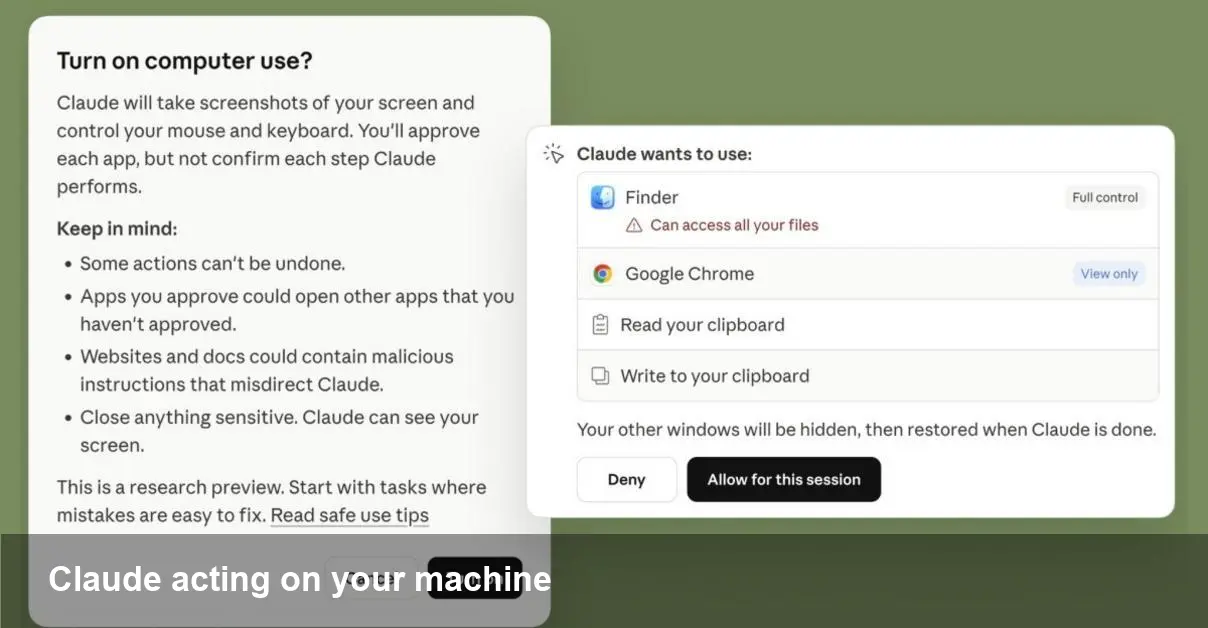
Anthropic has extended the Claude family with tools that can not only generate code and instructions but also act on a user’s computer. For developers, founders, and IT teams this moves AI beyond suggestion into practical execution: an assistant that can run tests, edit files, open terminals, and automate multi-step workflows on your behalf. That opens clear productivity gains — and new security and governance headaches.
Quick background: Anthropic, Claude, Code and Cowork
Anthropic is an AI startup focused on building helpful and safe large language models. Claude is its flagship assistant line. Two capabilities gaining attention are Claude Code (designed for programming tasks) and Cowork (a broader assistant workflow tool). Both are intended to reduce friction for technical users by taking repetitive or context-heavy actions off a human’s plate.
Think of Claude Code as a coding partner that can not only propose patches but also apply them, run the test suite, and report results. Cowork is positioned for cross-app workflows: launching tools, moving files, filling forms, and orchestrating tasks that usually require switching between windows and terminals.
How these tools interact with your machine (technical overview)
- Permission model: To act on your system, the assistant needs an agent or connector with scoped permissions. That connector mediates actions (filesystem, shell, apps) and should ask for explicit consent for elevated tasks.
- Execution layer: Actions are typically implemented via a local client or a secure remote session. The assistant translates intent into commands and the client runs them in the host environment.
- Feedback loop: Results (command output, file diffs, test results) are sent back to the model so it can iterate, explain what it did, or roll back changes.
This architecture makes the agent feel like a human collaborator with keyboard access. But it also means you’re trusting code synthesis with live execution privileges.
Three practical examples developers will recognize
- Fixing a CI failure
- Scenario: A unit test fails on a branch. You ask Claude Code to diagnose and fix the issue. The assistant runs tests locally, opens the failing file, suggests a patch, applies it, re-runs tests, and generates a pull request with the change and a description of the reasoning.
- Why useful: Reduces the edit-test-debug loop and produces a ready-to-review PR.
- Dependency upgrades and compatibility checks
- Scenario: You need to bump a library and ensure nothing breaks. Claude can modify the project dependency file, run your build matrix, execute a subset of smoke tests, and report failing modules.
- Why useful: Saves manual dependency juggling and gives a quick risk assessment before merging.
- Cross-app workflow automation (Cowork)
- Scenario: Onboarding a new hire requires creating accounts, provisioning a VM, and updating a wiki. Cowork can open each admin panel, fill forms with provided data, run the provisioning script, and confirm that resources are active.
- Why useful: Eliminates tedious, error-prone steps and centralizes auditing.
Security, compliance, and governance — what to watch
- Least privilege: Only grant the minimal permissions needed. For code changes, prefer a sandbox workspace or a branch-specific token rather than repo-wide write keys.
- Audit trails: Look for connectors that log commands, file changes, timestamps, and agent decisions. Integration with SIEM and audit logs is essential in teams.
- Data leakage: Agents will observe files and outputs. Ensure secrets (API keys, private tokens) are redacted or stored in vaults the agent cannot read.
- Human-in-the-loop controls: Configure mandatory approvals for destructive operations (deletes, production pushes) and require explicit confirmation for network-accessing actions.
- Regulatory fit: For regulated industries, you’ll need clear policies governing third-party code execution and data residency — check whether the connector runs locally or routes through external servers.
How teams can adopt these tools safely
- Start with read-only and simulation modes so the assistant can propose commands without executing them.
- Use ephemeral environments (containers or disposable VMs) for initial experiments. That contains risk while letting the model run real tests.
- Create templates and guardrails: approved scripts for common tasks, pre-authorized branches, and whitelisted directories.
- Integrate with CI/CD: Have the assistant open PRs and let your existing pipelines validate changes before any merge to main.
Business value and productivity impact
- Faster iteration: By automating repetitive test-and-fix cycles, developers can spend more time on design and architecture.
- Reduced context switching: Cowork-style orchestration keeps employees from bouncing between admin consoles and local machines.
- Operational efficiency: Internal ops teams can codify runbooks as agent-playbooks and accelerate routine provisioning.
- Cost trade-offs: There’s an upfront investment in safe integration—permission models, logging, and training staff on proper use. But for many teams the time reclaimed from manual tasks will offset that quickly.
Limitations and realistic expectations
- Model certainty: AI can propose changes confidently even when incorrect. Always review diffs and test outcomes before trusting automatic edits.
- Edge cases and legacy systems: Connectors work best with common toolchains. Legacy apps, bespoke internal tooling, and proprietary formats may need custom integration.
- Latency and reliability: Running tests or provisioning remote resources still depends on your environment; the assistant speeds orchestration but not underlying resource availability.
Where this leads next — three implications
- Agent marketplaces: Expect third-party connectors and pre-built playbooks for popular stacks (Kubernetes, Terraform, Git providers) that reduce integration effort.
- Standardized permission APIs: Teams will demand consistent permission and audit APIs so different agents can be governed uniformly across vendors.
- New roles and workflows: “AI-validator” or “agent ops” may emerge — engineers who author safe playbooks, review automated changes, and maintain trust boundaries.
AI assistants that can operate your computer are a leap in utility: they turn suggestions into action. For developers and teams the potential to compress feedback loops and automate cross-tool workflows is powerful. But the same capability requires disciplined controls — sandboxing, logging, and human oversight — to avoid accidental damage or data exposure. Start small, instrument everything, and build the permissions story before you hand an assistant the keyboard.