How X's New Toggle Stops Grok Editing Your Images

What changed and why it matters
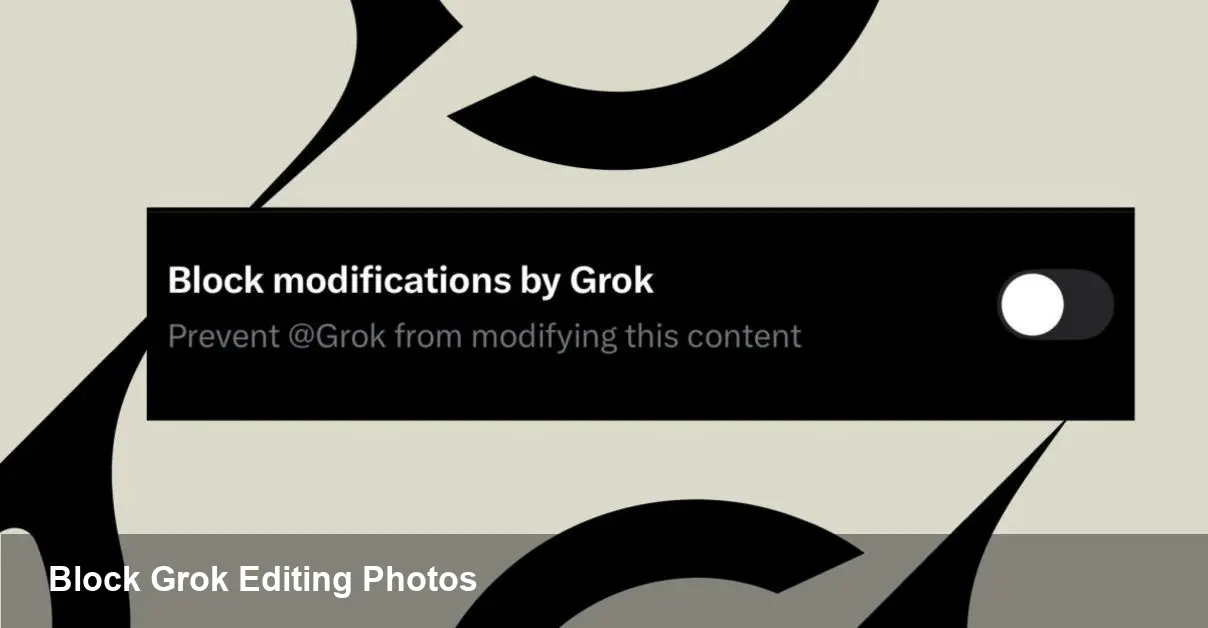
X has added a user control that prevents the Grok chatbot from altering images you upload to the platform. For people who share photos — from professional photographers to everyday users — this is a direct response to concerns about AI-driven image manipulation, misattribution, and remixing without consent.
The move is pragmatic rather than revolutionary: it gives individuals a way to opt out of one specific AI feature on the platform. It doesn’t make your images immune to copying, screenshots, or re-uploads, but it does reduce the risk of a widely available assistant being used to modify or repurpose your media directly inside the X ecosystem.
Quick background: Grok and X
Grok is the conversational AI assistant integrated with X. It can respond to text prompts and, in many cases, interact with images shared on the platform — for example, generating edits, offering creative variants, or answering questions about a picture. That capability is powerful for creative workflows and accessibility, but it also raises questions about consent and creative control. X’s setting is a platform-level answer to those concerns: a toggle to stop Grok from using your uploaded photos for editing.
How creators and organizations can use the setting
- Photographers and visual artists: Enable the control if you want to prevent casual AI remixes of your work that could dilute your brand or misrepresent your intent. This is especially useful when you release professional shots that are still commercially valuable.
- Journalists and newsrooms: Protect raw source images to avoid altered visuals being mistaken for factual reporting. Combined with newsroom policies about image verification, the toggle reduces the chance of the assistant producing misleading edits.
- Brands and marketers: Use the setting for campaign assets during active use windows (e.g., pre-launch) so user-facing AIs can’t create off-brand variants that go viral.
- Everyday users: Turn the control on to avoid seeing Grok-generated parodies or edits of personal photos in replies or threads.
Practical examples
1) A wedding photographer posts a curated album. By activating the block, the photographer prevents Grok from offering stylized edits or background changes that fans or strangers could republish under the original post.
2) A product manager shares a prototype image and wants to keep creative control during testing. Blocking Grok reduces the chance someone will generate altered product renders that circulate ahead of schedule.
3) A news photographer shares a photo from a sensitive scene. The newsroom activates the setting while the image is in use to minimize automated edits that could change the context.
These are straightforward scenarios, but they highlight what the control buys you: a limited but meaningful degree of control over automated in-platform manipulation.
What this does — and doesn’t — protect against
This feature is useful, but it has clear limits:
- It targets Grok specifically. Other third-party tools, human editors, or someone who downloads and re-uploads an image are not stopped by this toggle.
- It doesn’t prevent screenshots, copies, or off-platform editing. Once an image is public, technical and legal protections have different strengths and weaknesses.
- Enforcement depends on platform compliance. The toggle tells X and Grok not to edit a flagged image, but the underlying effectiveness hinges on how the platform routes images to AI systems and whether any external agents ignore the flag.
Guidance for developers and platform integrators
If your product or workflow relies on Grok’s image-editing capabilities, plan for opt-out behavior. Practical steps:
- Build fallbacks: Detect when an image is flagged as not editable and offer users a manual upload flow that explicitly grants permission for edits.
- Respect content flags: If you build integrations with X, consume the same metadata or API signals that indicate user preferences so you don’t create surprises for content owners.
- Update UX: Make the permission flow obvious. If a user disables the block for a particular image, record that consent in a way you can display later (audit trails help with disputes).
For startups building image-editing features on social platforms, this change emphasizes the need for consent-first designs: imagine your pipeline with a “can-edit” flag baked into content metadata.
Business and trust impacts
Allowing people to prohibit AI edits is a trust play. Platforms that give users more control over how their content is used often see improved engagement from creators who previously withheld their best work because of misuse concerns. For X, the toggle can reduce moderation heat and legal exposure related to manipulated images. For creators and brands, it reduces the chance of unintended derivatives undermining campaigns or reputations.
However, there’s trade-off: some viral, creative moments arise from playful remixes. Locking images down may reduce organic, AI-driven engagement that benefits platform virality.
Broader implications and what to watch next
1) Standardized content flags will gain traction. This setting is a first step toward standardized signals (embedded metadata or API fields) that tell any compliant AI model whether content can be used for training, editing, or generation. Watch for cross-platform initiatives or open standards that formalize these signals.
2) Provenance and verification tools will become more important. As platforms wrestle with manipulated media, embedding provenance data (e.g., signed metadata or C2PA-like credentials) will help distinguish original assets from post-hoc edits.
3) Policy and legal frameworks will evolve. Expect more policy attention on platform responsibilities when AI tools can alter image content at scale. The interplay between user-level settings, platform enforcement, and regulatory expectations will be a key area to monitor.
Practical recommendation
If you publish visual content on X and want to preserve creative control, enable the Grok-blocking option for sensitive or commercial images as a simple protective measure. For developers building on top of X, treat these controls as first-class metadata and design flows that surface and respect user consent.
This isn’t a total solution to image misuse — no toggle can stop every bad actor — but it’s a useful, practical tool for creators and organizations who want more agency over how AI can interact with their photos. How platforms extend this control across other AI agents and across the web will determine whether these are meaningful building blocks or merely stopgaps in a fast-moving AI landscape.