Gmail drops Gemini side panel for Pro and Ultra users

Key Takeaways:
- Google is replacing the Gemini side panel on the Gmail web interface for US AI Pro and AI Ultra subscribers.
- Core features (summaries, suggested replies, drafting) are moving into Gmail’s new in-line AI experiences.
- Help Me Write remains, Proofread is upgraded, and AI Overviews can summarize longer threads; Workspace customers are not affected.
- The Gemini side panel still appears on Gmail mobile (Android) and in Google Workspace plans for now.
What Google changed
Google has shifted many Gemini side panel capabilities directly into Gmail’s interface through “in-line AI experiences.” The update removes the legacy Gemini side panel on the web for some paid AI subscribers in the US.
Which features moved
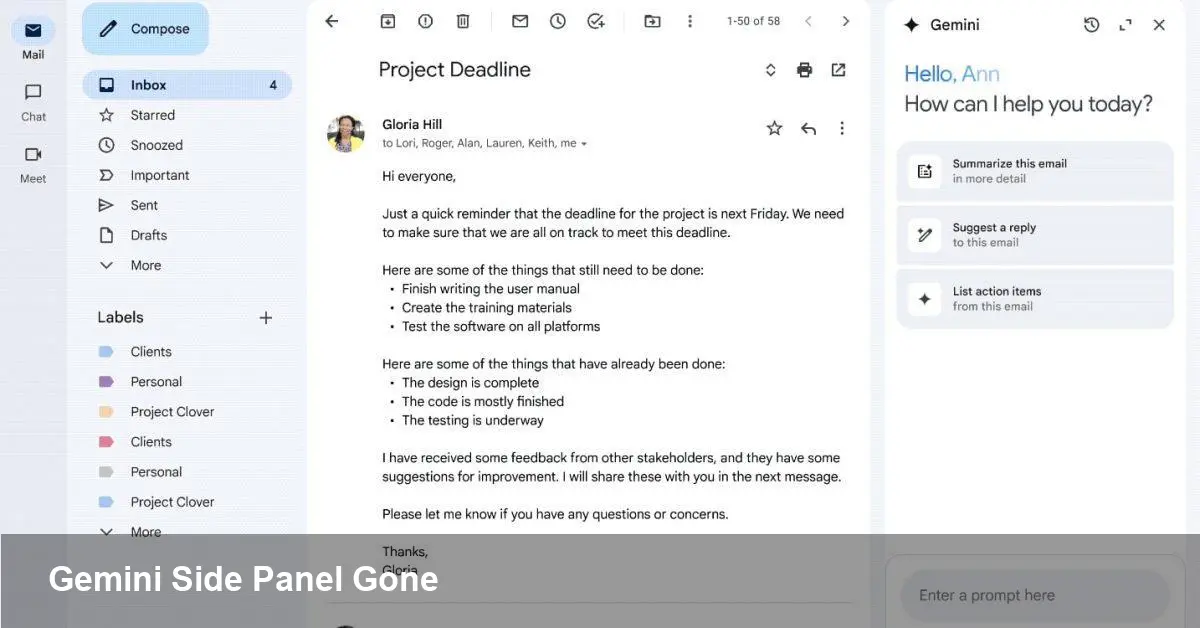
The removed side panel previously let users summarize email threads, suggest responses, draft messages, and search prior emails, Drive files, or calendar details via the Gemini spark next to the profile photo. Those functions are now integrated into Gmail’s inline tools.
How the in-line tools differ
Help Me Write remains available for drafting, while Proofread has been enhanced into a stronger spelling, grammar, and style assistant. Suggested Replies now factor in thread context for more relevant quick responses.
AI Overviews and search integration
Google also introduced AI Overviews that can summarize longer threads inside Gmail and brings similar overviews into Search for a more seamless experience where users expect it. That makes long-email triage and quick information extraction faster without opening a separate chat panel.
Who is affected and what stays the same
According to Google’s support guidance, AI Pro and AI Ultra subscribers in the US “may no longer see Ask Gemini in Gmail or be able to open the Gemini in Gmail side panel.” This change is limited to consumer Pro/Ultra tiers on the web.
Exceptions and platform notes
The Gemini side panel currently remains on Gmail mobile for Android. Administrators and users on Google Workspace plans should see no change to the Gemini side panel availability at this time.
What users should do
If you relied on the old side panel, look for the same capabilities in message compose and conversation views. Try Help Me Write, use the upgraded Proofread, and open AI Overviews when you need a summary of long threads.
Troubleshooting
If the side panel has disappeared unexpectedly and you want to confirm availability, check Gmail’s settings and Google’s support pages for the latest rollout notes. Workspace admins should monitor the Google Workspace dashboard and release notes for any future changes.
Bottom line: Google is consolidating Gemini’s assistant features directly into Gmail’s UI to make AI tools feel more native. For US AI Pro and AI Ultra web users the old Ask Gemini side panel will be phased out in favor of in-line experiences, while Workspace customers and many mobile users retain the traditional side panel for now.