Alexa Plus Web Interface Live on Alexa.com for Some

• Key Takeaways:
- Alexa.com now displays a browser-based Alexa Plus interface for some logged-in Amazon users.
- The web UI mirrors the Alexa Plus chatbot from the Alexa app and exposes smart‑home controls, calendar, lists and files.
- Menus include prebuilt prompts (Plan, Learn, Create, Shop, Find) and a visible disclaimer: “Alexa may not always get it right.”
- Appearance appears to be a limited rollout rather than a full public launch.
What’s showing up on Alexa.com
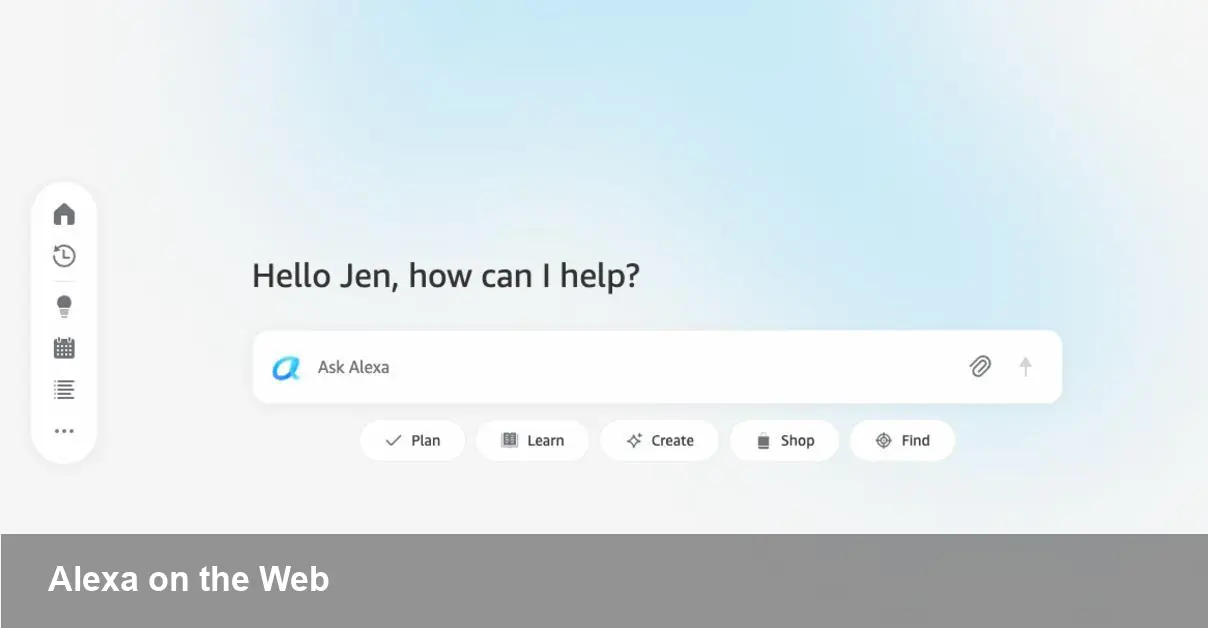
Amazon’s Alexa.com has recently begun loading a full Alexa Plus web interface for select users instead of the informational landing page it previously served. The experience looks and behaves like the Alexa Plus chatbot inside the Alexa mobile app.
When accessed while signed into an Amazon account, the page opens to a blue-and-white chat screen with a greeting and a text box. The input area supports file uploads, and a small disclaimer acknowledges that the assistant can be imperfect.
Features visible in the web interface
A row of drop‑down menus—Plan, Learn, Create, Shop, Find—offers prebuilt prompts that route users directly into the chat workflow. Examples include “Plan for my next getaway,” “Create a study guide,” “Shop trending products,” and “Book a table.”
A left-hand toolbar provides quick access to recent chats (including conversations synced from Echo devices), smart home controls that responded promptly in testing, calendar entries, Alexa lists, reminders, tasks and a files section. That combination suggests Amazon is aiming for parity between the mobile app and a browser-based control surface.
Why this matters
Putting Alexa Plus on the web could make the assistant more accessible for users who prefer desktop workflows or who want to manage smart‑home and productivity features from a browser. The web UI also helps unify interactions across Echo devices and a logged-in account by surfacing recent chats and synced device history.
For developers and smart‑home integrators, a browser presence can simplify testing and demonstration without needing to rely on a physical Echo device.
Limited rollout and caveats
Early reports indicate the Alexa.com web interface is appearing only for some users, suggesting a staged deployment. The assistant’s small on-screen warning—“Alexa may not always get it right”—remains visible.
Amazon hasn’t publicly detailed timing for a broader rollout. For now, users who see the site can try the menus and smart‑home controls while signed into their Amazon accounts; others will still be redirected to an informational page.
As Amazon expands Alexa Plus, the web interface will be one to watch for changes in how voice assistants blend into desktop and multi‑device workflows.